




















Related searches
0 results
Not found
No content related to ""
theme-light theme-light-text
theme-dark-text theme-light
Age of Empires Mobile

Age of Empires Mobile

UID Top-up
Login Top-up
9999 Apex Coins
9999 Apex Coins
$ 96.75
$ 99.99
4999 Apex Coins
4999 Apex Coins
$ 48.35
$ 49.99
1999 Apex Coins
1999 Apex Coins
$ 18.83
$ 19.99
999 Apex Coins
999 Apex Coins
$ 9.62
$ 9.99
499 Apex Coins
499 Apex Coins
$ 4.54
$ 4.99
99 Apex Coins
99 Apex Coins
$ 0.95
$ 0.99
50000 Empire Coins
50000 Empire Coins
$ 96.75
$ 99.99
24000 Empire Coins
24000 Empire Coins
$ 48.35
$ 49.99
9200 Empire Coins
9200 Empire Coins
$ 18.83
$ 19.99
4400 Empire Coins
4400 Empire Coins
$ 9.62
$ 9.99
2100 Empire Coins
2100 Empire Coins
$ 4.54
$ 4.99
400 Empire Coins
400 Empire Coins
$ 0.95
$ 0.99

Quantity

Price
$0.00
HOW TO BUY?
Total
- +

0

Overall Rating
0.0
0 reviews
Overall Rating
0.0
Based on 0 reviews
  • 5 Star
    0%
  • 4 Star
    0%
  • 3 Star
    0%
  • 2 Star
    0%
  • 1 Star
    0%
Product Introduction
Recharge guide
User Reviews(0)


AGE OF EMPIRES MOBILE TOP-UP

Age of Empires Mobile Top-Up — Empire Coins

BUILD YOUR EMPIRE

Age of Empires Mobile brings empire building to mobile with real-time battles, legendary heroes, city development, technology progression, alliances, and large-scale conflicts across a living world map. Empire Coins are the premium in-game currency and can be used for a variety of valuable content, including limited-time packs, hero-related items, event items, cosmetics, speed-ups, and other progression resources.

WHY

Why Top Up on buffhub.com?

We are a gaming top-up platform providing convenient services for Age of Empires Mobile and other popular games and digital services, including Ragnarok: The New World, Lords Mobile: Kingdom Wars, and Top Heroes: Kingdom Saga. Here is why you should choose BuffHub:

  • Lowest Price Guarantee — BuffHub is committed to providing competitive prices for Age of Empires Mobile top-ups. When you need affordable Empire Coins, you can compare the available denominations and choose the option that best suits your needs.


  • Stackable Coupons up to 10% Off — Both new and returning users can apply eligible discount coupons to selected purchases, helping you save more when topping up Age of Empires Mobile Empire Coins.
  • Convenient Top-Up Process — Select the amount of Empire Coins you want and provide the information required for the selected top-up method. For Age of Empires Mobile, make sure your Player ID and Server ID are entered accurately before completing your order.
  • Fast Delivery — Age of Empires Mobile Empire Coins are generally credited shortly after payment has been confirmed. Processing is usually completed within minutes, although server response times or other circumstances may occasionally result in a longer delay.
  • Secure Transactions — BuffHub provides a convenient online purchasing process for Age of Empires Mobile top-ups. Always make sure the Player ID and Server ID requested on the order page are entered correctly before completing payment.
  • 24/7 Online Customer Support — If you encounter questions or issues while placing or processing your Age of Empires Mobile top-up order, customer support is available to assist with order-related inquiries.
  • Multiple Payment Methods — BuffHub provides multiple payment options so players can choose a suitable method when purchasing Age of Empires Mobile Empire Coins and complete the checkout process more conveniently.

When you choose BuffHub, you get a convenient Age of Empires Mobile Empire Coins top-up experience with a simple ordering process and fast processing. Select your preferred Empire Coins package, enter your Player ID and Server ID carefully, complete your purchase, and return to your empire once the recharge is credited.


About Age of Empires Mobile

Age of Empires Mobile combines city building and strategy with real-time battles on mobile. Players can develop their cities, expand across the world map, research technology, recruit legendary heroes, form alliances, and take part in battles against rival strongholds.

Progress revolves around developing your empire while making strategic decisions about resources, heroes, technology, and military power. Alliances and large-scale conflicts also give players opportunities to cooperate with others and compete for control across the map.

What Are Empire Coins?

Empire Coins are the premium in-game currency in Age of Empires Mobile. They can be used for a variety of valuable purchases, including limited-time packs, hero chests, event items, cosmetics, speed-ups, advanced troops, building upgrades, special equipment, and other progression-related content.

Because many of these purchases are connected to hero development, city progression, and limited-time content, Empire Coins give players additional options when deciding how they want to develop their empire and use their resources.

What Are Apex Coins?

Apex Coins may be shown by top-up platforms as the denomination or voucher unit used when purchasing Age of Empires Mobile content. They are different from Empire Coins, which are the premium currency ultimately credited to the player's Age of Empires Mobile account.

When selecting a top-up package, check the denomination displayed on the purchase page and the corresponding Empire Coins or eligible content you will receive. This helps ensure you understand what the selected package provides before completing payment.

More down down
Fold Up up up
 

Top-Up Information & Precautions

Before purchasing Age of Empires Mobile Empire Coins, prepare your Player ID and Server ID. Both pieces of information are important for identifying the correct game account, so check them carefully before submitting your order.

Item Description
Platform Age of Empires Mobile
Server Global Server
Top-Up Currency Empire Coins / Apex Coins denomination depending on the selected package
Required Information
Player ID
Server ID
Processing Time Empire Coins are usually credited within minutes after payment confirmation. Server response times may occasionally cause a longer delay.
Recharge Result After the recharge has been completed successfully, enter Age of Empires Mobile and check that the corresponding Empire Coins have been credited to your account.

Important Note:

  • Please enter your Age of Empires Mobile Player ID and Server ID accurately. Incorrect information may cause the recharge to fail or be delivered to the wrong account.
  • Always double-check the Server ID shown in your game before completing your purchase, especially if your server name or designation has changed.
  • Empire Coins are usually credited within minutes, but server response times may occasionally cause delays.

How to Find Your Age of Empires Mobile Player ID

1
Log In to the Game: Open Age of Empires Mobile and log in to the account you want to top up.
2
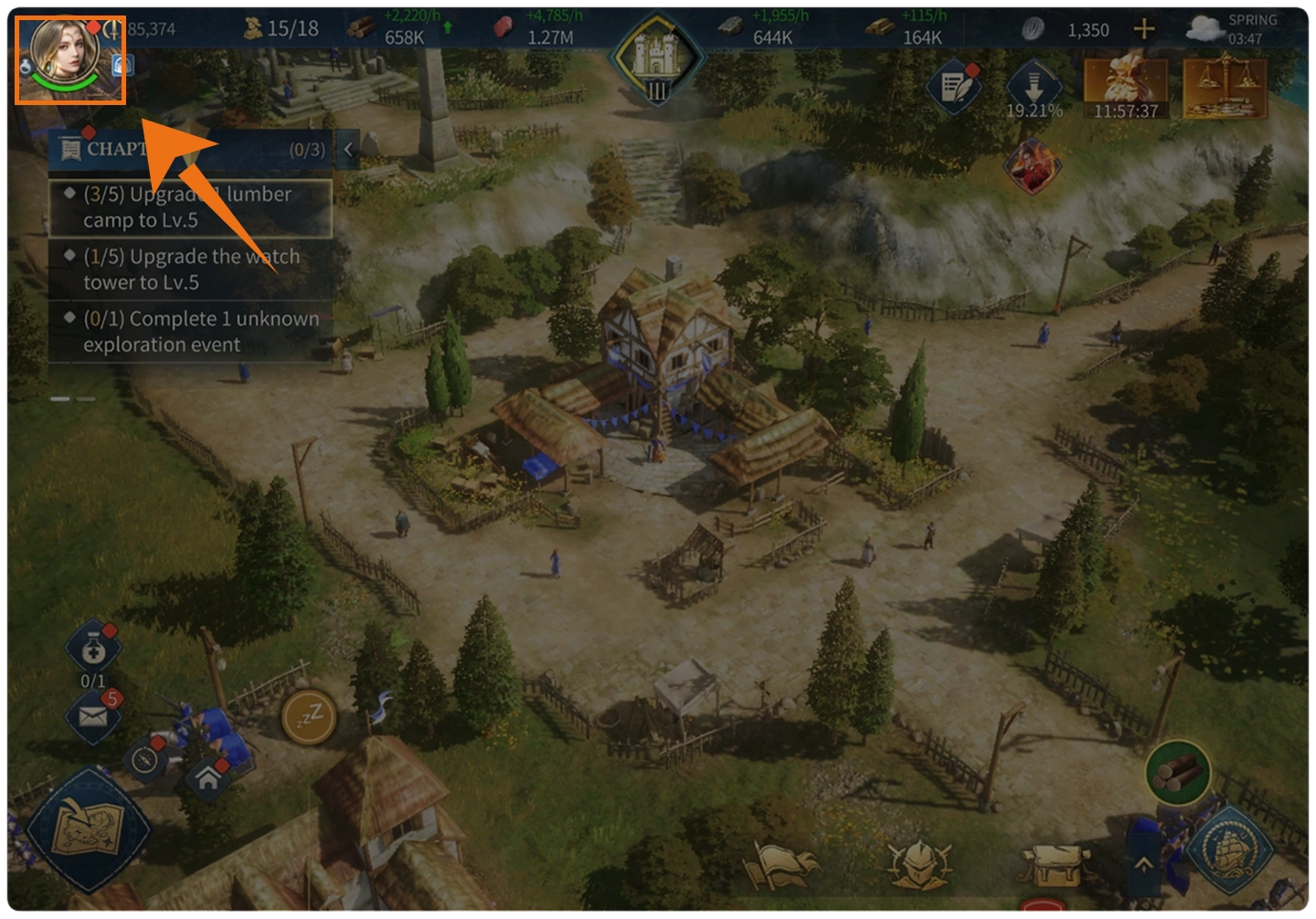
Open Your Profile: Tap the Avatar icon in the upper-left corner of the main screen to open your player information.
How to open your profile in Age of Empires Mobile
3
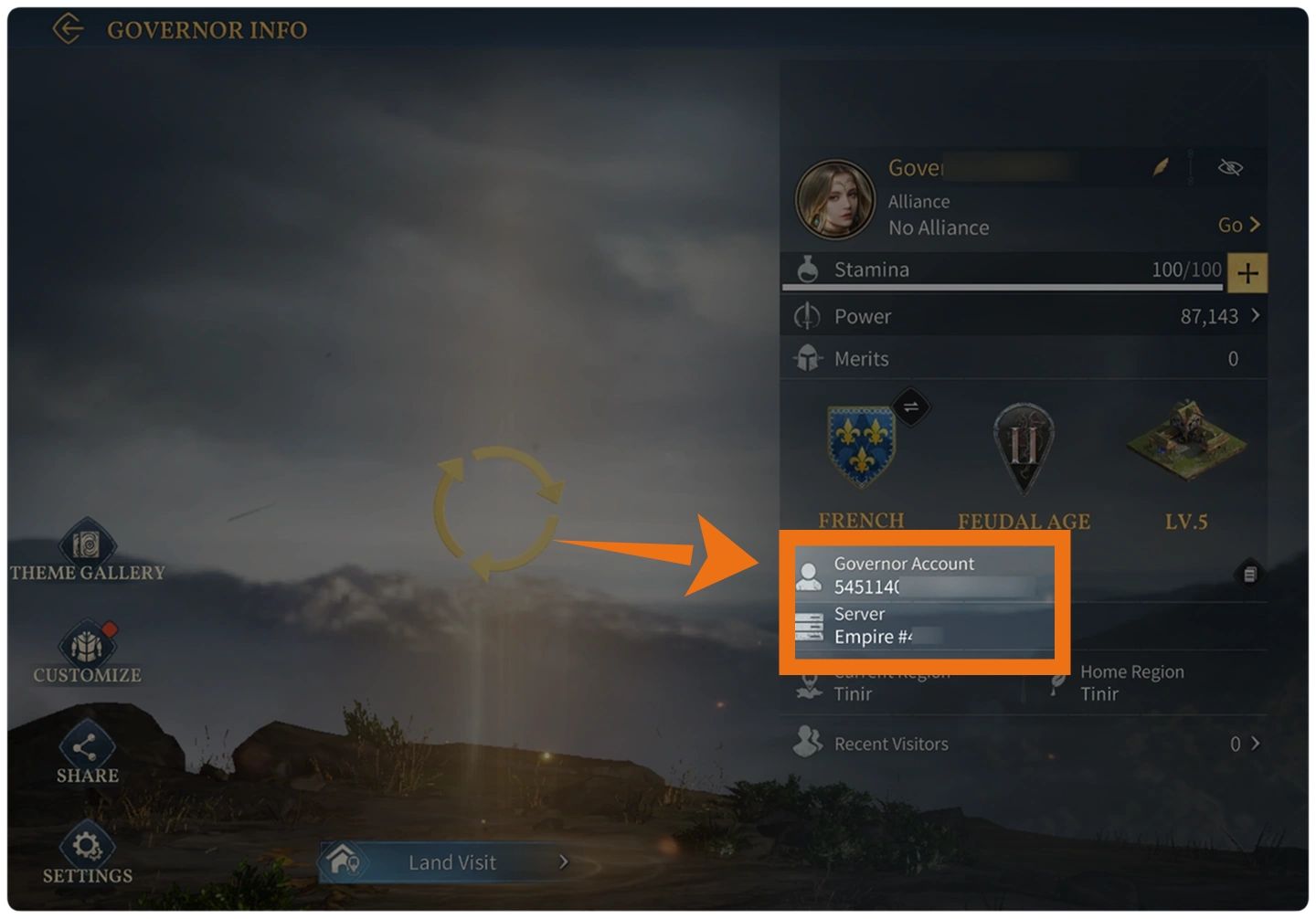
Check Your Information: Your Player ID and Server ID can be found on the profile page. Copy the details carefully before returning to the top-up page.
How to find Player ID and Server ID in Age of Empires Mobile

How to Top Up Age of Empires Mobile

The Age of Empires Mobile top-up process only takes a few steps. Before starting, prepare your Player ID and Server ID and check that both details match the account you want to recharge.

Frequently Asked Questions (FAQ)

Q1: What Information Do I Need to Top Up Age of Empires Mobile?

You need your Age of Empires Mobile Player ID and Server ID. Check both details carefully before completing the order to make sure the recharge is delivered to the correct account.

Q2: How Do I Find My Age of Empires Mobile Player ID and Server ID?

Log in to Age of Empires Mobile and tap the Avatar icon in the upper-left corner of the main screen. Your Player ID and Server ID can be found on the profile page.

Q3: What Is the Difference Between Apex Coins and Empire Coins?

Empire Coins are the premium currency credited to your Age of Empires Mobile account. Apex Coins may be displayed by a top-up platform as the denomination used to select a corresponding purchase package.

Q4: How Long Does an Age of Empires Mobile Top-Up Take?

Empire Coins are usually credited within minutes after payment has been confirmed, although server response times may occasionally cause a delay.

Q5: What Should I Do If My Empire Coins Have Not Arrived?

First, check that the Player ID and Server ID entered with the order are correct. If the information is accurate but the Empire Coins have still not arrived after the expected processing period, contact customer support and provide your order information so the recharge status can be checked.

More down down
Fold Up up up

No reviews yet.

Sort By :
Latest

No reviews yet.

Product Introduction

  • Alipay Alipay
  • ApplePay ApplePay
  • bancontact bancontact
  • bancontact-1 bancontact-1
  • billease billease
  • blik blik
  • boleto boleto
  • boost boost
  • bpi bpi
  • dana dana
  • Ewallet Ewallet
  • gcash gcash
  • GooglePay GooglePay
  • Ideal Ideal
  • kakao_pay kakao_pay
  • Klarna Klarna
  • konbini konbini
  • Kplus Kplus
  • line line
  • MBWAY MBWAY
  • multibanco multibanco
  • mybank mybank
  • naverpay naverpay
  • NetBanking NetBanking
  • oxxo oxxo
  • payco payco
  • paynow paynow
  • payu payu
  • pix pix
  • Qiwi Qiwi
  • rabbit rabbit
  • samsung samsung
  • sberpay sberpay
  • SBP SBP
  • SEPA SEPA
  • skrill skrill
  • spei spei
  • swish swish
  • tng tng
  • Tosspay Tosspay
  • truemoney truemoney
  • usdt usdt
  • Visa Visa
  • Visa-mastercard Visa-mastercard
  • Visa-mastercard+jbc Visa-mastercard+jbc
  • yoomoney yoomoney
  • Alipay Alipay
  • ApplePay ApplePay
  • bancontact bancontact
  • bancontact-1 bancontact-1
  • billease billease
  • blik blik
  • boleto boleto
  • boost boost
  • bpi bpi
  • dana dana
  • Ewallet Ewallet
  • gcash gcash
  • GooglePay GooglePay
  • Ideal Ideal
  • kakao_pay kakao_pay
  • Klarna Klarna
  • konbini konbini
  • Kplus Kplus
  • line line
  • MBWAY MBWAY
  • multibanco multibanco
  • mybank mybank
  • naverpay naverpay
  • NetBanking NetBanking
  • oxxo oxxo
  • payco payco
  • paynow paynow
  • payu payu
  • pix pix
  • Qiwi Qiwi
  • rabbit rabbit
  • samsung samsung
  • sberpay sberpay
  • SBP SBP
  • SEPA SEPA
  • skrill skrill
  • spei spei
  • swish swish
  • tng tng
  • Tosspay Tosspay
  • truemoney truemoney
  • usdt usdt
  • Visa Visa
  • Visa-mastercard Visa-mastercard
  • Visa-mastercard+jbc Visa-mastercard+jbc
  • yoomoney yoomoney
Language & Currency
  • Language
    English
    中文(繁体)
    日本語
    Bahasa Indonesia
    Bahasa Melayu
    Français
    Italiano
    Deutsch
    Русский
    Español
    한국어
  • Display Currency
    $ USD
    € EUR
    £ GBP
    C$ CAD
    A$ AUD
    S$ SGD
    Ұ JPY
    ₩ KRW
    SA SAR
    AED AED
    RM MYR
    ₱ PHP
    Rp IDR
    ฿ THB
    NT$ TWD
    HK$ HKD
    ₫ VND
    MX$ MXN
    R$ BRL
    ₽ RUB