


















Related searches
0 results
Not found
No content related to ""
theme-light theme-light-text
theme-dark-text theme-light
Fate War

Fate War

broadcast broadcast
Join the BUFFHUB Discord community and instantly receive a $10 discount coupon
Any 0.99 Pack
Any 0.99 Pack
$ 0.9
$ 0.99
Any 1.99 Pack
Any 1.99 Pack
$ 1.79
$ 1.99
Any 4.99 Pack
Any 4.99 Pack
$ 4.49
$ 4.99
Any 9.99 Pack
Any 9.99 Pack
$ 8.99
$ 9.99
Any 14.99 Pack
Any 14.99 Pack
$ 13.49
$ 14.99
Any 19.99 Pack
Any 19.99 Pack
$ 17.99
$ 19.99
Any 24.99 Pack
Any 24.99 Pack
$ 22.49
$ 24.99
Any 49.99 Pack
Any 49.99 Pack
$ 44.99
$ 49.99
Any 99.99 Pack
Any 99.99 Pack
$ 89.99
$ 99.99
99 Gold
99 Gold
$ 0.9
$ 0.99
999 Gold
999 Gold
$ 8.99
$ 9.99
4,999 Gold
4,999 Gold
$ 44.99
$ 49.99
9,999 Gold
9,999 Gold
$ 89.99
$ 99.99
29,999 Gold
29,999 Gold
$ 269.99
$ 299.99

Quantity

Price
$0.00
HOW TO BUY?
Total
- +

0

Overall Rating
5.0
0 reviews
Overall Rating
5.0
Based on 0 reviews
  • 5 Star
    0%
  • 4 Star
    0%
  • 3 Star
    0%
  • 2 Star
    0%
  • 1 Star
    0%
Product Introduction
Recharge guide
User Reviews(0)
FATE WAR TOP-UP

Fate War Top-Up — Buy Gold & In-Game Packs


Build your Tribe, strengthen your forces, and prepare for every new challenge with a convenient Fate War top-up. BUFFHUB offers both Fate War Gold and multiple in-game pack tiers, giving you the flexibility to choose a package based on your current progression and spending needs. Complete your purchase and follow the available Self-TopUp or account-login process to receive the corresponding content in your game account.

What Fate War Top-Up Options Can I Get on BUFFHUB?

BUFFHUB provides a range of Fate War recharge options, including fixed-price in-game packs and Gold packages. Instead of buying more than you need, you can select the tier that matches the package or amount of Gold you currently want.

⚔️ What Can Fate War Gold and Packs Help With?

Premium resources can support different parts of your progression depending on what you purchase. Gold can be used across premium services and available store content, while individual packs may provide resources or benefits tied to the package selected inside the game.

  • Support Tribe Development: Use available premium resources to help maintain faster overall progression.
  • Access Premium Content: Gold can be used for premium services, bundles, VIP-related features, and other eligible purchases.
  • Choose the Pack You Need: Any Pack options let you match your purchase to a specific in-game package price tier.

Available pack contents, prices, and purchase options may change over time. Check the information displayed in Fate War and on the BUFFHUB checkout page before placing an order.

Why Top Up Fate War on buffhub.com?

We are a trusted game top-up platform serving millions of players across more than 200 popular games, including Destiny: Rising, Duet Night Abyss, and Once Human. Here is why you should choose BUFFHUB:

  • Lowest Price Guarantee — Our prices are generally lower than those in the in-game Store. When you need a better-value Fate War top-up option, BUFFHUB helps you get more from every purchase.
  • Stackable Coupons for Up to 10% Off — Both new and returning users can apply discount coupons on top of our existing promotional prices to save even more on each top-up.
  • Flexible Top-Up Options — Fate War orders may use Self-TopUp or account-login processing depending on the selected product. Follow the instructions shown for your order and make sure the account information you provide is accurate.
  • Fast Delivery — Fate War top-up orders are processed as quickly as possible after your payment and required account information have been confirmed. Please make sure your submitted details are correct to avoid unnecessary delays.
  • Secure and Compliant Top-Up Channels — We use secure top-up and payment channels and do not use fraudulent cards or payment methods from unknown sources, helping minimize account and transaction risks.
  • 24/7 Online Customer Support — Whenever you encounter an order issue or have a question about topping up Fate War, you can contact our online customer support team for assistance.
  • Multiple Payment Methods — We support Visa, Mastercard, digital wallets, debit cards, and a growing range of local payment methods, allowing you to pay using the option that suits you best.

Choose BUFFHUB for a safer, faster, and more affordable Fate War top-up experience, so you can return to developing your Tribe, strengthening your army, and preparing for the next survival challenge.

About Fate War

Fate War is a strategy simulation game that combines city-building, dynamic seasons, tactical battles, and roguelike expeditions. Set in a mythical world after Ragnarok, the game puts you in command of a Tribe struggling to survive against monsters, harsh environments, and the remnants of lost gods.


Develop your Sanctuary, manage resources, strengthen commanders and lieutenants, and expand your forces as new threats emerge. From settlement growth to seasonal expeditions and large-scale strategic progression, every decision contributes to the future of your Tribe.

More down down
Fold Up up up

Fate War Top-Up Information & Requirements

Applicable Platform Fate War Mobile
Applicable Server International Server
Available Top-Up Methods Self-TopUp or account-login processing, depending on the selected product.
Supported Login Methods
1. IGG Account
2. Google
3. Facebook
Account-Login Top-Up Information
1. Login Method
2. Fate War Account
3. Password
4. UID
Processing Time Account-login orders are generally processed within approximately 30 minutes. Actual processing time may vary depending on order volume and account verification.
⚠️ Important: Huawei and RuStore versions are currently not supported for this type of Fate War top-up. Check your game version and account information before placing an order.

How to Find Your Fate War UID

01

Open Your Profile: Log in to Fate War and tap your Avatar in the upper-left corner of the game screen.

Fate War main screen showing the Avatar in the upper-left corner
02

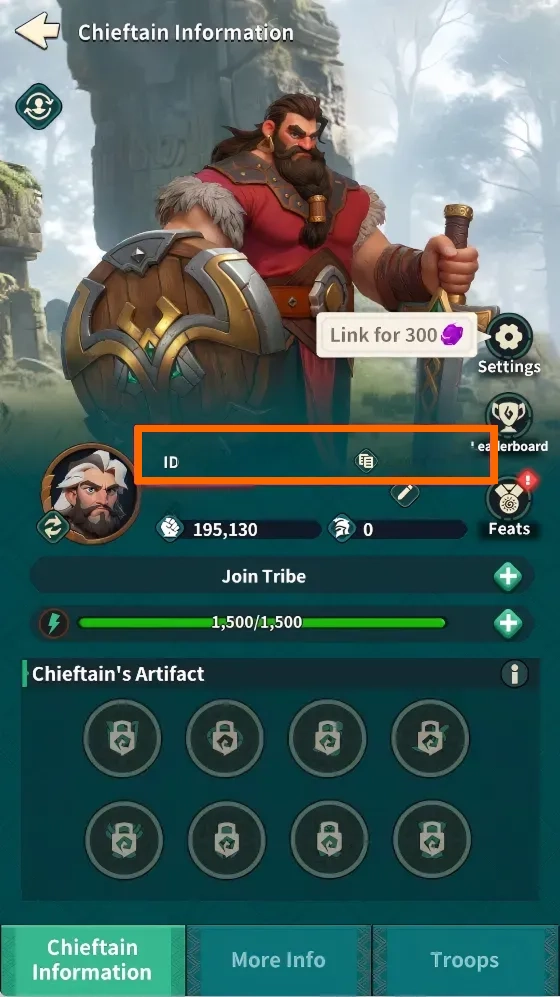
Check Your ID: Open the Chieftain Information page and find your ID. Copy or record it carefully before placing your order.

Fate War Chieftain Information page showing the player ID field

How to Bind Your Fate War IGG Account

01

Open Your Avatar: Enter Fate War and tap the Avatar in the upper-left corner.

Fate War main interface showing where to tap the Avatar
02

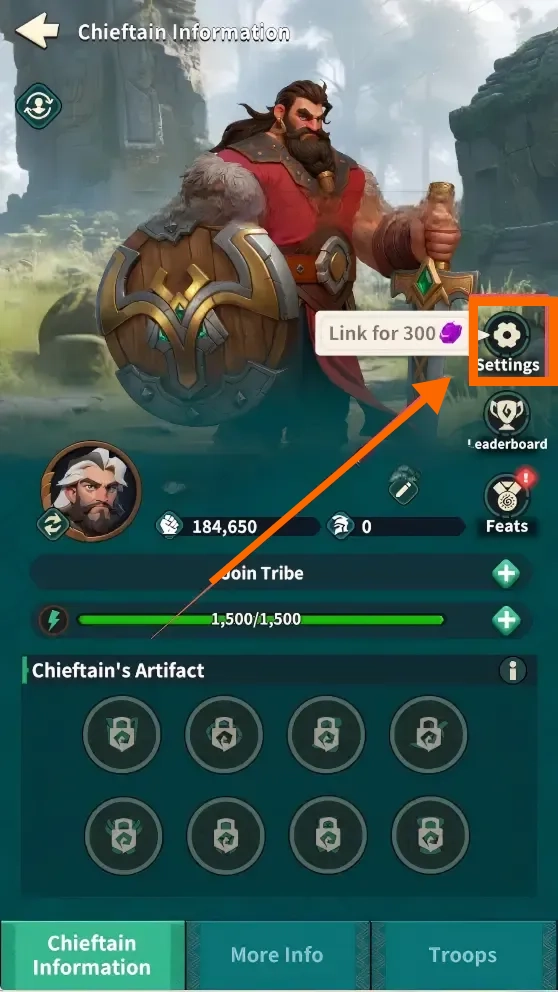
Open Settings: On the Chieftain Information page, tap Settings.

Fate War Chieftain Information page highlighting the Settings button
03

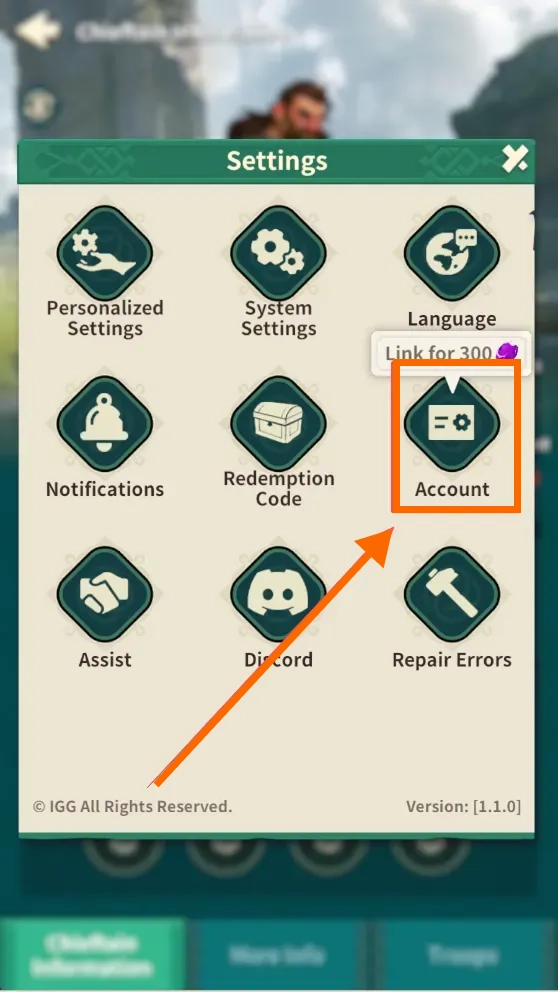
Select Account: In Settings, select Account.

Fate War Settings menu highlighting the Account option
04

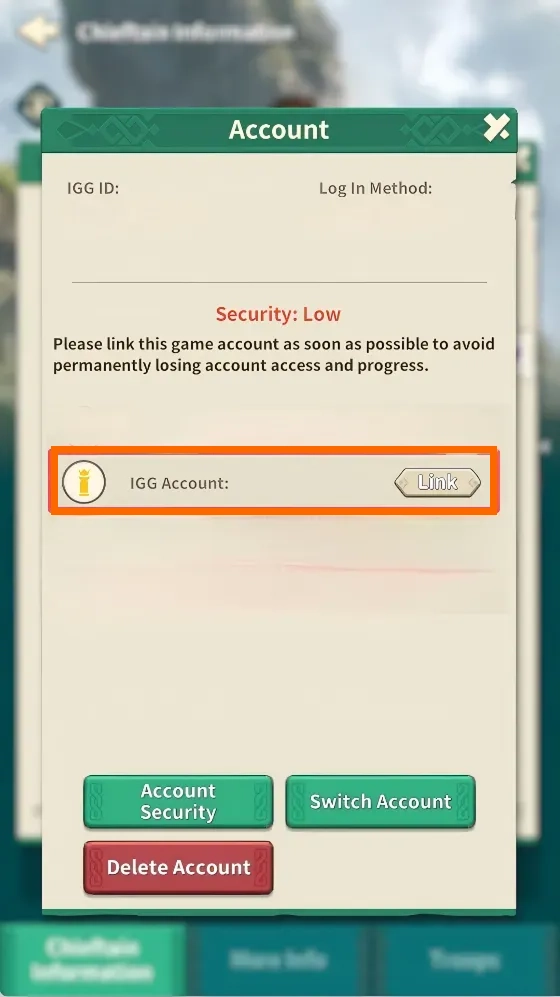
Link Your IGG Account: Find IGG Account and select Link. Follow the on-screen instructions to finish linking your account.

Fate War Account page showing the IGG Account Link option

Fate War Self-TopUp Tutorial

If Self-TopUp is available for your order, use the recharge page to log in and purchase the matching Fate War pack. Follow the steps below and do not log in to the same account on another device while the top-up is being processed.

STEP 01

Choose a Package and Pay

Choose the Fate War Gold package or Any Pack tier you want on BUFFHUB and complete payment. If Self-TopUp is available, select it to continue.

STEP 02

Log In to Fate War

Log in to the Fate War account you want to top up. Check the account carefully before moving to the next step.

STEP 03

Select the Matching Pack

Open the Fate War Store and select the pack that matches the price tier you purchased on BUFFHUB. Check the pack before confirming.

STEP 04

Wait for the Top-Up

Wait while the purchase is processed. Do not close the recharge page or log in to the same Fate War account on another device.

STEP 05

Check Your Purchase

When the top-up is complete, return to Fate War and check that the Gold or selected pack has been added to your account.

Account Login Top-Up: Manual Top-Up Guide

01

Visit the Website: Go to the BUFFHUB website, select your preferred language and currency, and log in to your account.

02

Find the Product: From the navigation menu on the homepage, select Game Top-Up > Fate War.

03

Confirm Your Order: Select the Fate War Gold package or Any Pack tier you want, then click “buy now”.

04

Complete Secure Payment: Select your preferred payment method and complete the transaction.

05

Submit Your Information and Wait: Provide the required login method, Fate War account, password, and UID on the order page, or contact customer support if assistance is needed. Our top-up specialist will then log in and complete the purchase. Please do not log in to your Fate War account during this process.

After your information has been submitted successfully, the system will automatically redirect you to the Waiting Page. Please wait while our top-up specialist processes your order.

BUFFHUB manual top-up process showing account information entry, account verification, and submission steps
06

Top-Up Complete:

· Automatic Redirect: Once our specialist has finished processing your order, the page will automatically redirect you to the top-up success page.

· Check Your Order: You can also visit “Purchase History” at any time to check your order status and top-up progress.

· Start Playing: Once the top-up is confirmed, log in to your Fate War account and check that the purchased Gold or pack has been added.

⚠️ Important Notes

1.

Match the Correct Pack: If you purchase an Any Pack tier, make sure the corresponding Fate War package has the same listed value before confirming the purchase.

2.

Check Your Account Information: For account-login orders, make sure your login method, account, password, and UID are correct before submitting them.

3.

Do Not Log In at the Same Time: Do not access the same Fate War account from another device while Self-TopUp or manual top-up processing is still in progress.

4.

Version Availability: Huawei and RuStore versions are currently not supported for this type of Fate War top-up.

Frequently Asked Questions

Q1: What can I buy for Fate War on BUFFHUB?

BUFFHUB currently provides multiple Fate War Any Pack tiers as well as Gold packages, including 99, 999, 4,999, 9,999, and 29,999 Gold options. Available products and prices may change, so check the product page before purchasing.

Q2: What information do I need for a Fate War manual top-up?

For account-login processing, prepare your login method, Fate War account, password, and UID. Make sure all information belongs to the account you want to top up.

Q3: Which Fate War login methods are supported?

Supported login methods include IGG Account, Google, and Facebook. IGG Account is recommended for this type of top-up.

Q4: How long does a Fate War manual top-up take?

Account-login orders are generally processed within approximately 30 minutes. Actual delivery time can vary depending on order volume, login verification, and other processing conditions.

Q5: Can I log in to Fate War while my top-up is being processed?

It is best not to. During Self-TopUp or manual top-up processing, do not log in to the same Fate War account from another device until the top-up has finished.

Q6: What should I do if my Fate War purchase has not arrived?

First, check your BUFFHUB order status and confirm that your account information and selected package are correct. If the order is marked as complete but the purchased content has not appeared in Fate War, contact BUFFHUB online customer support with your order details.

More down down
Fold Up up up

No reviews yet.

Sort By :
Latest

No reviews yet.

Product Introduction

  • Alipay Alipay
  • ApplePay ApplePay
  • bancontact bancontact
  • bancontact-1 bancontact-1
  • billease billease
  • blik blik
  • boleto boleto
  • boost boost
  • bpi bpi
  • dana dana
  • Ewallet Ewallet
  • gcash gcash
  • GooglePay GooglePay
  • Ideal Ideal
  • kakao_pay kakao_pay
  • Klarna Klarna
  • konbini konbini
  • Kplus Kplus
  • line line
  • MBWAY MBWAY
  • multibanco multibanco
  • mybank mybank
  • naverpay naverpay
  • NetBanking NetBanking
  • oxxo oxxo
  • payco payco
  • paynow paynow
  • payu payu
  • pix pix
  • Qiwi Qiwi
  • rabbit rabbit
  • samsung samsung
  • sberpay sberpay
  • SBP SBP
  • SEPA SEPA
  • skrill skrill
  • spei spei
  • swish swish
  • tng tng
  • Tosspay Tosspay
  • truemoney truemoney
  • usdt usdt
  • Visa Visa
  • Visa-mastercard Visa-mastercard
  • Visa-mastercard+jbc Visa-mastercard+jbc
  • yoomoney yoomoney
  • Alipay Alipay
  • ApplePay ApplePay
  • bancontact bancontact
  • bancontact-1 bancontact-1
  • billease billease
  • blik blik
  • boleto boleto
  • boost boost
  • bpi bpi
  • dana dana
  • Ewallet Ewallet
  • gcash gcash
  • GooglePay GooglePay
  • Ideal Ideal
  • kakao_pay kakao_pay
  • Klarna Klarna
  • konbini konbini
  • Kplus Kplus
  • line line
  • MBWAY MBWAY
  • multibanco multibanco
  • mybank mybank
  • naverpay naverpay
  • NetBanking NetBanking
  • oxxo oxxo
  • payco payco
  • paynow paynow
  • payu payu
  • pix pix
  • Qiwi Qiwi
  • rabbit rabbit
  • samsung samsung
  • sberpay sberpay
  • SBP SBP
  • SEPA SEPA
  • skrill skrill
  • spei spei
  • swish swish
  • tng tng
  • Tosspay Tosspay
  • truemoney truemoney
  • usdt usdt
  • Visa Visa
  • Visa-mastercard Visa-mastercard
  • Visa-mastercard+jbc Visa-mastercard+jbc
  • yoomoney yoomoney
Language & Currency
  • Language
    English
    中文(繁体)
    日本語
    Bahasa Indonesia
    Bahasa Melayu
    Français
    Italiano
    Deutsch
    Русский
    Español
    한국어
  • Display Currency
    $ USD
    € EUR
    £ GBP
    C$ CAD
    A$ AUD
    S$ SGD
    Ұ JPY
    ₩ KRW
    SA SAR
    AED AED
    RM MYR
    ₱ PHP
    Rp IDR
    ฿ THB
    NT$ TWD
    HK$ HKD
    ₫ VND
    MX$ MXN
    R$ BRL
    ₽ RUB