





















Related searches
0 results
Not found
No content related to ""
theme-light theme-light-text
theme-dark-text theme-light
Poppo Live

Poppo Live

broadcast broadcast
Only top up your own Poppo Live account. Do not trust credit card cash-out requests from third-party platforms—you may lose your funds.
25500 Coins
25500 Coins
$ 2.91
43500 Coins
43500 Coins
$ 4.74
83000 Coins
83000 Coins
$ 9.05
180000 Coins
180000 Coins
$ 19.62
270000 Coins
270000 Coins
$ 29.43
450000 Coins
450000 Coins
$ 49.05
910000 Coins
910000 Coins
$ 99.18
1,780,000 Coins
1,780,000 Coins
$ 194.00

Quantity

Price
$0.00
HOW TO BUY?
Total
- +

₩0

Overall Rating
5.0
2,764 reviews
Overall Rating
5.0
Based on 2,764 reviews
  • 5 Star
    100%
  • 4 Star
    0%
  • 3 Star
    0%
  • 2 Star
    0%
  • 1 Star
    0%
Product Introduction
Recharge guide
User Reviews(2,764)
PREMIUM OFFERS

Poppo Live Coin Top-Up on BUFFHUB
- Current Coin Top-Up Deals

Poppo Live is built around real-time interaction through live streams, virtual gifts, Party rooms, and PK sessions. BUFFHUB provides an online Poppo Live Coin top-up option for users who want to add Coins using their Poppo Live User ID. For this direct User ID top-up flow, your Poppo Live account password is not required. Once payment is confirmed, the order is processed according to the User ID you submit.

Current Poppo Live Coin Offers and Discounts

Selected Poppo Live Coin packages on BUFFHUB are currently listed below their displayed reference prices, giving you lower-priced options across several Coin amounts. The actual savings vary by package and current promotion, while eligible coupons may provide additional discounts when the applicable campaign rules allow them. Check the live product price, available offer, and final checkout total before completing your order.

Keep Coins Ready for the Live Moments You Care About

A Poppo Live top-up often happens because something is already going on: you want to send a gift, join a Fan Club, enter a Party room, or support a host during a PK session. That makes the Coin price, correct User ID, processing speed, and checkout options more useful than a long list of generic promises. BUFFHUB keeps those parts of the purchase straightforward.

  • Lower-Priced Coins With Current Discounts — Compare several Poppo Live Coin packages before paying. Selected amounts are listed at discounted prices, and eligible coupons may provide additional savings when the current promotion rules allow them.
  • Top Up With Your User ID, Not Your Password — The direct top-up route uses the Poppo Live User ID of the account receiving the Coins. Your Poppo Live login password is not required for this method.
  • Quick Coin Processing — Poppo Live User ID orders are usually processed quickly, with many top-ups credited in around 3 minutes. Actual timing can vary with payment verification, order volume, or temporary platform delays.
  • More Ways to Complete Checkout — BUFFHUB supports multiple payment methods. Depending on your region and the options shown at checkout, these may include credit or debit cards, e-wallets, bank transfers, convenience-store payments, and other supported local methods.

Checkout Without Unnecessary Poppo Live Account Access

Payments are handled through a secure checkout process, while the User ID top-up route avoids unnecessary access to your Poppo Live login account. Because the direct recharge only needs the required top-up information, you do not have to hand over your Poppo Live password to complete the order.

Help Is Available When an Order Needs Attention

If a payment is still being checked, you want to confirm the User ID, or your Coins are taking longer than expected to appear, 24/7 customer support is available for order-related assistance. This describes support availability rather than a fixed response or resolution time.

If you are topping up before sending a virtual gift, joining a Fan Club, or supporting a host during a Party or PK session, choose the Coin amount you need, double-check your Poppo Live User ID, and complete checkout before you need the balance. That keeps the top-up tied to the live moment you are actually preparing for.

BUFFHUB also provides top-up pages for other games and digital services, including ChatGPT, Chamet, BIGO LIVE, and Roblox.

About Poppo Live and Coins

What Is Poppo Live?

Poppo Live is a global interactive live-streaming platform where users can watch creators, chat in real time, share short-form content, and join live social experiences. Its current features include live broadcasts, Party rooms, PK sessions, virtual gifts, short videos, and other community-based interactions. These features give viewers several ways to participate instead of simply watching a stream.


What Are Poppo Live Coins?

Poppo Live Coins are virtual currency purchased by users for supported in-app interactions.

· Gifts and Live Interaction: Coins can be spent on virtual gifts and selected interactive features during Poppo Live sessions. Official Poppo Live features such as Fan Club actions can also require Coins under the platform's current rules.

· Supporting Creators: Gifts purchased with Coins contribute to creator-side rewards according to Poppo Live's own rules. Viewer Coins and the rewards or Points used on the creator side should not be treated as the same virtual balance.
More down down
Fold Up up up

Top-Up Information and Important Notes

Item Details
Supported Platform Poppo Live Mobile App
Supported Server International Server
Required Information
Poppo Live User ID
Estimated Processing Time Usually credited in around 3 minutes, although actual timing can vary
⚠️

Important Notice: Check your Poppo Live User ID carefully before submitting the order because the Coins are sent according to the ID you provide. A completed direct top-up generally cannot be reversed after it has been successfully credited to the submitted account.

How to Find Your Poppo Live User ID

Your User ID identifies the Poppo Live account that should receive the Coins, so check it carefully before placing the order. Follow these steps to find it:

1.

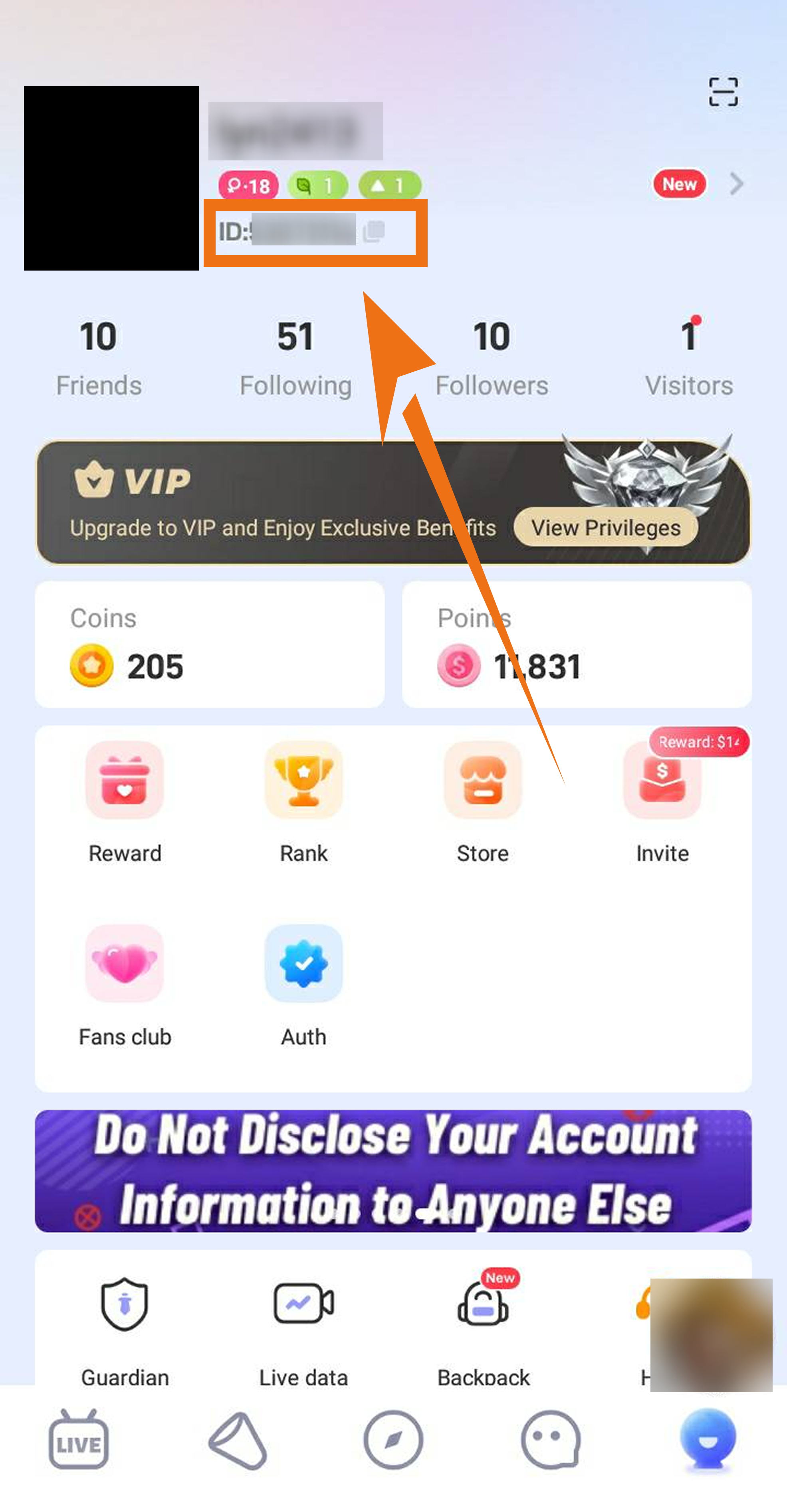
Open the App: Open the Poppo Live app and go to your Profile.

2.

Find Your ID: Locate the unique User ID displayed on your account profile and copy it carefully before returning to the BUFFHUB order page.

How to find your Poppo Live User ID for Coin top-up

Poppo Live User ID Top-Up Guide

Use the correct Poppo Live User ID and follow the checkout steps below to complete your Coin top-up:

1

Open BUFFHUB: Visit BUFFHUB.COM and open the Poppo Live Coin top-up page.

2

Enter Your User ID: Enter the Poppo Live User ID of the account that should receive the Coins. Check the number before continuing because the order is processed according to the information you submit.

3

Complete Checkout: Choose the Coin amount you want and select one of the payment methods currently available on the checkout page. Depending on your region, supported options may include credit or debit cards, e-wallets, bank transfers, convenience-store payments, and other local methods.

4

Check Your Coin Balance: After payment is confirmed, Poppo Live Coin orders are usually processed quickly and are often credited in around 3 minutes. Payment verification, higher order volume, or temporary platform delays can increase the actual processing time, so check the order status if the Coins take longer than expected to appear.

❓ Frequently Asked Questions (FAQ)

Q1: Do I need my Poppo Live password for a User ID top-up?

No. The direct top-up method uses your Poppo Live User ID to identify the account that should receive the Coins. Your Poppo Live login password is not required for this top-up route.

Q2: What happens if I enter the wrong Poppo Live User ID?

Check the User ID carefully before paying. If a direct top-up has already been successfully credited to the account identified by the User ID you submitted, the completed transaction generally cannot be reversed. If incorrect recharge information causes the top-up itself to fail, refund handling follows BUFFHUB's direct recharge policy after the information error is confirmed.

Q3: What should I do if my Poppo Live Coins take longer than expected to arrive?

Coin orders are usually processed quickly and are often credited in around 3 minutes, but payment verification or heavier order volume can cause delays. Check your order status and confirm that you submitted the correct User ID first. If the order still needs attention, BUFFHUB's 24/7 customer support is available for order-related assistance.


More down down
Fold Up up up
U324093501
Purchased 180000 Coins · Sep 26, 2026

Very fast and reliable service. Will use again.

U170805363
Purchased 180000 Coins · Sep 26, 2026

スムーズでした。また利用します。

U642434772
Purchased 83000 Coins · Sep 26, 2026

最初は心配でしたが、大丈夫でした。

U609239187
Purchased 270000 Coins · Sep 25, 2026

Smooth transaction, very pleased.

U632399013
Purchased 43500 Coins · Sep 25, 2026

Cepat dan tidak ribet. Puas!

U661099873
Purchased 43500 Coins · Sep 24, 2026

Tout s'est bien passé, recharge immédiate.

View All Comments
Sort By :
Latest
U324093501
Purchased 180000 Coins

Very fast and reliable service. Will use again.

Sep 26, 2026
U170805363
Purchased 180000 Coins

スムーズでした。また利用します。

Sep 26, 2026
U642434772
Purchased 83000 Coins

最初は心配でしたが、大丈夫でした。

Sep 26, 2026
U609239187
Purchased 270000 Coins

Smooth transaction, very pleased.

Sep 25, 2026
U632399013
Purchased 43500 Coins

Cepat dan tidak ribet. Puas!

Sep 25, 2026
U661099873
Purchased 43500 Coins

Tout s'est bien passé, recharge immédiate.

Sep 24, 2026
View All Comments

Product Introduction

Remind

  • Alipay Alipay
  • ApplePay ApplePay
  • bancontact bancontact
  • bancontact-1 bancontact-1
  • billease billease
  • blik blik
  • boleto boleto
  • boost boost
  • bpi bpi
  • dana dana
  • Ewallet Ewallet
  • gcash gcash
  • GooglePay GooglePay
  • Ideal Ideal
  • kakao_pay kakao_pay
  • Klarna Klarna
  • konbini konbini
  • Kplus Kplus
  • line line
  • MBWAY MBWAY
  • multibanco multibanco
  • mybank mybank
  • naverpay naverpay
  • NetBanking NetBanking
  • oxxo oxxo
  • payco payco
  • paynow paynow
  • payu payu
  • pix pix
  • Qiwi Qiwi
  • rabbit rabbit
  • samsung samsung
  • sberpay sberpay
  • SBP SBP
  • SEPA SEPA
  • skrill skrill
  • spei spei
  • swish swish
  • tng tng
  • Tosspay Tosspay
  • truemoney truemoney
  • usdt usdt
  • Visa Visa
  • Visa-mastercard Visa-mastercard
  • Visa-mastercard+jbc Visa-mastercard+jbc
  • yoomoney yoomoney
  • Alipay Alipay
  • ApplePay ApplePay
  • bancontact bancontact
  • bancontact-1 bancontact-1
  • billease billease
  • blik blik
  • boleto boleto
  • boost boost
  • bpi bpi
  • dana dana
  • Ewallet Ewallet
  • gcash gcash
  • GooglePay GooglePay
  • Ideal Ideal
  • kakao_pay kakao_pay
  • Klarna Klarna
  • konbini konbini
  • Kplus Kplus
  • line line
  • MBWAY MBWAY
  • multibanco multibanco
  • mybank mybank
  • naverpay naverpay
  • NetBanking NetBanking
  • oxxo oxxo
  • payco payco
  • paynow paynow
  • payu payu
  • pix pix
  • Qiwi Qiwi
  • rabbit rabbit
  • samsung samsung
  • sberpay sberpay
  • SBP SBP
  • SEPA SEPA
  • skrill skrill
  • spei spei
  • swish swish
  • tng tng
  • Tosspay Tosspay
  • truemoney truemoney
  • usdt usdt
  • Visa Visa
  • Visa-mastercard Visa-mastercard
  • Visa-mastercard+jbc Visa-mastercard+jbc
  • yoomoney yoomoney
Language & Currency
  • Language
    English
    中文(繁体)
    日本語
    Bahasa Indonesia
    Bahasa Melayu
    Français
    Italiano
    Deutsch
    Русский
    Español
    한국어
  • Display Currency
    $ USD
    € EUR
    £ GBP
    C$ CAD
    A$ AUD
    S$ SGD
    Ұ JPY
    ₩ KRW
    SA SAR
    AED AED
    RM MYR
    ₱ PHP
    Rp IDR
    ฿ THB
    NT$ TWD
    HK$ HKD
    ₫ VND
    MX$ MXN
    R$ BRL
    ₽ RUB