















Related searches
0 results
Not found
No content related to ""
theme-light theme-light-text
theme-dark-text theme-light
eFootball

eFootball

IOS
Android
130 Coins
130 Coins
$ 1.04
$ 1.19
300 Coins
300 Coins
$ 2.36
$ 2.69
550 Coins
550 Coins
$ 4.19
$ 4.79
750 Coins
750 Coins
$ 5.68
$ 6.49
1040 Coins
1040 Coins
$ 7.7
$ 8.79
2130 Coins
2130 Coins
$ 15.75
$ 17.99
3250 Coins
3250 Coins
$ 24.02
$ 26.99
5700 Coins
5700 Coins
$ 38.52
$ 43.99
12800 Coins
12800 Coins
$ 82.3
$ 93.99

Quantity

Price
$0.00
HOW TO BUY?
Total
- +

0

Overall Rating
5.0
0 reviews
Overall Rating
5.0
Based on 0 reviews
  • 5 Star
    0%
  • 4 Star
    0%
  • 3 Star
    0%
  • 2 Star
    0%
  • 1 Star
    0%
Product Introduction
Recharge guide
User Reviews(0)
BUFFHUB EXCLUSIVE

Top Up eFootball Coins on BUFFHUB — Fast Login Top-Up for Your Dream Team

Build your Dream Team faster with a convenient eFootball Coins top-up on BUFFHUB. Whether you are saving Coins for player signings, special player lists, limited-time packs, or other eligible in-game content, having enough eFootball Coins gives you more freedom to strengthen your squad when the right opportunity appears. BUFFHUB provides a straightforward Login Top-up service, allowing you to choose the package you need, submit the required account information, keep your account offline during processing, and return to the pitch once your order is complete.

eFootball Login Top-Up Information

eFootball Coins on BUFFHUB are delivered through a Login Top-up process. To help your order proceed smoothly, please enter your Account (KONAMI/Email), Password, and User ID accurately. You may also be asked to provide customer service with a screenshot of the in-game package you want to purchase. Once your information has been submitted, please keep the game account offline until the top-up is completed.

Important steps for a smoother top-up:

  • Check Your Account Details: Make sure your Account (KONAMI/Email), Password, and User ID are entered correctly before submission.
  • Keep Your Account Offline: Do not log in to eFootball after submitting your account information until you receive confirmation that the order is complete.
  • Stay in Contact with Support: If confirmation of a specific in-game package is required, provide the requested screenshot according to the customer service instructions.
  • Wait for Completion: Accurate information and keeping the account offline can help avoid unnecessary delays. Actual delivery time depends on the processing status of each order.

Why Top Up eFootball Coins on buffhub.com?


At BUFFHUB, we provide a flexible, secure, and competitively priced way to top up eFootball Coins. As a professional game top-up platform, BUFFHUB serves players worldwide across popular games and digital services, including FC 26 Coins, Fate War, and FC 27 Coins. Every eFootball Coins order is handled according to the following service standards:

Competitive Prices

BUFFHUB aims to provide competitive eFootball Coins pricing so you have more flexibility when adding resources to your account. Available prices and discounts are displayed directly on the product and checkout pages.

Extra Promotions and Savings

In addition to regular product pricing, BUFFHUB may provide promotional offers and discounts, giving both new and returning players more opportunities to save when topping up eFootball Coins.

Secure Handling of Login Information

Because eFootball uses a Login Top-up process, you only need to provide the account information requested for the order, including your Account, Password, and User ID. Please follow the top-up instructions carefully and keep your account offline while the order is being processed.

Efficient Top-Up Process

From selecting your package and completing payment to submitting your account information, the process is designed to stay simple and easy to follow. Correct details and an offline account help reduce unnecessary verification delays.

Standardized Login Top-Up Procedure

Each eFootball Coins order follows a structured Login Top-up procedure. If the selected product requires confirmation of a specific in-game package, customer service may contact you for a screenshot before completing the purchase.

24/7 Customer Support

If you need help selecting a product, submitting account details, confirming an in-game package, or checking an order, the BUFFHUB customer service team is available around the clock to assist you.

Multiple Payment Methods

BUFFHUB supports a variety of global and local payment options, allowing players from different regions to choose from the payment methods shown during checkout.

About eFootball and eFootball Coins

What Is eFootball?

eFootball is a free-to-play football game centered around competitive matches and Dream Team squad building. Players can sign footballers, develop their squads, experiment with different formations, and compete in a variety of matches and events. Live Updates and seasonal content regularly influence available players and team-building choices, keeping the competitive environment active throughout the year.

What Can eFootball Coins Be Used For?

eFootball Coins are a premium in-game currency used for eligible player signings and other available in-game content. Depending on the current game content, Coins may be used for selected player lists, packs, bundles, or other items that require Coins. Saving enough Coins gives you more flexibility when a player or limited-time option that fits your Dream Team becomes available.

More down down
Fold Up up up

eFootball Top-Up Information and Important Notes

Applicable Platform eFootball Mobile 
Applicable Server International Server
Top-Up Method Login Top-up
Required Information 1. Account (KONAMI/Email)
2. Password
3. User ID
Important Notes
  1. 1. Enter Your Information Carefully: Make sure your Account, Password, and User ID are correct before submitting the order to avoid unnecessary delays.
  2. 2. Stay in Contact with Customer Service: If confirmation is required, please provide a screenshot of the in-game package you want to purchase according to the customer service instructions.
  3. 3. Keep Your Account Offline: After submitting your login information, do not log in to eFootball until you receive confirmation that the top-up has been completed.

  4. 4. Confirm the Product Before Payment: Check the selected eFootball Coins package or in-game item carefully before completing your order.
  5. 5. Check Your Account After Completion: Once you receive the completion notice, log back in to eFootball and confirm that the Coins or selected item has been credited successfully.

How to Prepare Your eFootball Account for Top-Up

! How to Find Your eFootball User ID

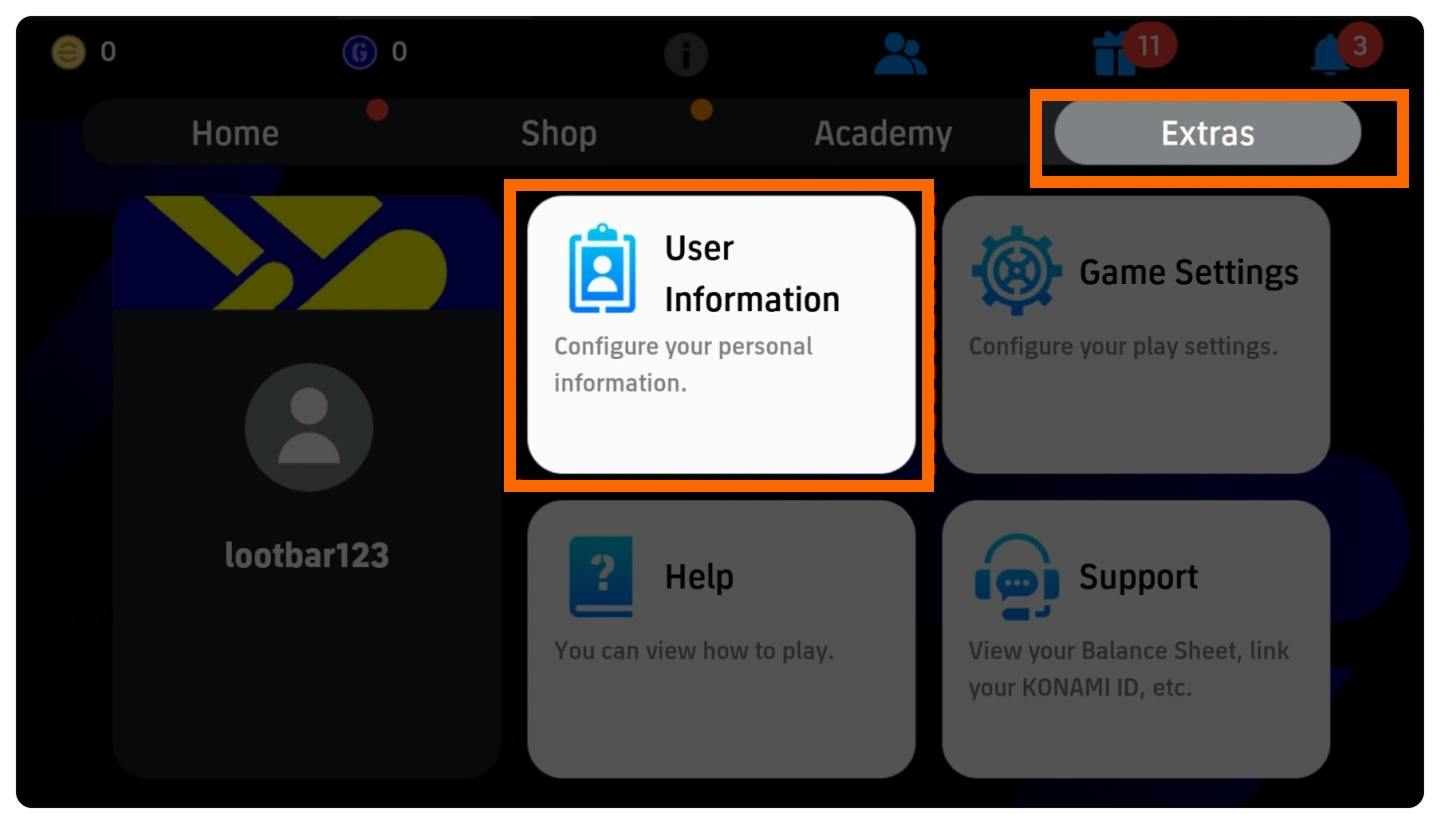
  1. Tap "Extras" on the eFootball home screen, then select "User Information".
    eFootball Extras menu showing the User Information option
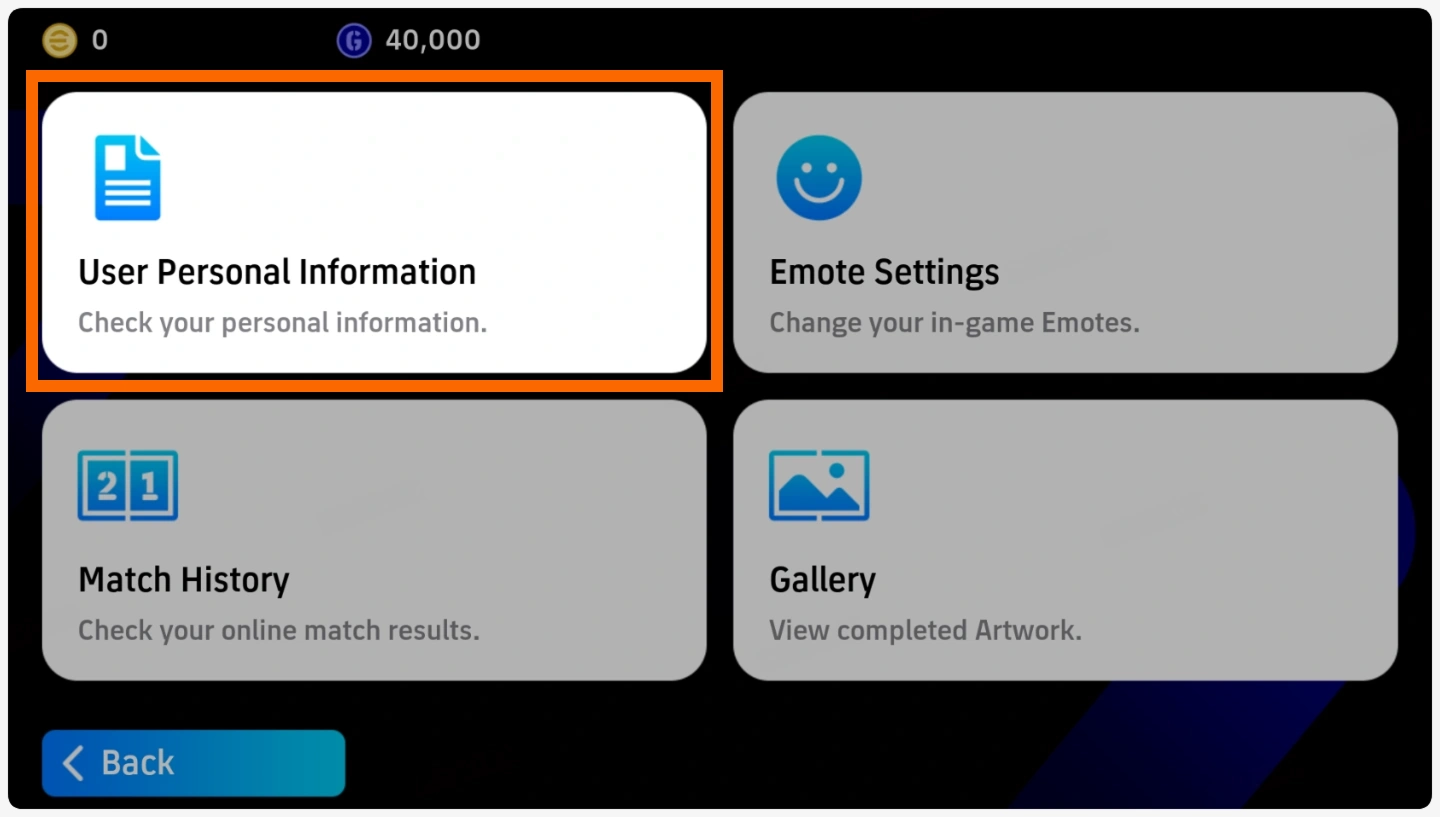
  2. On the User Information screen, select "User Personal Information".
    eFootball User Information screen showing User Personal Information
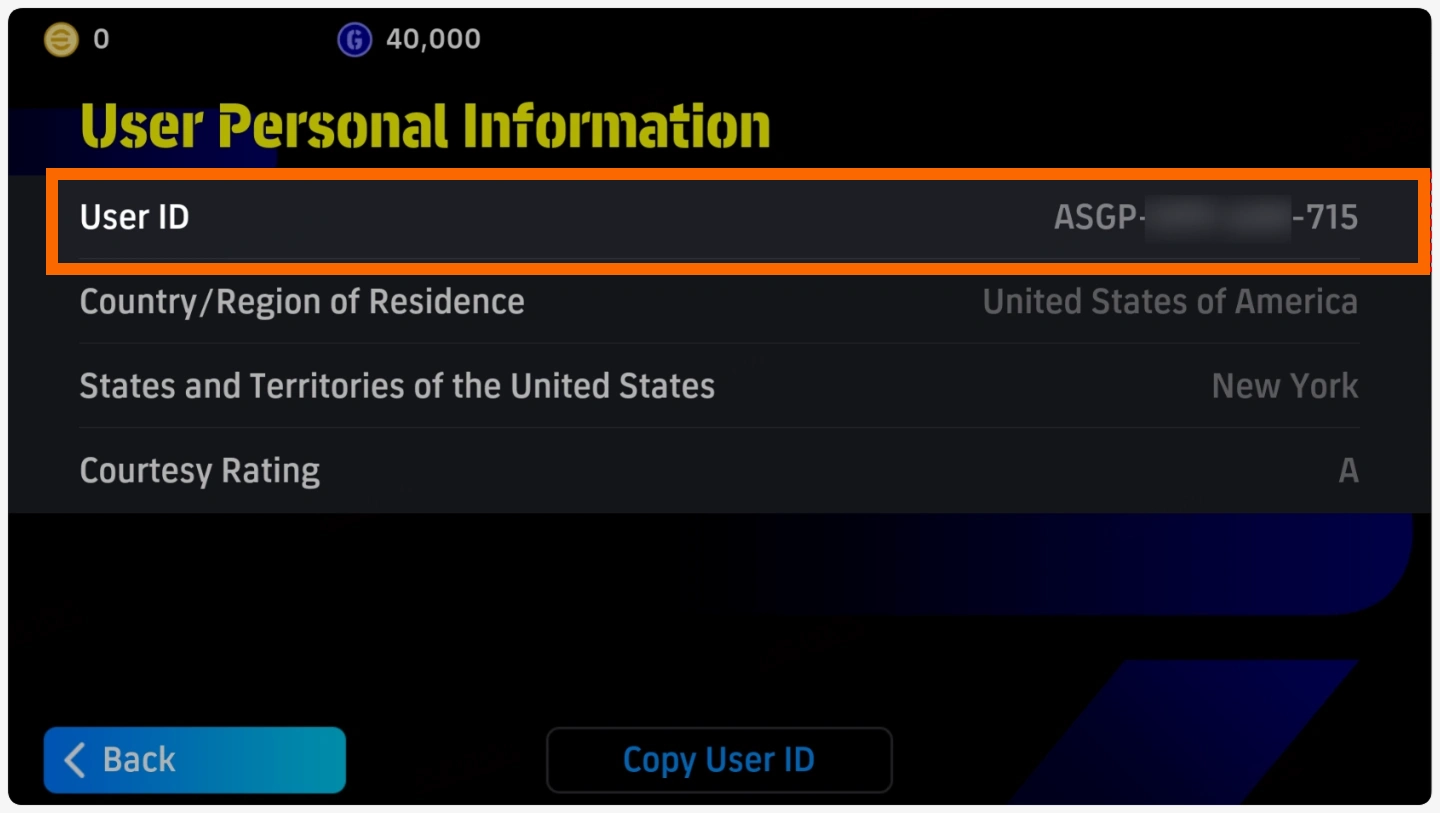
  3. Your User ID will appear near the top of the User Personal Information page. You can use the "Copy User ID" button to copy it accurately before submitting your top-up information.
    eFootball User Personal Information page showing the User ID

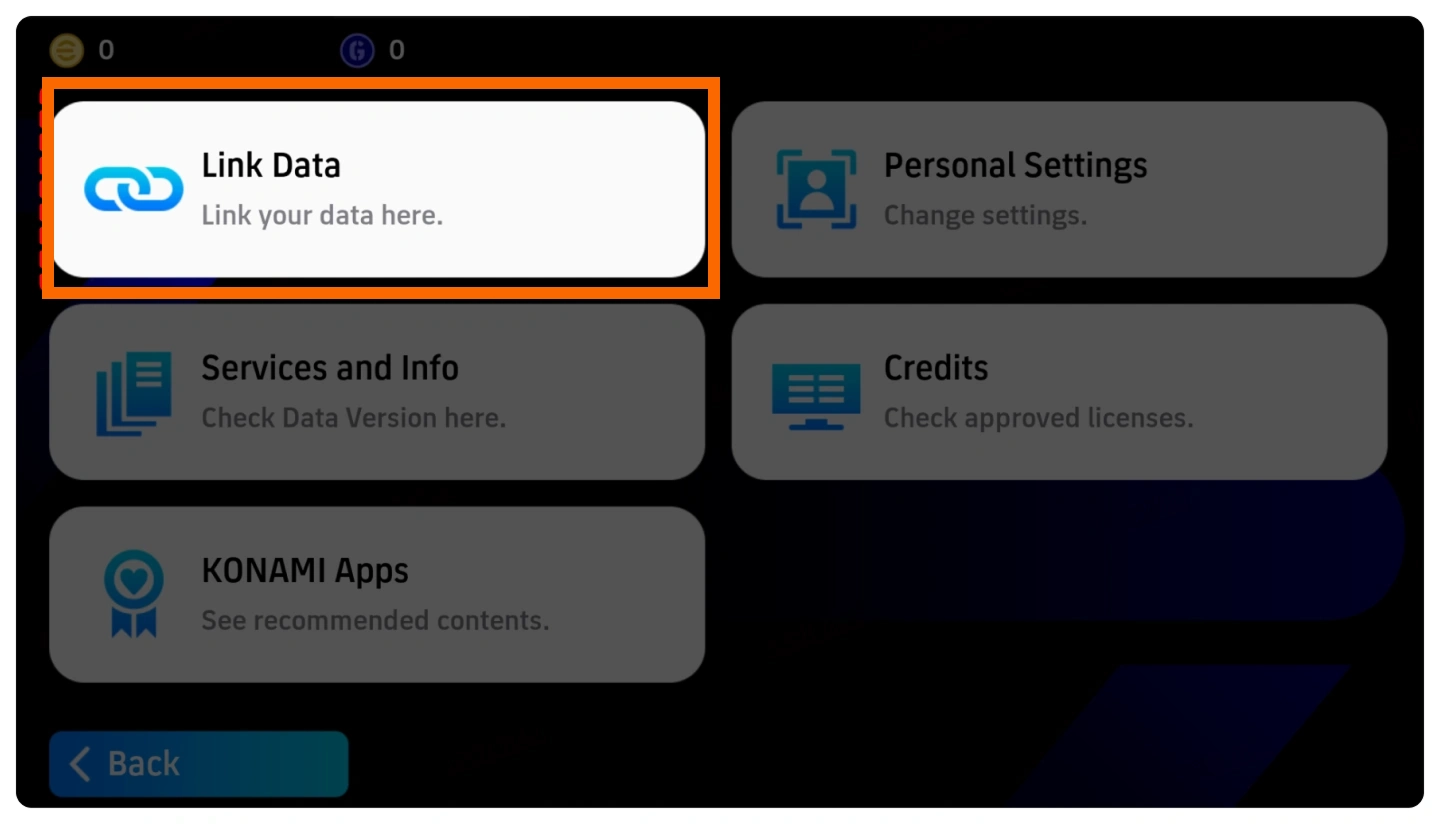
! How to Link Your eFootball Account Data

Before submitting your account for Login Top-up, make sure your eFootball data is linked to an account you can access. Follow the steps below to find the Link Data settings.

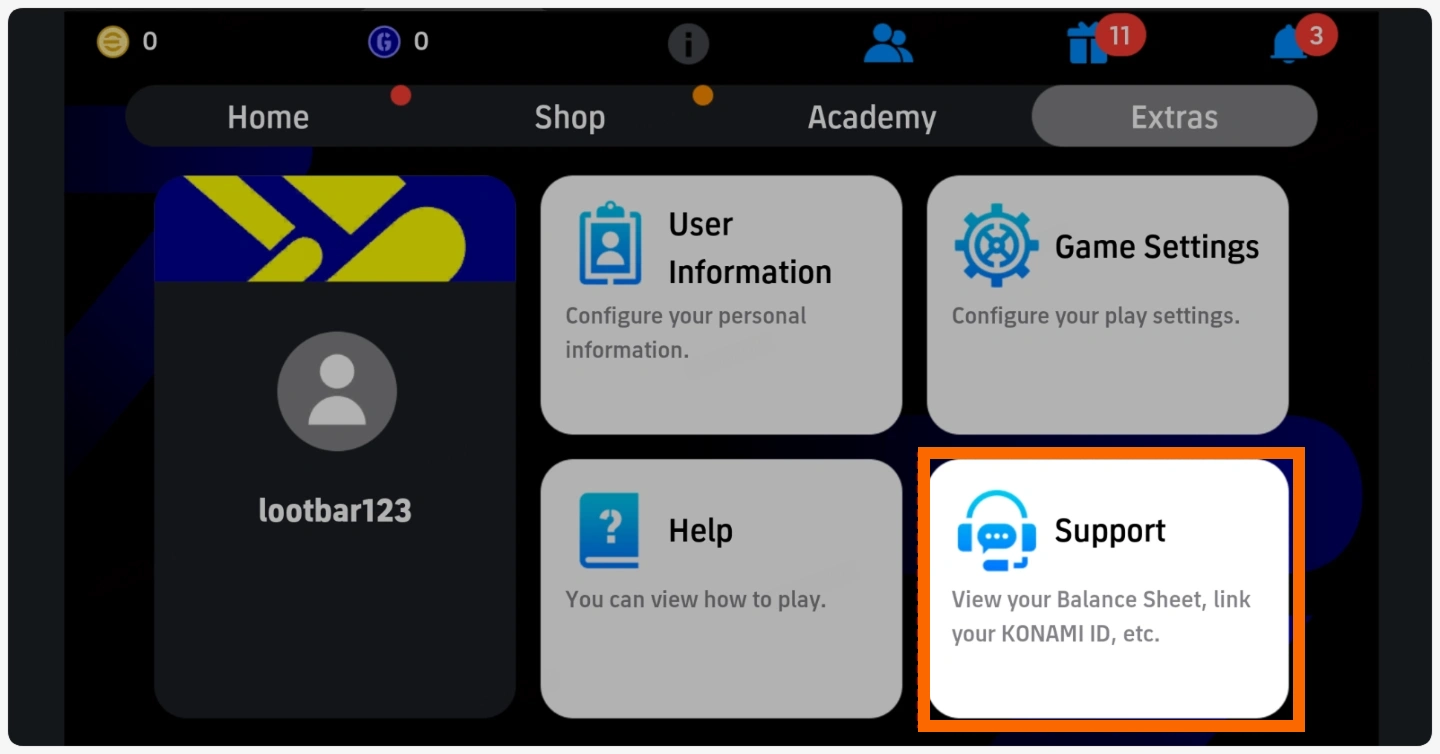
  1. Go to "Extras" and select "Support".
    eFootball Extras menu showing the Support option
  2. On the Support screen, select "Link Data".
    eFootball Support screen showing the Link Data option
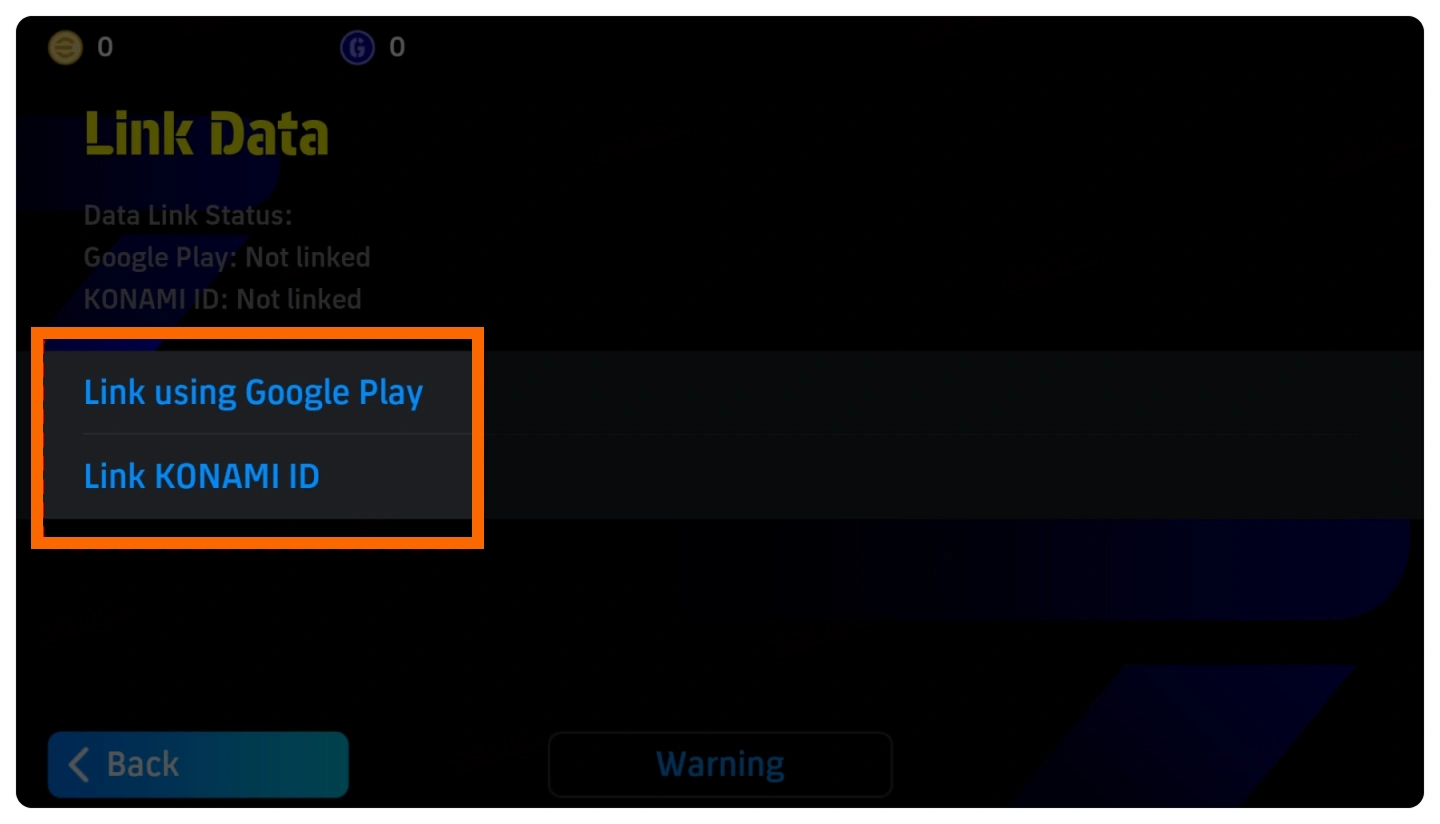
  3. Choose the available linking method for your account and follow the on-screen instructions. If you use a KONAMI ID for your Login Top-up, select "Link KONAMI ID".
    eFootball Link Data screen showing Link KONAMI ID and other linking options

How to Top Up eFootball Coins on BUFFHUB

  1. 01

    Visit BUFFHUB: Go to BUFFHUB and select your preferred language and displayed currency.

  2. 02

    Choose eFootball: Find eFootball in the game top-up section and open the corresponding product page.

  3. 03

    Select Your Product: Choose the eFootball Coins package or available in-game item you want to purchase and confirm the product details.

  4. 04

    Complete Payment: Select your preferred payment method, click buy now, and complete checkout.

  5. 05

    Submit Your Login Information: Enter your Account (KONAMI/Email), Password, and User ID accurately. If customer service needs to confirm the selected product, provide the requested in-game screenshot.

Frequently Asked Questions (FAQ)

Q1: What top-up method does BUFFHUB use for eFootball?

This product uses Login Top-up. After completing payment, you need to provide the Account (KONAMI/Email), Password, and User ID required for the order so the top-up can be processed.

Q2: Which platform and server are supported?

The current product information lists eFootball Mobile (iOS Only) and the International Server. Please check the product page again before ordering in case the supported platform or region changes.

Q3: How do I find my eFootball User ID?

Open Extras, select User Information, and then choose User Personal Information. Your User ID will be displayed near the top of the page, where you can copy it before submitting your order.

Q4: How do I link my eFootball account data?

Go to Extras, select Support, and then choose Link Data. From there, select the available linking method for your account and follow the on-screen instructions. If you use a KONAMI ID, choose Link KONAMI ID.

Q5: Can I log in to eFootball during the top-up?

No. After submitting your account information, please keep the account offline until you receive confirmation that the order has been completed. Logging in during processing may interfere with the top-up procedure.

Q6: What can eFootball Coins be used for?

eFootball Coins can be used for eligible player signings and other in-game content that requires Coins. Available uses may change as new player lists, packs, bundles, and seasonal content are introduced.

More down down
Fold Up up up

No reviews yet.

Sort By :
Latest

No reviews yet.

Product Introduction

  • Alipay Alipay
  • ApplePay ApplePay
  • bancontact bancontact
  • bancontact-1 bancontact-1
  • billease billease
  • blik blik
  • boleto boleto
  • boost boost
  • bpi bpi
  • dana dana
  • Ewallet Ewallet
  • gcash gcash
  • GooglePay GooglePay
  • Ideal Ideal
  • kakao_pay kakao_pay
  • Klarna Klarna
  • konbini konbini
  • Kplus Kplus
  • line line
  • MBWAY MBWAY
  • multibanco multibanco
  • mybank mybank
  • naverpay naverpay
  • NetBanking NetBanking
  • oxxo oxxo
  • payco payco
  • paynow paynow
  • payu payu
  • pix pix
  • Qiwi Qiwi
  • rabbit rabbit
  • samsung samsung
  • sberpay sberpay
  • SBP SBP
  • SEPA SEPA
  • skrill skrill
  • spei spei
  • swish swish
  • tng tng
  • Tosspay Tosspay
  • truemoney truemoney
  • usdt usdt
  • Visa Visa
  • Visa-mastercard Visa-mastercard
  • Visa-mastercard+jbc Visa-mastercard+jbc
  • yoomoney yoomoney
  • Alipay Alipay
  • ApplePay ApplePay
  • bancontact bancontact
  • bancontact-1 bancontact-1
  • billease billease
  • blik blik
  • boleto boleto
  • boost boost
  • bpi bpi
  • dana dana
  • Ewallet Ewallet
  • gcash gcash
  • GooglePay GooglePay
  • Ideal Ideal
  • kakao_pay kakao_pay
  • Klarna Klarna
  • konbini konbini
  • Kplus Kplus
  • line line
  • MBWAY MBWAY
  • multibanco multibanco
  • mybank mybank
  • naverpay naverpay
  • NetBanking NetBanking
  • oxxo oxxo
  • payco payco
  • paynow paynow
  • payu payu
  • pix pix
  • Qiwi Qiwi
  • rabbit rabbit
  • samsung samsung
  • sberpay sberpay
  • SBP SBP
  • SEPA SEPA
  • skrill skrill
  • spei spei
  • swish swish
  • tng tng
  • Tosspay Tosspay
  • truemoney truemoney
  • usdt usdt
  • Visa Visa
  • Visa-mastercard Visa-mastercard
  • Visa-mastercard+jbc Visa-mastercard+jbc
  • yoomoney yoomoney
Language & Currency
  • Language
    English
    中文(繁体)
    日本語
    Bahasa Indonesia
    Bahasa Melayu
    Français
    Italiano
    Deutsch
    Русский
    Español
    한국어
  • Display Currency
    $ USD
    € EUR
    £ GBP
    C$ CAD
    A$ AUD
    S$ SGD
    Ұ JPY
    ₩ KRW
    SA SAR
    AED AED
    RM MYR
    ₱ PHP
    Rp IDR
    ฿ THB
    NT$ TWD
    HK$ HKD
    ₫ VND
    MX$ MXN
    R$ BRL
    ₽ RUB