















Related searches
0 results
Not found
No content related to ""
theme-light theme-light-text
theme-dark-text theme-light
MONOPOLY GO!

MONOPOLY GO!

broadcast broadcast
Join the BUFFHUB Discord community and instantly receive a $10 discount coupon
1.99 Dice
1.99 Dice
$ 1.50
$ 1.99
4.99 Dice
4.99 Dice
$ 4.02
$ 4.99
9.99 Dice
9.99 Dice
$ 8.00
$ 9.99
19.99 Dice
19.99 Dice
$ 16.10
$ 19.99
49.99 Dice
49.99 Dice
$ 40.20
$ 49.99
99.99 Dice
99.99 Dice
$ 80.00
$ 99.99

Quantity

Price
$0.00
HOW TO BUY?
Total
- +

0

Overall Rating
5.0
2,880 reviews
Overall Rating
5.0
Based on 2,880 reviews
  • 5 Star
    99%
  • 4 Star
    1%
  • 3 Star
    0%
  • 2 Star
    0%
  • 1 Star
    0%
Product Introduction
Recharge guide
User Reviews(2,880)

MONOPOLY GO! Top Up – Dice Rolls | BUFFHUB

Dice Rolls, First-Purchase Value, and Login Top-Up Details

Need more Dice Rolls for your next run around the Board? BUFFHUB provides a MONOPOLY GO! Login Top-Up service with different purchase amounts available for players who want additional Dice Rolls or other eligible in-game content. Before ordering, compare the current price, available discount, first-purchase eligibility, and account requirements so you know exactly what applies to your purchase.

MONOPOLY GO! Dice Rolls and In-Game Resources

Dice Rolls affect how often you can move around the Board, while MONOPOLY money supports the building side of your account progression.

About Dice Rolls

Dice Rolls determine how often you can move your Token around the Board. Each roll can take you to different Tiles, rewards, events, or activities, so having more Dice available gives you more opportunities to keep playing.

About MONOPOLY Money

MONOPOLY money is an important in-game resource used as you develop your Boards and Landmarks. It is also earned through normal Board activity, including moving around the Board and collecting rewards.

First Top-Up Eligibility

The current BUFFHUB listing includes additional Dice Rolls for eligible first-time purchases. Eligibility depends on whether the MONOPOLY GO! account has previously made a purchase through the game or another purchase channel, so check your account status before ordering.

MONOPOLY GO! First Top-Up Bonus Amounts

For an eligible MONOPOLY GO! account making its first purchase, the current BUFFHUB listing shows the following Dice Roll totals. Because the first-purchase benefit depends on account eligibility, check that the account has not already made a qualifying purchase through another channel before placing the order.

Base Top-Up Amount First Top-Up Total (Bonus Included)
100 Dice Rolls 270 Dice Rolls
255 Dice Rolls 705 Dice Rolls
550 Dice Rolls 1,550 Dice Rolls
1,300 Dice Rolls 3,700 Dice Rolls
3,800 Dice Rolls 11,300 Dice Rolls
8,200 Dice Rolls 26,200 Dice Rolls
BUFFHUB Reminder: The first top-up benefit is available once for an eligible account. If the account has already completed a qualifying purchase through another platform or channel, the first-purchase bonus may no longer apply. Check your account eligibility before ordering.

How Does BUFFHUB Add Value to a MONOPOLY GO! Top-Up?

A MONOPOLY GO! purchase is not only about choosing a Dice Roll amount. Current pricing, first-purchase eligibility, checkout options, the Login Top-Up requirements, and how the order is handled can all affect which option makes sense for your account. BUFFHUB brings those details together on the same product page.

BEFORE CHECKOUT

Compare Dice Roll Prices, Discounts, and First-Purchase Value

BUFFHUB lists MONOPOLY GO! top-up options at competitive prices, while selected products can also include discounted pricing, current offers, or other available savings. Eligible first-time purchases can add another layer of value, so you can compare the regular price, current discount, and applicable first-top-up total before deciding which Dice Roll option fits your budget.

AT CHECKOUT

Use Flexible Payment Options with Clear Login Requirements

BUFFHUB provides multiple payment methods at checkout, with payment completed through a secure transaction environment. Because this MONOPOLY GO! product uses Login Top-Up, the required In-Game Name and Facebook account information are shown as part of the order requirements rather than being presented as a UID-only recharge. That makes it easier to review what the manual purchase requires before you commit.

AFTER ORDERING

Know the Processing Window and Where to Get Help

After the required information has been submitted correctly, MONOPOLY GO! Login Top-Up orders are usually processed in around 30 minutes. Actual completion time can vary during busy periods, when additional account verification is needed, or for larger orders. If you need assistance with payment, account information, order status, or verification, 24/7 customer support is available for order-related help.

For MONOPOLY GO!, it is worth checking more than the largest Dice Roll amount on the page. Compare the current price and discount, confirm whether the first-purchase benefit still applies to your account, and review the Login Top-Up requirements before submitting the order. The detailed account and purchase instructions are covered in the top-up guide.

What Is MONOPOLY GO!?

MONOPOLY GO! is Scopely's free-to-play mobile take on the classic MONOPOLY board game, available on iOS and Android. Players roll Dice to move their Token around themed Boards, earn MONOPOLY money, collect rewards, and interact with other players.

The Board includes Property Tiles and Railroad Tiles alongside familiar MONOPOLY spaces. Building and upgrading Landmarks adds Houses to Property Tiles, while landing on a Railroad can trigger activities such as Shutdown or Bank Heist. Dice management, Board progression, collecting, and player interaction all shape the day-to-day experience.

More down down
Fold Up up up

MONOPOLY GO! Top-Up Information

Item Details
Supported Platforms MONOPOLY GO! Mobile Game (iOS / Android)
Supported Server Global Server
Top-Up Method Login Top-Up
Required Information In-Game Name, Facebook Account / Email, Facebook Password, and Facebook Recovery Code
Payment Multiple payment methods are available at checkout, with payment completed through a secure transaction environment. Available options may vary by region.
Estimated Processing Time Orders are usually processed in around 30 minutes after the required information is submitted. Processing can take longer during busy periods, when additional verification is required, or for larger orders.

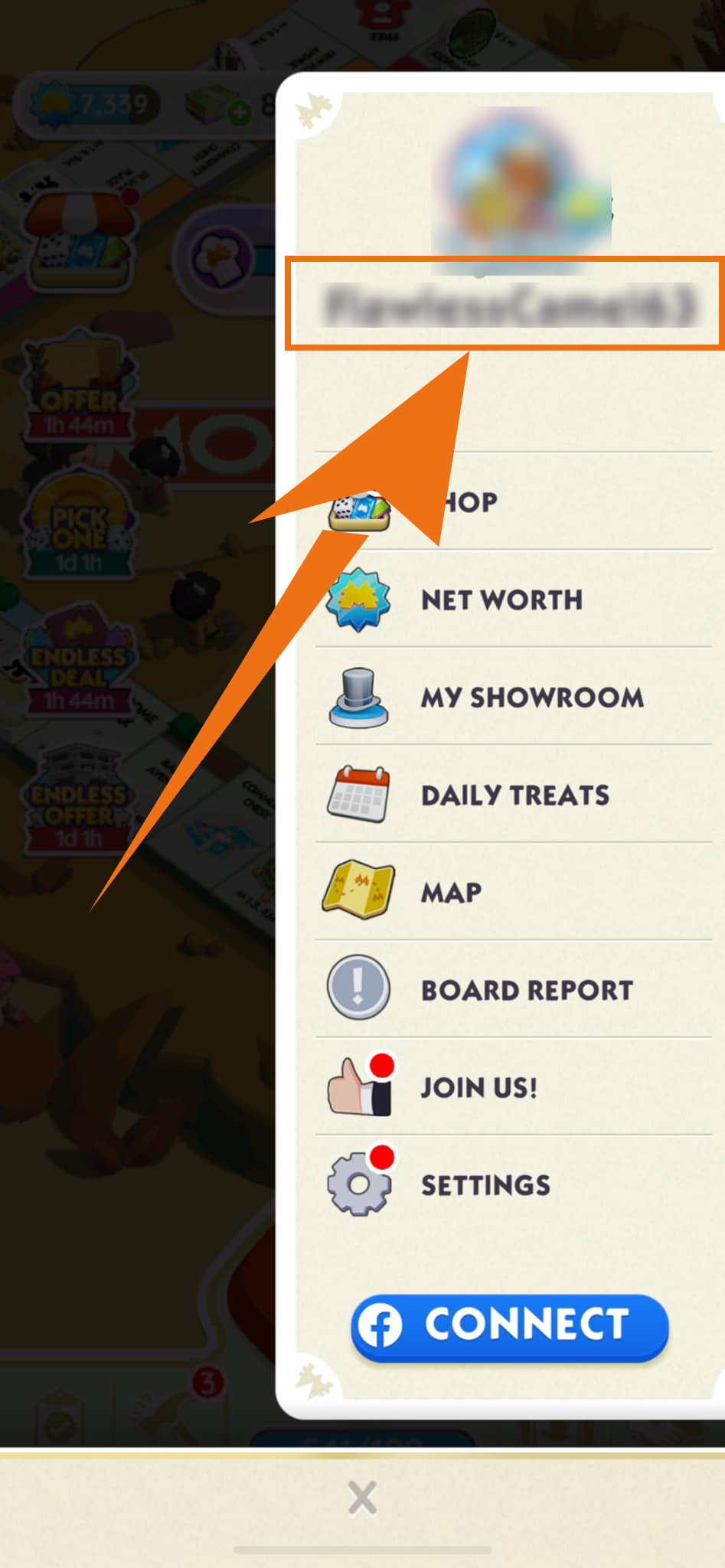
How to Find Your MONOPOLY GO! In-Game Name

How to find your MONOPOLY GO! in-game name

How to Find Your Facebook Recovery Code

This Login Top-Up currently requires a Facebook Recovery Code as part of the account information used during manual processing. Prepare the requested recovery code before submitting your order and check that you are using the Facebook account linked to the correct MONOPOLY GO! profile.

Login Top-Up: Manual Top-Up Guide

  1. 01

    Visit the Website

    Go to the BUFFHUB website, select your preferred language and displayed currency, and sign in to your account.

  2. 02

    Find MONOPOLY GO!

    From the homepage navigation, select Game Top-Up > MONOPOLY GO! (Manual Top-Up).

  3. 03

    Confirm Your Order

    Select the currently available MONOPOLY GO! top-up option you want and review the product details, price, discount, and first-purchase eligibility when applicable. Then click “buy now”.


  4. 04

    Complete Payment

    Choose an available payment method, review the order information, and complete the transaction through checkout.

  5. 05

    Submit Your Information and Wait

    Provide the requested In-Game Name and Facebook account information through the order page or support flow. A top-up specialist will use the submitted information to complete the manual purchase. Do not log in to the game account while the order is being processed.

    Waiting page after submitting information for MONOPOLY GO manual top-up

    After the required information has been submitted successfully, the system will redirect you to the waiting page while the manual top-up specialist begins processing the order.

  6. 06

    Check the Completed Order

    · Page Redirect: Once processing is complete, the page will redirect to the top-up success page.

    · Check Your Order: You can also open “Purchase History” to review the current order status and processing progress.

    · Check Your Purchase: Once the order is confirmed as completed, log in to MONOPOLY GO! and verify the purchased Dice Rolls or other selected content.

Important Information

  • Information Accuracy: Check your In-Game Name, Facebook account information, and any requested recovery information carefully before submitting the order. Incorrect information can delay manual processing.
  • Account Requirement: The current BUFFHUB instructions ask you to keep at least 50 Dice Rolls on the MONOPOLY GO! account before the order is processed.
  • Login Restriction: Do not log in to MONOPOLY GO! while the top-up specialist is processing the order. Another active login may interrupt the current account session and delay or disrupt the purchase.
  • After-Sales Policy: Successfully delivered top-ups are subject to the current BUFFHUB after-sales terms. Review your account details and selected product carefully before completing payment.

Frequently Asked Questions (FAQ)

Q1: Why does this MONOPOLY GO! Login Top-Up require a Facebook Recovery Code?

The current manual top-up process lists a Facebook Recovery Code among the required account information. Prepare the requested code together with the Facebook account linked to your MONOPOLY GO! profile so the order can proceed when account verification is needed.

Q2: How is payment handled for a MONOPOLY GO! top-up?

BUFFHUB processes payment through a secure transaction environment and provides multiple payment methods at checkout. Available payment options can vary by region, so check the methods shown on your checkout page before completing the order.

Q3: How long does a MONOPOLY GO! Login Top-Up take?

Orders are usually processed in around 30 minutes after the required information has been submitted correctly. Processing can take longer during busy periods, when additional verification is needed, or for larger orders; the current guidance notes that some orders may take up to around 5 hours.

Q4: What should I do if my MONOPOLY GO! top-up is taking longer than expected?

First check that the submitted account information is correct and that you have not logged in while the order is being processed. If the order still needs attention, contact BUFFHUB's 24/7 customer support with your order details so the current status can be checked.

More down down
Fold Up up up
U116033890
Purchased 4.99 Dice · Sep 18, 2026

Tutto a posto.

ABvuKbsT53
Purchased 4.99 Dice · Sep 17, 2026

短時間で完了して助かりました。

sBwP1Qt7P
Purchased 1.99 Dice · Sep 17, 2026

👍

U848586890
Purchased 1.99 Dice · Sep 17, 2026

Proses cepat.

U451753366
Purchased 9.99 Dice · Sep 16, 2026

Very good.

U191658762
Purchased 4.99 Dice · Sep 16, 2026

效率高,下次還會來。

View All Comments
Sort By :
Latest
U116033890
Purchased 4.99 Dice

Tutto a posto.

Sep 18, 2026
ABvuKbsT53
Purchased 4.99 Dice

短時間で完了して助かりました。

Sep 17, 2026
sBwP1Qt7P
Purchased 1.99 Dice

👍

Sep 17, 2026
U848586890
Purchased 1.99 Dice

Proses cepat.

Sep 17, 2026
U451753366
Purchased 9.99 Dice

Very good.

Sep 16, 2026
U191658762
Purchased 4.99 Dice

效率高,下次還會來。

Sep 16, 2026
View All Comments

Product Introduction

  • Alipay Alipay
  • ApplePay ApplePay
  • bancontact bancontact
  • bancontact-1 bancontact-1
  • billease billease
  • blik blik
  • boleto boleto
  • boost boost
  • bpi bpi
  • dana dana
  • Ewallet Ewallet
  • gcash gcash
  • GooglePay GooglePay
  • Ideal Ideal
  • kakao_pay kakao_pay
  • Klarna Klarna
  • konbini konbini
  • Kplus Kplus
  • line line
  • MBWAY MBWAY
  • multibanco multibanco
  • mybank mybank
  • naverpay naverpay
  • NetBanking NetBanking
  • oxxo oxxo
  • payco payco
  • paynow paynow
  • payu payu
  • pix pix
  • Qiwi Qiwi
  • rabbit rabbit
  • samsung samsung
  • sberpay sberpay
  • SBP SBP
  • SEPA SEPA
  • skrill skrill
  • spei spei
  • swish swish
  • tng tng
  • Tosspay Tosspay
  • truemoney truemoney
  • usdt usdt
  • Visa Visa
  • Visa-mastercard Visa-mastercard
  • Visa-mastercard+jbc Visa-mastercard+jbc
  • yoomoney yoomoney
  • Alipay Alipay
  • ApplePay ApplePay
  • bancontact bancontact
  • bancontact-1 bancontact-1
  • billease billease
  • blik blik
  • boleto boleto
  • boost boost
  • bpi bpi
  • dana dana
  • Ewallet Ewallet
  • gcash gcash
  • GooglePay GooglePay
  • Ideal Ideal
  • kakao_pay kakao_pay
  • Klarna Klarna
  • konbini konbini
  • Kplus Kplus
  • line line
  • MBWAY MBWAY
  • multibanco multibanco
  • mybank mybank
  • naverpay naverpay
  • NetBanking NetBanking
  • oxxo oxxo
  • payco payco
  • paynow paynow
  • payu payu
  • pix pix
  • Qiwi Qiwi
  • rabbit rabbit
  • samsung samsung
  • sberpay sberpay
  • SBP SBP
  • SEPA SEPA
  • skrill skrill
  • spei spei
  • swish swish
  • tng tng
  • Tosspay Tosspay
  • truemoney truemoney
  • usdt usdt
  • Visa Visa
  • Visa-mastercard Visa-mastercard
  • Visa-mastercard+jbc Visa-mastercard+jbc
  • yoomoney yoomoney
Language & Currency
  • Language
    English
    中文(繁体)
    日本語
    Bahasa Indonesia
    Bahasa Melayu
    Français
    Italiano
    Deutsch
    Русский
    Español
    한국어
  • Display Currency
    $ USD
    € EUR
    £ GBP
    C$ CAD
    A$ AUD
    S$ SGD
    Ұ JPY
    ₩ KRW
    SA SAR
    AED AED
    RM MYR
    ₱ PHP
    Rp IDR
    ฿ THB
    NT$ TWD
    HK$ HKD
    ₫ VND
    MX$ MXN
    R$ BRL
    ₽ RUB