
















Related searches
0 results
Not found
No content related to ""
theme-light theme-light-text
theme-dark-text theme-light
Infinity Nikki

Infinity Nikki

broadcast broadcast
Join the BUFFHUB Discord community and instantly receive a $10 discount coupon
Weekly Gains
Weekly Gains
$ 0.85
$ 0.99
Monthly Gifts
Monthly Gifts
$ 4.24
$ 4.99
Distant Anthem
Distant Anthem
$ 8.49
$ 9.99
Miracle Epic
Miracle Epic
$ 16.56
$ 19.49
Any $4.99 Pack
Any $4.99 Pack
$ 4.24
$ 4.99
Any $6.99 Pack
Any $6.99 Pack
$ 5.94
$ 6.99
Any $9.99 Pack
Any $9.99 Pack
$ 8.49
$ 9.99
Any $14.99 Pack
Any $14.99 Pack
$ 12.74
$ 14.99
Any $19.99 Pack
Any $19.99 Pack
$ 16.99
$ 19.99
Any $29.99 Pack
Any $29.99 Pack
$ 25.49
$ 29.99
Any $49.99 Pack
Any $49.99 Pack
$ 42.47
$ 49.99
Any 99.99 Pack
Any 99.99 Pack
$ 84.95
$ 99.99
60 Stellarite
60 Stellarite
$ 0.85
$ 0.99
300 Stellarite
300 Stellarite
$ 4.24
$ 4.99
980 Stellarite
980 Stellarite
$ 12.74
$ 14.99
1980 Stellarite
1980 Stellarite
$ 25.49
$ 29.99
3280 Stellarite
3280 Stellarite
$ 42.47
$ 49.99
6480 Stellarite
6480 Stellarite
$ 84.95
$ 99.99

Quantity

Price
$0.00
HOW TO BUY?
Total
- +

₩0

Overall Rating
5.0
2,679 reviews
Overall Rating
5.0
Based on 2,679 reviews
  • 5 Star
    100%
  • 4 Star
    0%
  • 3 Star
    0%
  • 2 Star
    0%
  • 1 Star
    0%
Product Introduction
Recharge guide
User Reviews(2,679)
 
 
BUFFHUB PREMIUM SERVICE

Infinity Nikki Top-Up:
Stellarite Top-Up for Stylists

Infinity Nikki combines open-world exploration, styling, Resonance, and Ability gameplay, so the right purchase depends on what you are preparing for. BUFFHUB offers Stellarite and supported in-game purchase options for Stylists planning a Resonance, a Store outfit, Monthly Gifts, or another eligible item. Check the current product, top-up route, and final price before placing your order.


Stellarite First Top-Up Double Bonus and Reset Rules

How Does a First Top-Up Double Bonus Reset Work?

Infinity Nikki can reset the Stellarite first top-up double bonus through specific version updates announced by the game. For example, Version 2.0 reset all tiers on the Stellarite Purchase screen, allowing each tier to become eligible for its first top-up double bonus again after the reset. Because reset timing can change between versions, check the latest official announcement and the current in-game Stellarite Purchase screen before making a purchase.

How the First Top-Up Bonus Is Applied

Top-Up Type Bonus Details
First Stellarite Top-Up Eligible tiers receive the corresponding first top-up double bonus shown on the current Stellarite Purchase screen.
Subsequent Top-Ups After the first top-up double bonus for a tier has been used, subsequent rewards and any additional bonuses are subject to the current in-game Store display.

* Actual bonus rules, eligible tiers, reset timing, and delivered rewards are subject to official Infinity Nikki announcements and the current in-game Stellarite Purchase screen.

A Stylist’s Four Checks Before an Infinity Nikki Top-Up

A Stellarite purchase can serve very different plans in Infinity Nikki. One Stylist may be preparing for Resonance, while another is saving for a Store outfit, Monthly Gifts, or another pack. Before paying, it is more useful to check the target, top-up route, checkout, and timing than to treat every recharge the same way. BUFFHUB also carries related titles such as Love and Deepspace and Heartopia.

01 · STYLE TARGETMatch the Stellarite amount to the outfit, Resonance, or Store item you actually want. BUFFHUB lists lower-priced and competitively priced Infinity Nikki top-up options across different Stellarite tiers and selected packs. Some products may also carry strong current discounts or promotional pricing, so compare the displayed product and final price before paying. If the in-game Stellarite Purchase screen currently shows a first top-up double bonus for your chosen tier, include that bonus in your budget instead of assuming the largest package is automatically the right choice.
02 · TOP-UP ROUTEDecide who completes the in-game purchase before you submit the order. With the self-service route, you log in to your Infold Account and complete the corresponding purchase yourself, so you do not provide your game account password to a top-up agent. Manual top-up is a separate route and requires the account and purchase information shown in the detailed guide, including login details for staff-assisted processing.
03 · CHECKOUTCheck the final price and available payment choices together. BUFFHUB provides multiple payment methods, with the available options shown during checkout. Payment and order information are handled through a secure checkout environment, so you can review the selected Stellarite tier or pack and the final total before completing the transaction.
04 · TIMING & SUPPORTLeave enough time before the Resonance or Store purchase you are planning. Self-service top-ups usually take around 3–5 minutes, while manual top-ups generally take around 15 minutes. Payment verification, order volume, login checks, or game server conditions can extend those estimates, so they are not fixed delivery times. If you need help with the order, payment, login route, or delivery status, customer support is available 24/7 for order-related assistance.

About Infinity Nikki

Infinity Nikki is a multi-platform open-world styling adventure developed by Infold Games. Players travel through Miraland alongside Nikki and Momo, combining fashion collection and customization with exploration, quests, puzzles, photography, and other open-world activities.

Ability Outfits are also tied to Infinity Nikki’s exploration systems. By collecting and unlocking the relevant abilities, Stylists can use functions such as Floating, Purification, Animal-Grooming, Bug-Catching, and Fishing, while the newer Ability Setup system also gives players more freedom to customize how supported abilities look during exploration.

More down down
Fold Up up up

Top-Up Information and Important Notes

Item Details
Supported Platforms iOS, Android, PC, PlayStation 5, and Mac. Account progress can be shared across supported platforms when you use the same properly linked account. Platforms available for manual top-up are subject to the information shown on the product page.


Supported Servers Global Servers
Information Required for Manual Top-Up
1. Game login account, password, character name, and UID
2. Screenshot of the in-game item you want to purchase
3. Quantity of the item you want to purchase
Processing Time Manual top-ups usually take around 15 minutes. Actual processing time may vary depending on order volume, login verification, payment review, or game server status.
Important: To make the manual login process smoother, use your Infold Account if your game progress is already linked to one. Direct Apple Account login is currently not supported for manual top-ups. If necessary, link your game progress to an available Infold Account before placing your order.

How to Find Your Character Name and UID

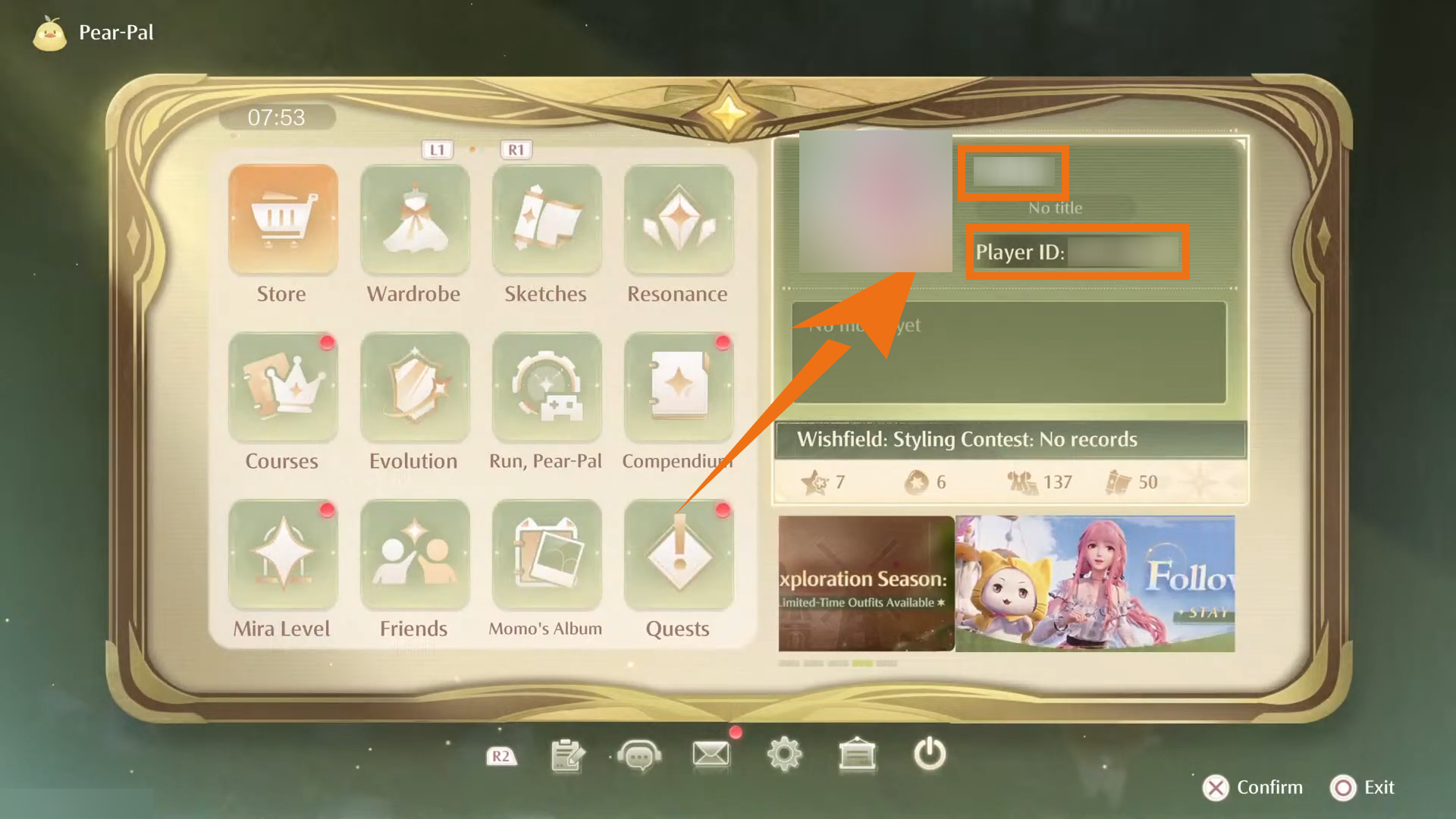
Open Pear-Pal in the game and go to your Stylist Card to view your character name and UID. When entering the order information, make sure both values exactly match the details displayed in your game account.

How to find your character name and UID in Infinity Nikki

Top-Up Guide

Login Top-Up: Self-Service (Recommended)

  1. 1

    Open the Product Page: Visit BUFFHUB, select your preferred language and currency, then search for and open “Infinity Nikki.”

  2. 2

    Choose a Product: Select your preferred Stellarite tier, Monthly Gifts, or another supported in-game item, then click “Top Up Now” and complete the payment.

  3. 3

    Log In and Complete the Purchase: Open the self-service page, log in to your Infold Account, and purchase the corresponding in-game item according to your order.

  4. 4

    Log Out After the Purchase: Log out after completing the purchase. The login record for the self-service session is also cleared according to the platform’s standard process.

Login Top-Up: Manual Top-Up Guide

  1. 01

    Open the Website: Visit the BUFFHUB website, select your preferred language and currency, and log in to your account.

  2. 02

    Find the Product: Click “Game Top-Up” in the homepage navigation bar, then select Infinity Nikki (Manual Top-Up).

  3. 03

    Confirm Your Order: Choose the Stellarite tier, Monthly Gifts, or other pack you want to purchase, then click “Top Up Now.”

  4. 04

    Complete the Payment: Select one of the available payment methods, confirm that all order information is correct, and complete the payment.

  5. 05

    Submit Your Information and Wait: Enter your game login account, password, character name, UID, and item quantity on the order page, then upload a screenshot of the item you want to purchase. You can also contact online customer support if assistance is needed. After receiving the required information, a staff member will log in to the game and complete the purchase according to your order. Please do not log in to your game account while the manual top-up is being processed, as this may cause a login conflict.

    Waiting page after submitting information for an Infinity Nikki manual top-up

    After your information has been submitted, the system will redirect you to the waiting page. Please allow some time for staff to begin processing the order in sequence.

  6. 06

    Top-Up Complete:

    ・Page Notification: Once the manual top-up has been completed, the page will redirect to the top-up confirmation page.

    ・Track Your Order: You can also visit “Purchase History” to check the order status and processing progress.

    ・Log In to Confirm: After confirming that the order is complete, log in to your Infinity Nikki account and check your Stellarite balance or purchased items.

    ・Account Security: After confirming delivery, you can change your game account password for additional account security.

Frequently Asked Questions (FAQ)

Q1: What Are Stellarites in Infinity Nikki?

Stellarites are Infinity Nikki’s premium currency. They can be converted into Diamonds according to the in-game rules and can also be used for selected Store purchases. Check the current Store for the available items and conversion options before spending them.

Q2: Why Is a Product Screenshot Required for a Manual Top-Up?

A product screenshot helps the staff member identify the exact Stellarite tier, Monthly Gifts, or other pack you want to purchase. This is especially useful when several products have similar names or prices.

Q3: Is Game Progress Shared Across Different Platforms?

Yes. When the account is linked correctly and you use the same linked account, Infinity Nikki supports shared progress across iOS, Android, PC, PlayStation 5, and Mac. Check your linked login method before switching platforms.

Q4: Why Can the Price on BUFFHUB Differ from the In-Game Price?

The displayed price can vary with payment currency, region, exchange rates, platform pricing, and current promotional offers. Before placing an order, check the product details, Stellarite amount, payment currency, and final checkout total.

Q5: What Should I Do If I Encounter a Problem During the Top-Up?

If you encounter login verification problems, an order-processing issue, or missing items, contact BUFFHUB’s 24/7 customer support and provide your order number so the team can check the order details.

More down down
Fold Up up up
U124487576
Purchased Any 99.99 Pack · Sep 26, 2026

Rapide et efficace

U970985879
Purchased Monthly Gifts · Sep 24, 2026

fast and easy to use! thank you! ^^

U150957648
Purchased Any $49.99 Pack · Sep 24, 2026

good

U520044191
Purchased Any $14.99 Pack · Sep 24, 2026

È stato veloce

U847624513
Purchased 3280 Stellarite · Sep 24, 2026

SO GOOD

U930797784
Purchased Monthly Gifts · Sep 24, 2026

the best

View All Comments
Sort By :
Latest
U124487576
Purchased Any 99.99 Pack

Rapide et efficace

Sep 26, 2026
U970985879
Purchased Monthly Gifts

fast and easy to use! thank you! ^^

Sep 24, 2026
U150957648
Purchased Any $49.99 Pack

good

Sep 24, 2026
U520044191
Purchased Any $14.99 Pack

È stato veloce

Sep 24, 2026
U847624513
Purchased 3280 Stellarite

SO GOOD

Sep 24, 2026
U930797784
Purchased Monthly Gifts

the best

Sep 24, 2026
View All Comments

Product Introduction

Remind

  • Alipay Alipay
  • ApplePay ApplePay
  • bancontact bancontact
  • bancontact-1 bancontact-1
  • billease billease
  • blik blik
  • boleto boleto
  • boost boost
  • bpi bpi
  • dana dana
  • Ewallet Ewallet
  • gcash gcash
  • GooglePay GooglePay
  • Ideal Ideal
  • kakao_pay kakao_pay
  • Klarna Klarna
  • konbini konbini
  • Kplus Kplus
  • line line
  • MBWAY MBWAY
  • multibanco multibanco
  • mybank mybank
  • naverpay naverpay
  • NetBanking NetBanking
  • oxxo oxxo
  • payco payco
  • paynow paynow
  • payu payu
  • pix pix
  • Qiwi Qiwi
  • rabbit rabbit
  • samsung samsung
  • sberpay sberpay
  • SBP SBP
  • SEPA SEPA
  • skrill skrill
  • spei spei
  • swish swish
  • tng tng
  • Tosspay Tosspay
  • truemoney truemoney
  • usdt usdt
  • Visa Visa
  • Visa-mastercard Visa-mastercard
  • Visa-mastercard+jbc Visa-mastercard+jbc
  • yoomoney yoomoney
  • Alipay Alipay
  • ApplePay ApplePay
  • bancontact bancontact
  • bancontact-1 bancontact-1
  • billease billease
  • blik blik
  • boleto boleto
  • boost boost
  • bpi bpi
  • dana dana
  • Ewallet Ewallet
  • gcash gcash
  • GooglePay GooglePay
  • Ideal Ideal
  • kakao_pay kakao_pay
  • Klarna Klarna
  • konbini konbini
  • Kplus Kplus
  • line line
  • MBWAY MBWAY
  • multibanco multibanco
  • mybank mybank
  • naverpay naverpay
  • NetBanking NetBanking
  • oxxo oxxo
  • payco payco
  • paynow paynow
  • payu payu
  • pix pix
  • Qiwi Qiwi
  • rabbit rabbit
  • samsung samsung
  • sberpay sberpay
  • SBP SBP
  • SEPA SEPA
  • skrill skrill
  • spei spei
  • swish swish
  • tng tng
  • Tosspay Tosspay
  • truemoney truemoney
  • usdt usdt
  • Visa Visa
  • Visa-mastercard Visa-mastercard
  • Visa-mastercard+jbc Visa-mastercard+jbc
  • yoomoney yoomoney
Language & Currency
  • Language
    English
    中文(繁体)
    日本語
    Bahasa Indonesia
    Bahasa Melayu
    Français
    Italiano
    Deutsch
    Русский
    Español
    한국어
  • Display Currency
    $ USD
    € EUR
    £ GBP
    C$ CAD
    A$ AUD
    S$ SGD
    Ұ JPY
    ₩ KRW
    SA SAR
    AED AED
    RM MYR
    ₱ PHP
    Rp IDR
    ฿ THB
    NT$ TWD
    HK$ HKD
    ₫ VND
    MX$ MXN
    R$ BRL
    ₽ RUB