




















Related searches
0 results
Not found
No content related to ""
theme-light theme-light-text
theme-dark-text theme-light
Tiles Survive!

Tiles Survive!

broadcast broadcast
Join the BUFFHUB Discord community and instantly receive a $10 discount coupon
New User Exclusive: Any 4.99 Pack
Total 0/1
New User Exclusive: Any 4.99 Pack
$ 3.69
$ 4.99
New User Exclusive: Any 99.99 Pack
Total 0/1
New User Exclusive: Any 99.99 Pack
$ 76.34
$ 99.99
100 Waypoints
100 Waypoints
$ 0.78
$ 0.99
500 Waypoints
500 Waypoints
$ 3.91
$ 4.99
1,000 Waypoints
1,000 Waypoints
$ 7.83
$ 9.99
2,000 Waypoints
2,000 Waypoints
$ 15.66
$ 19.99
5,000 Waypoints
5,000 Waypoints
$ 39.17
$ 49.99
10,000 Waypoints
10,000 Waypoints
$ 78.34
$ 99.99
Standard Packs All In One
$ 144.91
$ 184.95
Any 0.99 Pack
Any 0.99 Pack
$ 0.78
$ 0.99
Any 4.99 Pack
Any 4.99 Pack
$ 3.91
$ 4.99
Any 9.99 Pack
Any 9.99 Pack
$ 7.83
$ 9.99
Any 19.99 Pack
Any 19.99 Pack
$ 15.66
$ 19.99
Any 49.99 Pack
Any 49.99 Pack
$ 37.22
$ 49.99
Any 99.99 Pack
Any 99.99 Pack
$ 78.34
$ 99.99

Quantity

Price
$0.00
HOW TO BUY?
Total
- +

0

Overall Rating
5.0
2,355 reviews
Overall Rating
5.0
Based on 2,355 reviews
  • 5 Star
    99%
  • 4 Star
    1%
  • 3 Star
    0%
  • 2 Star
    0%
  • 1 Star
    0%
Product Introduction
Recharge guide
User Reviews(2,355)

WAYPOINTS & PACKAGE TOP-UP

Tiles Survive! Top-Up
— Waypoints & Packages

Tiles Survive! mixes shelter development, hero growth, tile exploration, and Alliance play, so the right top-up often depends on what you are preparing for next. BUFFHUB provides both Self-Service Top-Up and Login Top-Up options for Waypoints and eligible packages. Depending on the route you choose, prepare your Game ID and FunPlus ID or the login and verification information requested for Login Top-Up.

Which BUFFHUB Top-Up Route Fits Your Tiles Survive! Account?

A Waypoints purchase before an event does not have the same priorities as a routine package top-up. Instead of treating every order the same, it is more useful to look at what matters for your budget, your timing, and how you want the account login handled.

For Chiefs Watching Their Budget

BUFFHUB lists lower-priced Tiles Survive! Waypoint and package options across several purchase tiers, giving you room to compare the amount you actually need before paying. Selected products are available with strong current discounts, while eligible promotions or coupons may provide additional savings when their campaign terms apply. Check the live product price and final checkout amount before confirming the order.

For Chiefs Topping Up Before a Big Push

If you are preparing for an event, a shelter upgrade, or another resource-heavy stretch, processing time matters. Self-Service Top-Up orders are generally processed quickly, usually in around 3–5 minutes, while Login Top-Up orders typically take around 15–30 minutes. Actual timing can vary with account verification, order volume, and platform conditions, and 24/7 customer support is available for order-related questions or delays.

For Chiefs Who Want More Control Over the Top-Up

BUFFHUB provides multiple payment methods at checkout, with the options available depending on your region and payment page. Payment is completed through a secure checkout environment, while Self-Service Top-Up lets you handle the game-account login and redemption through the interface yourself instead of submitting your password to customer support. If you prefer assisted processing, Login Top-Up remains available but may require your login method, password, and verification information.

BUFFHUB also provides top-up pages for other survival and strategy games, including Whiteout Survival, Last War: Survival Game, Kingshot, Dark War Survival, and Last Z: Survival Shooter.

About Tiles Survive!

Tiles Survive! launched worldwide in July 2025. It is a free-to-play survival strategy game from FunPlus in which players guide a group of survivors through a zombie-infested wilderness, gather resources, expand across new tiles, and develop a self-sufficient shelter.

As your settlement grows, you can improve production structures, maintain its power supply, recruit and develop heroes, and explore new areas for resources. Social progression is also part of the game: players can meet other Chiefs, join an Alliance, and work with allies while facing larger survival challenges.

More down down
Fold Up up up

What Do You Need Before Topping Up Tiles Survive!?

Choose the top-up method that matches your account and prepare the information required for that route before placing the order. Note: These BUFFHUB top-up methods currently do not support Apple ID login.

Top-Up Method Details
Option 1: Self-Service Top-Up
Recommended for faster processing

Use the Self-Service Top-Up interface to sign in to your game account and redeem the corresponding purchase in-game.

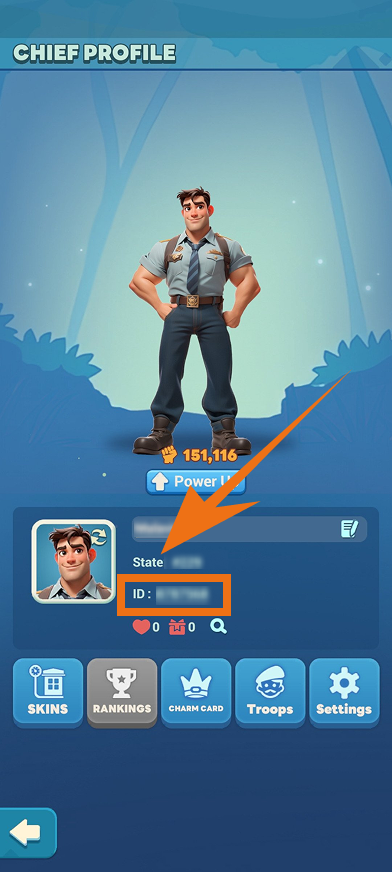
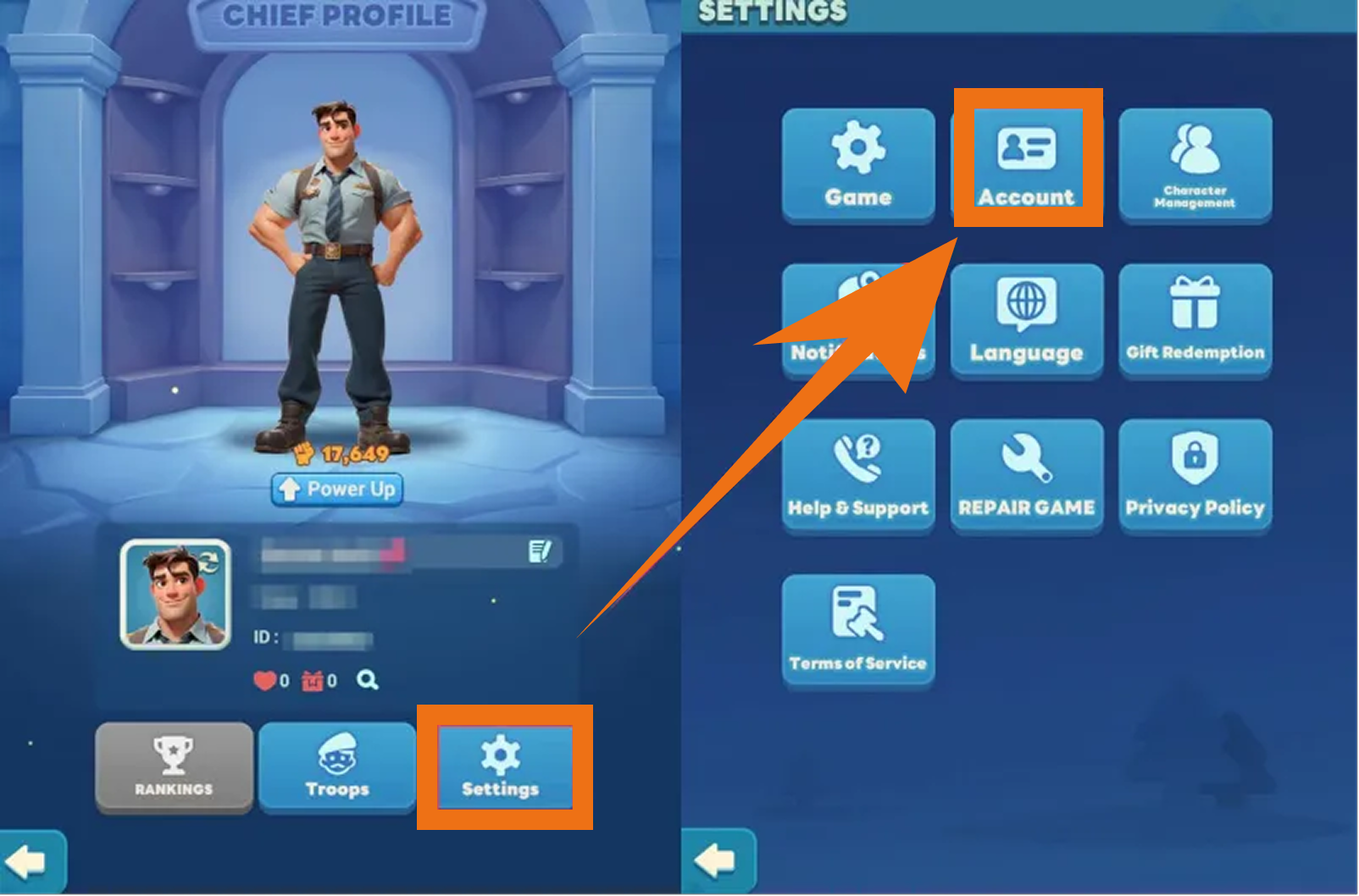
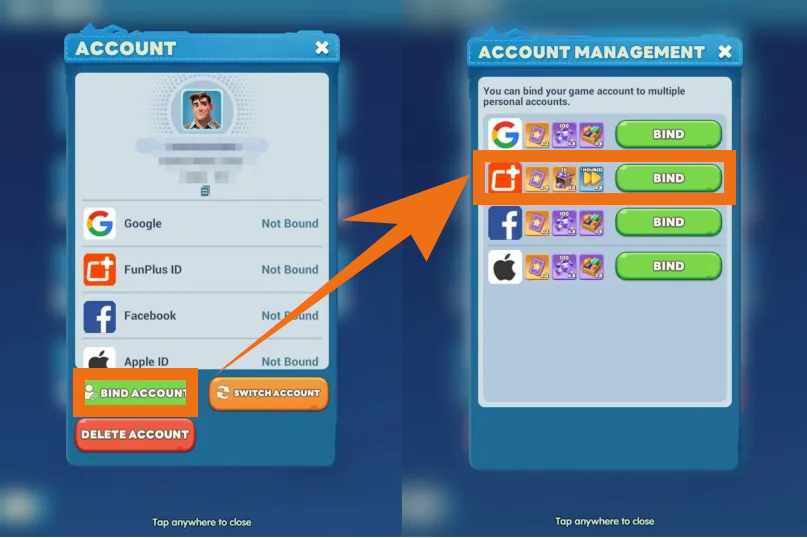
Required Information: Game ID and FunPlus ID. Linking a FunPlus ID can help make the order process more straightforward.

Supported Platform / Server: Tiles Survive! mobile version / International Server.

Option 2: Login Top-Up

The manual top-up team completes the selected purchase through your game account.

Required Information: Game ID, login method (Facebook, Google, or FunPlus ID), password, and a verification code when required.

Note: If verification-code login is required, BUFFHUB's 24/7 customer support team may contact you to request the email verification code. Staying available can help avoid unnecessary processing delays.

Purchase Guide

Self-Service Top-Up Steps

1
Select a Product: Choose the Waypoints or package you want and complete the payment. After purchasing, select the Self-Service Top-Up option.
2
Log In: Open the Self-Service interface through BUFFHUB and sign in to the game account linked to your order.
3
Redeem Your Package: Open the in-game store, confirm the package details, and redeem the content you purchased. For example, if you purchased 100 Waypoints, redeem the corresponding option in the Waypoints Store.
4
Wait for Processing: Redemption requires a short processing period. Do not close the interface or sign in to the same game account on another device while the redemption is still in progress.
5
Top-Up Complete: You will receive a completion notification once the redemption has finished. After you leave the result page, the login information used for the Self-Service session will be cleared automatically.

Login Top-Up Steps

1
Visit the Website: Go to the BUFFHUB website, choose your preferred language and currency, and log in.
2
Find the Product: From the homepage navigation bar, select Game Top-Up > Tiles Survive! (Login Top-Up).
3
Confirm Your Order: Choose the package or pass you want, then click “buy now”.
4
Complete Payment: Choose one of the payment methods available on your checkout page and complete the transaction.
6
Top-Up Complete:
· Page Redirect: Once the order has been processed, the page will redirect to the top-up success page.
· Check Your Order: You can also go to Purchase History to review your order and check its current status.
· Check Your Purchase: Once the order is marked as completed, log in to your Tiles Survive! account and confirm the Waypoints or package you purchased.

(Note: Due to currency differences, package prices in the platform's game store are displayed in U.S. dollars (USD). You can switch the display currency to view local prices and purchase a package of the corresponding value.)

Frequently Asked Questions

Q: Can I Use Apple ID Login for This Tiles Survive! Top-Up?

Not currently. The BUFFHUB top-up methods listed on this page do not support Apple ID login. If your game account is only connected to Apple ID, link a supported account method such as FunPlus ID before placing the order.

Q: How Long Does a Tiles Survive! Top-Up Usually Take?

Self-Service Top-Up orders are generally processed in around 3–5 minutes, while Login Top-Up orders usually take around 15–30 minutes. Actual processing time can vary depending on account verification, order volume, payment checks, and platform conditions.


Q: What If My Login Requires an Email Verification Code?

If a verification code is required for Login Top-Up, check your BUFFHUB messages and stay available after submitting the order. The 24/7 customer support team may contact you for the email verification code needed to continue processing the purchase.


More down down
Fold Up up up
zrYvB6wa
Purchased 100 Waypoints · Sep 11, 2026

Деньги поступили

U500068785
Purchased 5,000 Waypoints · Sep 11, 2026

Покупка прошла успешно, спасибо

U567636380
Purchased 100 Waypoints · Sep 11, 2026

Покупка быстро выкуплена 👍

U346831456
Purchased 10,000 Waypoints · Sep 11, 2026

Das Aufladen hat gut funktioniert. Danke.

U551045291
Purchased 500 Waypoints · Sep 11, 2026

Gute Arbeit

U509520872
Purchased 500 Waypoints · Sep 11, 2026

購入がすぐ反映されて助かります

View All Comments
Sort By :
Latest
zrYvB6wa
Purchased 100 Waypoints

Деньги поступили

Sep 11, 2026
U500068785
Purchased 5,000 Waypoints

Покупка прошла успешно, спасибо

Sep 11, 2026
U567636380
Purchased 100 Waypoints

Покупка быстро выкуплена 👍

Sep 11, 2026
U346831456
Purchased 10,000 Waypoints

Das Aufladen hat gut funktioniert. Danke.

Sep 11, 2026
U551045291
Purchased 500 Waypoints

Gute Arbeit

Sep 11, 2026
U509520872
Purchased 500 Waypoints

購入がすぐ反映されて助かります

Sep 11, 2026
View All Comments

Product Introduction

  • Alipay Alipay
  • ApplePay ApplePay
  • bancontact bancontact
  • bancontact-1 bancontact-1
  • billease billease
  • blik blik
  • boleto boleto
  • boost boost
  • bpi bpi
  • dana dana
  • Ewallet Ewallet
  • gcash gcash
  • GooglePay GooglePay
  • Ideal Ideal
  • kakao_pay kakao_pay
  • Klarna Klarna
  • konbini konbini
  • Kplus Kplus
  • line line
  • MBWAY MBWAY
  • multibanco multibanco
  • mybank mybank
  • naverpay naverpay
  • NetBanking NetBanking
  • oxxo oxxo
  • payco payco
  • paynow paynow
  • payu payu
  • pix pix
  • Qiwi Qiwi
  • rabbit rabbit
  • samsung samsung
  • sberpay sberpay
  • SBP SBP
  • SEPA SEPA
  • skrill skrill
  • spei spei
  • swish swish
  • tng tng
  • Tosspay Tosspay
  • truemoney truemoney
  • usdt usdt
  • Visa Visa
  • Visa-mastercard Visa-mastercard
  • Visa-mastercard+jbc Visa-mastercard+jbc
  • yoomoney yoomoney
  • Alipay Alipay
  • ApplePay ApplePay
  • bancontact bancontact
  • bancontact-1 bancontact-1
  • billease billease
  • blik blik
  • boleto boleto
  • boost boost
  • bpi bpi
  • dana dana
  • Ewallet Ewallet
  • gcash gcash
  • GooglePay GooglePay
  • Ideal Ideal
  • kakao_pay kakao_pay
  • Klarna Klarna
  • konbini konbini
  • Kplus Kplus
  • line line
  • MBWAY MBWAY
  • multibanco multibanco
  • mybank mybank
  • naverpay naverpay
  • NetBanking NetBanking
  • oxxo oxxo
  • payco payco
  • paynow paynow
  • payu payu
  • pix pix
  • Qiwi Qiwi
  • rabbit rabbit
  • samsung samsung
  • sberpay sberpay
  • SBP SBP
  • SEPA SEPA
  • skrill skrill
  • spei spei
  • swish swish
  • tng tng
  • Tosspay Tosspay
  • truemoney truemoney
  • usdt usdt
  • Visa Visa
  • Visa-mastercard Visa-mastercard
  • Visa-mastercard+jbc Visa-mastercard+jbc
  • yoomoney yoomoney
Language & Currency
  • Language
    English
    中文(繁体)
    日本語
    Bahasa Indonesia
    Bahasa Melayu
    Français
    Italiano
    Deutsch
    Русский
    Español
    한국어
  • Display Currency
    $ USD
    € EUR
    £ GBP
    C$ CAD
    A$ AUD
    S$ SGD
    Ұ JPY
    ₩ KRW
    SA SAR
    AED AED
    RM MYR
    ₱ PHP
    Rp IDR
    ฿ THB
    NT$ TWD
    HK$ HKD
    ₫ VND
    MX$ MXN
    R$ BRL
    ₽ RUB