



















Related searches
0 results
Not found
No content related to ""
theme-light theme-light-text
theme-dark-text theme-light
Destiny: Rising

Destiny: Rising

Silver All-In-One Bundle
$ 183.37
$ 190.94
60 Silver
60 Silver
$ 0.95
$ 0.99
300+10 Silver
300+10 Silver
$ 4.79
$ 4.99
600+30 Silver
600+30 Silver
$ 9.6
$ 9.99
1500 + 150 Silver
1500 + 150 Silver
$ 24
$ 24.99
3000+450 Silver
3000+450 Silver
$ 48.01
$ 49.99
6000+1200 Silver
6000+1200 Silver
$ 94.99
$ 99.99

Quantity

Price
$0.00
HOW TO BUY?
Total
- +

0

Overall Rating
5.0
0 reviews
Overall Rating
5.0
Based on 0 reviews
  • 5 Star
    0%
  • 4 Star
    0%
  • 3 Star
    0%
  • 2 Star
    0%
  • 1 Star
    0%
Product Introduction
Recharge guide
User Reviews(0)

Destiny: Rising Top-Up Information

Before purchasing Destiny: Rising Silver, please make sure your Server and UID are correct. Entering the wrong account information may affect the delivery of your top-up.

Applicable Platform

Destiny: Rising Mobile

Applicable Server

Global

Required Information for BUFFHUB Destiny: Rising Top-Ups

Server and UID

Note: Please check your UID and Server directly in Destiny: Rising before placing your order to help ensure the Silver is delivered to the correct account.

Destiny: Rising Silver First-Purchase Rewards

According to the recharge information currently provided for Destiny: Rising, the first purchase of each eligible Silver tier can receive double Silver, with the bonus available once per tier. Regular top-up bonuses may vary by account, so please check the reward amount displayed in the game before making your purchase.

Destiny: Rising Top-Up Delivery

After your Destiny: Rising Silver top-up has been completed successfully, log in to the game and check your Silver balance. If your order is marked as complete but the Silver has not appeared, verify the UID and Server submitted with your order or contact BUFFHUB customer support for assistance.

How to Find Your Destiny: Rising Server and UID

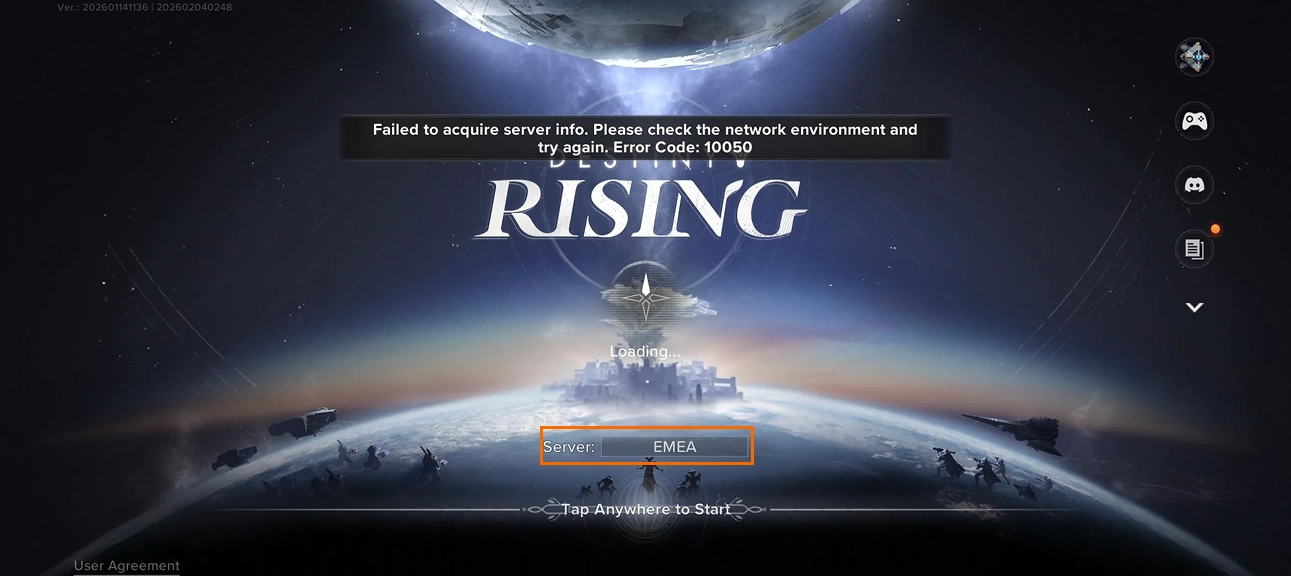
1. Launch Destiny: Rising and check your Server Name on the login screen before entering the game.

Destiny Rising login screen showing the Server Name before entering the game

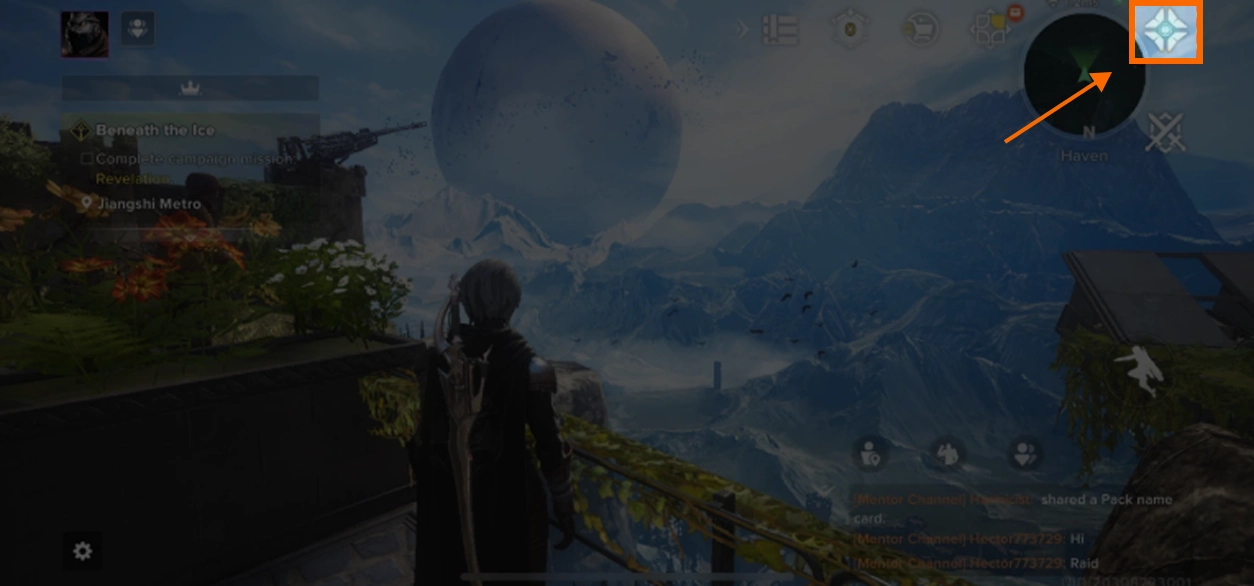
2. Log in to the character you want to top up and open your personal profile.

Destiny Rising gameplay screen showing the personal profile icon in the upper-right corner

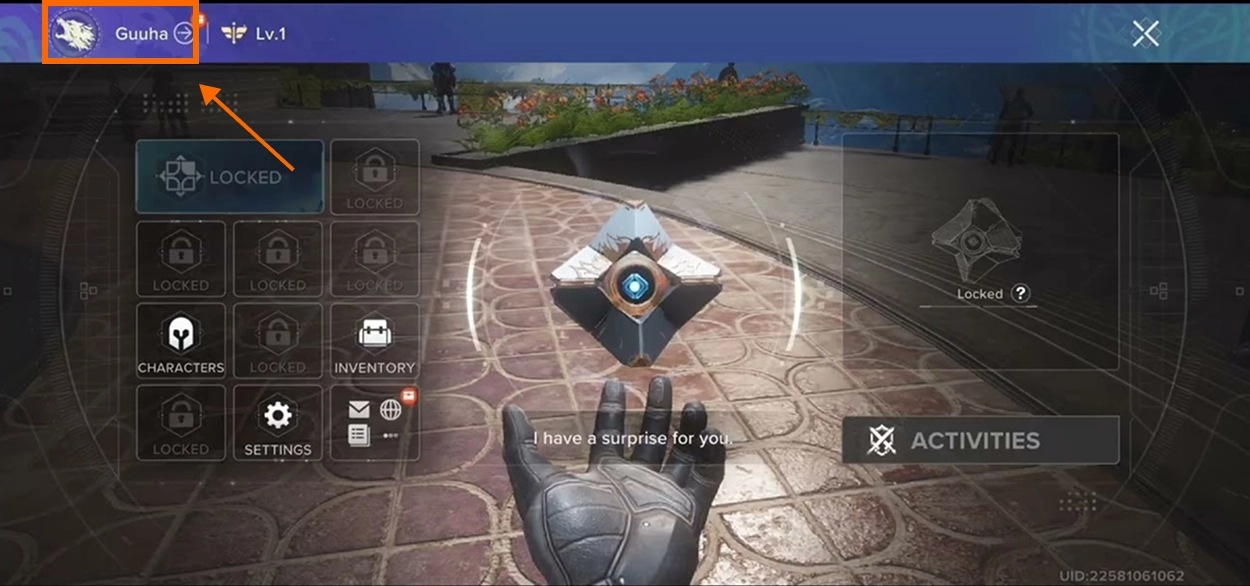
3. Enter your character profile page to view your account information.

Destiny Rising personal profile menu showing the in-game character name

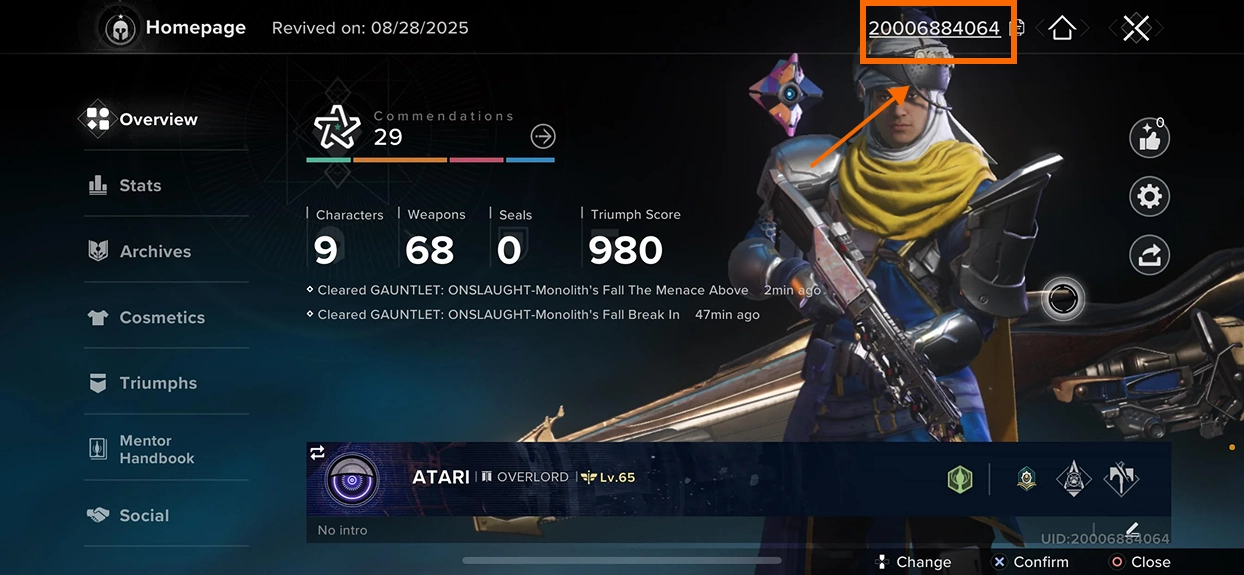
4. Find your UID on the profile page and use the copy function when available to avoid entering the wrong number.

Destiny Rising character homepage showing the player UID in the upper-right corner

Why Top Up Destiny: Rising on buffhub.com?

We are a trusted game top-up platform serving millions of players across more than 200 popular games, including Fate War, Duet Night Abyss, and Once Human. Here is why you should choose BUFFHUB:

  • Lowest Price Guarantee — Our prices are generally lower than those in the in-game Store. When you need a better-value Destiny: Rising top-up option, BUFFHUB helps you get more from every purchase.
  • Stackable Coupons for Up to 10% Off — Both new and returning users can apply discount coupons on top of our existing promotional prices to save even more on each top-up.
  • UID & Server Top-Up — Destiny: Rising supports recharge using your Server and UID. You do not need to provide your game account password when placing this type of top-up order.
  • Fast Delivery — Destiny: Rising top-up orders are processed as quickly as possible after your payment and account information have been confirmed. Please make sure your UID and Server are entered correctly to avoid unnecessary delays.
  • Secure and Compliant Top-Up Channels — We use secure top-up and payment channels and do not use fraudulent cards or payment methods from unknown sources, helping minimize account and transaction risks.
  • 24/7 Online Customer Support — Whenever you encounter an order issue or have a question about topping up Destiny: Rising, you can contact our online customer support team for assistance.
  • Multiple Payment Methods — We support Visa, Mastercard, digital wallets, debit cards, and a growing range of local payment methods, allowing you to pay using the option that suits you best.

Choose BUFFHUB for a safer, faster, and more affordable Destiny: Rising top-up experience, so you can return to building your roster, preparing for new battles, and exploring everything the game has to offer.

More down down
Fold Up up up

Top-Up Information

Item Details
Supported Platform Destiny: Rising Mobile
Supported Server Global
Top-Up Method UID Direct Top-Up
Required Information
Destiny: Rising Server and UID

How to Find Your Destiny: Rising Server and UID

01

Check Your Server: Launch Destiny: Rising and look at the login screen before entering the game. Your current Server name will be displayed there.

02

Enter the Game: Log in to Destiny: Rising using the character and Server that you want to recharge.

03

Open Your Profile: Open the character or personal profile page from the game interface. Depending on the interface version, this can be accessed through your profile or character icon.

04

Find Your UID: Your Destiny: Rising UID will be displayed on your profile or character homepage. Use the copy function when available to avoid entering the wrong number.

UID Top-Up: How to Top Up Destiny: Rising Silver

01

Visit the Website: Go to the BUFFHUB website, select your preferred language and currency, and sign in to your BUFFHUB account.

02

Find the Product: Select “Game Top-Up” from the main navigation menu, then open the Destiny: Rising product page.

03

Choose Your Silver Package: Select the amount of Destiny: Rising Silver you want to purchase and confirm the product information before continuing.

04

Enter Your UID and Server: Provide the Destiny: Rising UID and Server connected to the character you want to recharge. Please check both fields carefully before submitting your order.

05

Complete Secure Payment: Choose your preferred payment method, confirm the payment amount, and complete the transaction.

06

Confirm Delivery: After your order has been processed successfully, open Destiny: Rising and check your account to confirm that the purchased Silver has been credited.

Check Your Order: You can review your BUFFHUB order information to confirm the recharge status.

Check In-Game: Once the order is marked as successful, return to Destiny: Rising and verify your Silver balance.

Need Help? If the Silver has not appeared after the order is completed, contact BUFFHUB customer support and provide your order information for assistance.

⚠️ Important Notes

1.

Check Your UID: Make sure your Destiny: Rising UID is entered exactly as it appears on your profile. An incorrect UID may prevent the Silver from reaching the intended account.

2.

Select the Correct Server: Confirm the Server shown on the Destiny: Rising login screen before submitting your recharge information.

3.

No Password Required: Destiny: Rising uses a UID and Server recharge process for this top-up method, so you do not need to provide your game account password.

4.

Check Bonus Eligibility: First-purchase and regular Silver bonuses may vary depending on your account and purchase history. Always use the bonus information displayed in your game as the final reference.

Frequently Asked Questions

Q1: What information do I need to top up Destiny: Rising?

A: You need your Destiny: Rising Server and UID. Make sure both pieces of information match the character you want to recharge before submitting your order.

Q2: Do I need to provide my Destiny: Rising password?

A: No. This Destiny: Rising top-up method uses your Server and UID, so you do not need to provide your game account password.

Q3: What is Silver in Destiny: Rising?

A: Silver is a premium paid currency in Destiny: Rising. It can be used for selected store bundles, outfits, other premium content, or exchanged for Lumia Leaves.

Q4: How do I find my Destiny: Rising UID and Server?

A: Your Server name appears on the login screen before entering the game. To find your UID, log in and open your profile or character homepage, where your UID is displayed. Use the copy function when available to avoid entering the wrong number.

Q5: What should I do if my Destiny: Rising Silver has not arrived?

A: First, check whether your order has been completed and confirm that the UID and Server you submitted are correct. If the order is marked as successful but the Silver has not appeared, contact BUFFHUB online customer support for assistance.

More down down
Fold Up up up

No reviews yet.

Sort By :
Latest

No reviews yet.

Product Introduction

  • Alipay Alipay
  • ApplePay ApplePay
  • bancontact bancontact
  • bancontact-1 bancontact-1
  • billease billease
  • blik blik
  • boleto boleto
  • boost boost
  • bpi bpi
  • dana dana
  • Ewallet Ewallet
  • gcash gcash
  • GooglePay GooglePay
  • Ideal Ideal
  • kakao_pay kakao_pay
  • Klarna Klarna
  • konbini konbini
  • Kplus Kplus
  • line line
  • MBWAY MBWAY
  • multibanco multibanco
  • mybank mybank
  • naverpay naverpay
  • NetBanking NetBanking
  • oxxo oxxo
  • payco payco
  • paynow paynow
  • payu payu
  • pix pix
  • Qiwi Qiwi
  • rabbit rabbit
  • samsung samsung
  • sberpay sberpay
  • SBP SBP
  • SEPA SEPA
  • skrill skrill
  • spei spei
  • swish swish
  • tng tng
  • Tosspay Tosspay
  • truemoney truemoney
  • usdt usdt
  • Visa Visa
  • Visa-mastercard Visa-mastercard
  • Visa-mastercard+jbc Visa-mastercard+jbc
  • yoomoney yoomoney
  • Alipay Alipay
  • ApplePay ApplePay
  • bancontact bancontact
  • bancontact-1 bancontact-1
  • billease billease
  • blik blik
  • boleto boleto
  • boost boost
  • bpi bpi
  • dana dana
  • Ewallet Ewallet
  • gcash gcash
  • GooglePay GooglePay
  • Ideal Ideal
  • kakao_pay kakao_pay
  • Klarna Klarna
  • konbini konbini
  • Kplus Kplus
  • line line
  • MBWAY MBWAY
  • multibanco multibanco
  • mybank mybank
  • naverpay naverpay
  • NetBanking NetBanking
  • oxxo oxxo
  • payco payco
  • paynow paynow
  • payu payu
  • pix pix
  • Qiwi Qiwi
  • rabbit rabbit
  • samsung samsung
  • sberpay sberpay
  • SBP SBP
  • SEPA SEPA
  • skrill skrill
  • spei spei
  • swish swish
  • tng tng
  • Tosspay Tosspay
  • truemoney truemoney
  • usdt usdt
  • Visa Visa
  • Visa-mastercard Visa-mastercard
  • Visa-mastercard+jbc Visa-mastercard+jbc
  • yoomoney yoomoney
Language & Currency
  • Language
    English
    中文(繁体)
    日本語
    Bahasa Indonesia
    Bahasa Melayu
    Français
    Italiano
    Deutsch
    Русский
    Español
    한국어
  • Display Currency
    $ USD
    € EUR
    £ GBP
    C$ CAD
    A$ AUD
    S$ SGD
    Ұ JPY
    ₩ KRW
    SA SAR
    AED AED
    RM MYR
    ₱ PHP
    Rp IDR
    ฿ THB
    NT$ TWD
    HK$ HKD
    ₫ VND
    MX$ MXN
    R$ BRL
    ₽ RUB