



























Related searches
0 results
Not found
No content related to ""
theme-light theme-light-text
theme-dark-text theme-light
Bigo Live

Bigo Live

broadcast broadcast
Due to a large number of orders, delivery may be delayed by 1-5 minutes. Please wait patiently.
10 Diamonds
10 Diamonds
$ 0.19
$ 0.26
50 Diamonds
50 Diamonds
$ 0.97
$ 1.3
100 Diamonds
100 Diamonds
$ 1.93
$ 2.6
200 Diamonds
200 Diamonds
$ 3.84
$ 5.2
500 Diamonds
500 Diamonds
$ 9.62
$ 13
1000 Diamonds
1000 Diamonds
$ 19.24
$ 26
1600 Diamonds
1600 Diamonds
$ 30.79
$ 41.6
2000 Diamonds
2000 Diamonds
$ 47.03
$ 52
3000 Diamonds
3000 Diamonds
$ 70.53
$ 78
4000 Diamonds
4000 Diamonds
$ 76.97
$ 104
5000 Diamonds
5000 Diamonds
$ 96.21
$ 130
10000 Diamonds
10000 Diamonds
$ 192.42
$ 260
20000 Diamonds
20000 Diamonds
$ 384.85
$ 520
30000 Diamonds
30000 Diamonds
$ 699.99
$ 780

Quantity

Price
$0.00
HOW TO BUY?
Total
- +

0

Overall Rating
5.0
2,734 reviews
Overall Rating
5.0
Based on 2,734 reviews
  • 5 Star
    99%
  • 4 Star
    1%
  • 3 Star
    0%
  • 2 Star
    0%
  • 1 Star
    0%
Product Introduction
Recharge guide
User Reviews(2,734)
BUFFHUB EXCLUSIVE

BIGO LIVE Top-Up — Diamond Top-Up Deals

     
BIGO LIVE Diamonds are mainly used by viewers to purchase virtual gifts and support broadcasters during live streams. BUFFHUB provides an online BIGO LIVE Diamond top-up option for users who want to add Diamonds using their BIGO User ID (UID).

For the UID top-up route, you only need the correct BIGO User ID for the account receiving the Diamonds; your BIGO LIVE account password is not required. After selecting a Diamond package and completing checkout, the order is processed according to the UID you submit.

Current BIGO LIVE Diamond Deals

DEALS

BUFFHUB currently lists lower-priced BIGO LIVE Diamond packages across several denominations, with selected options offering savings of up to 26% OFF compared with the displayed reference price.

Package Savings: The discount can vary depending on the Diamond amount and the promotion currently available.
Promotional Offers: Additional coupon or promotional savings may be available when the applicable offer allows them.

Note: Check the live product price, applicable promotion terms, and final checkout amount before completing your order.

What Matters When You Recharge BIGO LIVE Diamonds?

For BIGO LIVE, the purchase itself does not need a long list of extra steps. Once you know how many Diamonds you want and have the correct UID ready, these are the seven BUFFHUB features that matter most for the order.

BUFFHUB Advantage What It Means for Your BIGO LIVE Top-Up
Lower-Priced Diamond Options Compare several affordable BIGO LIVE Diamond packages and choose the amount that fits how much you plan to spend on virtual gifts.
Promotions and Coupon Savings Selected packages can carry strong promotional discounts, while eligible coupon codes may provide additional savings when the current promotion rules allow them.
UID Top-Up Without Your Password For the UID recharge option, enter the BIGO User ID that should receive the Diamonds. Your BIGO LIVE login password is not required for this direct top-up flow.
Fast Order Processing Most UID Diamond orders are usually processed quickly, often in around 3 to 10 minutes, although payment checks, order volume, and temporary platform delays can affect timing.
Secure Checkout Environment Payment is completed through BUFFHUB's checkout flow, while the UID method avoids unnecessary access to your BIGO LIVE login account.
24/7 Order Support 24/7 customer support is available for order-related questions, including payment status, UID checks, and delayed top-up inquiries.
Multiple Payment Methods Depending on your region and checkout page, payment options can include credit or debit cards, e-wallets, bank transfers, convenience-store payments, and other supported local methods.

BUFFHUB also provides top-up pages for other games and digital services, including ChatGPT, Chamet, Poppo Live, and Roblox.

Introduction to BIGO LIVE and Diamonds

BIGO LIVE

BIGO LIVE is a global live-streaming social platform operated by BIGO Technology. Users can watch live broadcasts, chat with creators, join interactive live rooms, stream their own content, and send virtual gifts to broadcasters in real time.

Gaming streams are also part of the platform's content, while BUFFHUB separately provides top-up pages for popular mobile games such as PUBG MOBILE, Mobile Legends: Bang Bang, and Free Fire. BIGO LIVE also offers Virtual Live, which allows creators to broadcast through customizable 3D avatars.


What Are BIGO LIVE Diamonds?

BIGO LIVE Diamonds are virtual currency purchased by users on the platform. Their main role is to pay for virtual gifts that can be sent to broadcasters during live streams.

· Send Virtual Gifts: Use Diamonds to purchase eligible animated gifts from the live-room gift menu and send them to broadcasters you want to support.
· Support Broadcasters: Gifts sent by viewers contribute to a broadcaster's virtual-gift earnings. BIGO LIVE uses a separate virtual currency called Beans on the broadcaster side, subject to the platform's rules.


More down down
Fold Up up up

Top-Up Information and Important Notes

Item Details
Supported Platforms BIGO LIVE accounts supported by the current BUFFHUB top-up service, including accounts used through the mobile app
Supported Regions International accounts, with current exclusions for accounts registered in Malaysia, Singapore, and Brunei
Required Information BIGO User ID (UID)
Estimated Processing Time Most UID top-ups are usually credited in around 3 to 10 minutes, although actual timing can vary with payment verification, order volume, and temporary platform delays.

Important Notes:

  1. Check your BIGO User ID (UID) carefully before submitting the order. The Diamonds are credited according to the UID entered during the purchase.

  2. If a completed top-up has already been credited to the UID you submitted, the transaction generally cannot be reversed. If incorrect recharge information causes the top-up itself to fail, refund handling follows BUFFHUB's direct recharge policy after the information error is confirmed.
  3. Copying your UID directly from your BIGO LIVE profile and pasting it into the order field can help reduce typing errors.

How to Find Your BIGO LIVE UID

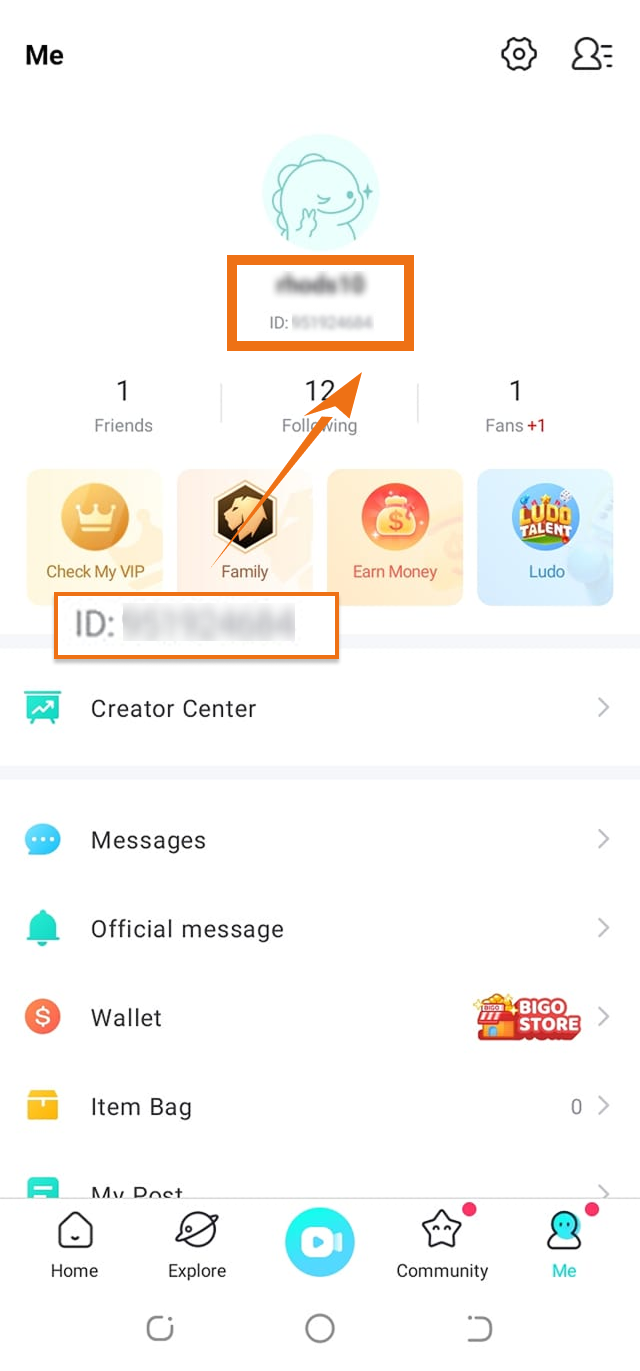
Your BIGO User ID identifies the account that should receive the Diamonds, so check it before placing the order. You can find the account identifier from your BIGO LIVE profile:

Open BIGO LIVE: Launch the app and open your profile from the Me section.
Check Your Profile: Find the numeric account ID shown on your profile and copy it carefully before returning to the BUFFHUB order page.
Guide to finding your BIGO LIVE UID for Diamond top-up

How to Top Up BIGO LIVE Diamonds with Your UID

  1. 1.

    Visit BUFFHUB: Go to the BUFFHUB website, select your preferred language and currency, and log in to your account.

  2. 2.

    Open BIGO LIVE: Find BIGO LIVE using the search bar or top-up navigation and open the Diamond product page.

  3. 3.

    Enter Your UID: Enter the correct BIGO User ID (UID), choose the Diamond package and quantity you want, and click “buy now”.

  4. 4.

    Complete Checkout: Select one of the payment methods currently available on your checkout page and complete the transaction. Depending on your region, supported options may include credit or debit cards, e-wallets, bank transfers, convenience-store payments, and other local methods.

  5. 5.

    Check the Order and Diamond Balance: Open “Purchase History” to check the latest order status. Once the order is completed, open BIGO LIVE and confirm the Diamond balance on the UID you submitted.

Login Top-Up: Manual Top-Up Guide

01

Visit the Website: Go to the BUFFHUB website, select your preferred language and currency, and log in to your account.

02

Find the Product: Click “Game Top-Up” in the navigation menu, then select BIGO LIVE (Manual Top-Up).

03

Confirm Your Order: Select the Diamond package or related product you want to purchase, then click “Top Up Now”.

04

Complete Payment: Choose one of the payment methods shown at checkout, confirm the order details and amount, and complete the payment.

05

Submit the Required Information and Wait: Provide the login or verification information requested for the manual top-up on the order page or through customer support. A staff member can then access the account to complete the selected purchase. Avoid logging in to the same BIGO LIVE account while the manual order is being processed, as simultaneous login activity may interrupt the session.

Waiting page displayed after submitting information for a manual BIGO LIVE top-up

After the required information has been submitted, the system will redirect you to the waiting page. Keep the order page available while the manual order is being processed.

06

Check the Completed Top-Up:

· Page Notification: After the order has been processed, the page will redirect to the top-up success page.

· Check Progress: You can also visit “Purchase History” to view the current order status and processing progress.

· Confirm the Purchase: Once the order is marked as completed, log in to BIGO LIVE and check your Diamond balance or purchased product on the correct account.

❓ Frequently Asked Questions (FAQ)

Q1: What information do I need for a BIGO LIVE UID top-up?

For the UID top-up option, you need the correct BIGO User ID (UID) of the account that should receive the Diamonds. Check the number carefully before completing the order.

Q2: Do I need to provide my BIGO LIVE password?

Not for the UID direct top-up route. The BIGO User ID is the key account information required for that method. The separate Manual Login Top-Up service may require login or verification information according to the instructions shown on the order page.

Q3: Are BIGO LIVE top-ups available for Malaysia, Singapore, and Brunei accounts?

The current BUFFHUB BIGO LIVE product page lists accounts registered in Malaysia, Singapore, and Brunei as unsupported. Check the latest regional information on the product page before placing an order.

Q4: What should I do if my Diamonds take longer than expected to appear?

Most UID orders are usually credited in around 3 to 10 minutes, but processing can take longer during payment checks or periods of heavier order volume. Check “Purchase History” first and confirm that you submitted the correct UID. If the order still needs attention, contact BUFFHUB customer support with your order details.

More down down
Fold Up up up
U570776204
Purchased 500 Diamonds · Sep 06, 2026

Sangat membantu, proses kilat.

QuantumLeap
Purchased 500 Diamonds · Sep 06, 2026

Smooth transaction. Will use again.

U409191867
Purchased 1000 Diamonds · Sep 06, 2026

Cepat dan aman, terima kasih banyak.

U306476637
Purchased 2000 Diamonds · Sep 06, 2026

Proses kilat, mantap!

U903451085
Purchased 100 Diamonds · Sep 06, 2026

Perfect!

U431666112
Purchased 1000 Diamonds · Sep 06, 2026

Gak nyesel pake sini. Cepat!

View All Comments
Sort By :
Latest
U570776204
Purchased 500 Diamonds

Sangat membantu, proses kilat.

Sep 06, 2026
QuantumLeap
Purchased 500 Diamonds

Smooth transaction. Will use again.

Sep 06, 2026
U409191867
Purchased 1000 Diamonds

Cepat dan aman, terima kasih banyak.

Sep 06, 2026
U306476637
Purchased 2000 Diamonds

Proses kilat, mantap!

Sep 06, 2026
U903451085
Purchased 100 Diamonds

Perfect!

Sep 06, 2026
U431666112
Purchased 1000 Diamonds

Gak nyesel pake sini. Cepat!

Sep 06, 2026
View All Comments

Product Introduction

  • Alipay Alipay
  • ApplePay ApplePay
  • bancontact bancontact
  • bancontact-1 bancontact-1
  • billease billease
  • blik blik
  • boleto boleto
  • boost boost
  • bpi bpi
  • dana dana
  • Ewallet Ewallet
  • gcash gcash
  • GooglePay GooglePay
  • Ideal Ideal
  • kakao_pay kakao_pay
  • Klarna Klarna
  • konbini konbini
  • Kplus Kplus
  • line line
  • MBWAY MBWAY
  • multibanco multibanco
  • mybank mybank
  • naverpay naverpay
  • NetBanking NetBanking
  • oxxo oxxo
  • payco payco
  • paynow paynow
  • payu payu
  • pix pix
  • Qiwi Qiwi
  • rabbit rabbit
  • samsung samsung
  • sberpay sberpay
  • SBP SBP
  • SEPA SEPA
  • skrill skrill
  • spei spei
  • swish swish
  • tng tng
  • Tosspay Tosspay
  • truemoney truemoney
  • usdt usdt
  • Visa Visa
  • Visa-mastercard Visa-mastercard
  • Visa-mastercard+jbc Visa-mastercard+jbc
  • yoomoney yoomoney
  • Alipay Alipay
  • ApplePay ApplePay
  • bancontact bancontact
  • bancontact-1 bancontact-1
  • billease billease
  • blik blik
  • boleto boleto
  • boost boost
  • bpi bpi
  • dana dana
  • Ewallet Ewallet
  • gcash gcash
  • GooglePay GooglePay
  • Ideal Ideal
  • kakao_pay kakao_pay
  • Klarna Klarna
  • konbini konbini
  • Kplus Kplus
  • line line
  • MBWAY MBWAY
  • multibanco multibanco
  • mybank mybank
  • naverpay naverpay
  • NetBanking NetBanking
  • oxxo oxxo
  • payco payco
  • paynow paynow
  • payu payu
  • pix pix
  • Qiwi Qiwi
  • rabbit rabbit
  • samsung samsung
  • sberpay sberpay
  • SBP SBP
  • SEPA SEPA
  • skrill skrill
  • spei spei
  • swish swish
  • tng tng
  • Tosspay Tosspay
  • truemoney truemoney
  • usdt usdt
  • Visa Visa
  • Visa-mastercard Visa-mastercard
  • Visa-mastercard+jbc Visa-mastercard+jbc
  • yoomoney yoomoney
Language & Currency
  • Language
    English
    中文(繁体)
    日本語
    Bahasa Indonesia
    Bahasa Melayu
    Français
    Italiano
    Deutsch
    Русский
    Español
    한국어
  • Display Currency
    $ USD
    € EUR
    £ GBP
    C$ CAD
    A$ AUD
    S$ SGD
    Ұ JPY
    ₩ KRW
    SA SAR
    AED AED
    RM MYR
    ₱ PHP
    Rp IDR
    ฿ THB
    NT$ TWD
    HK$ HKD
    ₫ VND
    MX$ MXN
    R$ BRL
    ₽ RUB