

Heartopia is built around slow-life exploration, home design, fashion, hobbies and social play, but its paid ecosystem adds another layer for players who want access to premium currency, memberships and selected in-game packs. Heart Diamonds are the central paid currency shown across the game's current recharge ecosystem, while GAMG membership products and rotating packs give regular players additional reasons to look beyond a basic currency recharge. Choosing the right service therefore depends on more than whether a storefront simply lists Heart Diamonds.



The more useful differences are how the order is fulfilled, which devices and servers are supported, and how much account information the player needs to provide. BuffHub and LootBar both provide player-operated Self-Service flows, LDShop currently uses an account-access recharge process, while TOPUPlive's main Heartopia page uses an Account ID and server-based direct recharge flow. Those differences make each platform suitable for a different type of player.





Last checked: August 15, 2026. For this comparison, we reviewed BuffHub, LootBar, LDShop and TOPUPlive as the four core third-party services. BuffHub is our best overall pick because its current Heartopia page combines broad product coverage, support for both mobile and non-Steam PC accounts, multiple regions, Self-Service Top-Up and a separate assisted fallback. LootBar is a strong Self-TopUp alternative, LDShop suits players comfortable with assisted login fulfillment, and TOPUPlive offers a notably different Account ID-based route.
Quick Recommendation
| Best For | Recommended Platform | Main Reason |
|---|---|---|
| Best Overall | BuffHub | Broad compatibility, Heart Diamond and pack coverage, plus Self-Service and assisted fulfillment |
| Strong Self-TopUp Alternative | LootBar | Player-operated Self-TopUp with broad regional coverage for mobile players |
| PC & Mobile Login Top-Up | LDShop | Supports non-Steam PC and mobile accounts with a clearly documented login-based workflow |
| Account ID Top-Up | TOPUPlive | Main recharge flow uses Account ID and server instead of an assisted game-account login |
These recommendations focus on relatively stable differences such as fulfillment model, account requirements and compatibility rather than temporary storefront promotions. Heartopia product catalogues can change as memberships, exhibitions and seasonal content rotate, so players should always verify the exact item and account requirements shown on the current product page before submitting an order.
What Should You Know Before Topping Up Heartopia?
Heart Diamonds are the principal paid currency consistently shown across Heartopia's current purchase ecosystem. XD's own purchase documentation also recognizes GAMG Junior Membership and GAMG Full Membership as paid products. Third-party stores may combine these recurring purchases with additional packs or event-related listings, although the exact catalogue differs between platforms and can change over time.
Before spending premium currency, it is also worth checking whether there are free resources available through redeem codes or current reward campaigns. The Heartopia codes and free rewards guide tracks current code status, recently expired codes, redemption instructions and rewards such as Wishing Stars, Moonlight Crystals and progression materials. Checking free rewards first can help you separate resources obtainable through events or codes from the premium items you actually want to purchase.
Heartopia has several server regions that matter when topping up. The current BuffHub, LootBar and LDShop pages identify combinations of America, Asia, Global, Southeast Asia and Taiwan/Hong Kong/Macau server environments. Players should therefore confirm the correct server rather than assuming that every Heartopia account can use every recharge page interchangeably.
Device compatibility needs similar attention. BuffHub and LDShop currently state that their services work with the mobile and PC versions while excluding Steam, whereas LootBar's published Heartopia Self-TopUp information specifically identifies the mobile version. TOPUPlive's current direct recharge page centers its process on the Account ID and server, so players should follow the compatibility and account instructions shown on the selected service rather than carrying assumptions from another platform.
Account information is where the four services differ most. BuffHub's current documentation uses Google or Facebook login information for its Self-Service or assisted workflows, while LootBar uses Google or Facebook inside its Self-TopUp environment. LDShop asks for substantially more account-access information, whereas TOPUPlive's current direct top-up flow asks for the Heartopia Account ID and server without publishing a game-login requirement as part of that main process.
How We Evaluated Each Heartopia Top-Up Platform
A useful Heartopia platform comparison needs to separate catalogue size from fulfillment design. We focused on the products currently available, account information required, device and server compatibility, recharge method and published support process rather than short-lived promotional details.
Product and Pack Flexibility
We checked whether each storefront only handles Heart Diamonds or also supports memberships and other Heartopia products. A broader catalogue is useful for players whose purchasing goals change from ordinary premium currency to a membership or current event-related item.
Top-Up Method
Heartopia currently has several distinct third-party recharge models. Self-Service lets the customer enter the game environment and complete the redemption, assisted top-up requires more direct involvement from the platform, and Account ID-based delivery can complete a supported transaction without the same game-login workflow. Understanding that distinction is more useful than treating every Heartopia recharge page as if it works the same way.
Platform and Account Compatibility
We considered whether each service publishes mobile, PC or Steam restrictions as well as supported server regions. We also checked whether the page asks for a UID, Account ID, Character Name, Google or Facebook login, password or verification code. Those requirements can meaningfully change how much account interaction is involved.
Payments and Support
Checkout choices and customer support can matter when an order runs into a server mismatch or account-information problem. Where a platform advertises customer-service availability, processing times or transaction-security features, those statements are treated as information published by that platform rather than independently verified guarantees.
1. BuffHub — Best Overall Heartopia Top-Up Platform
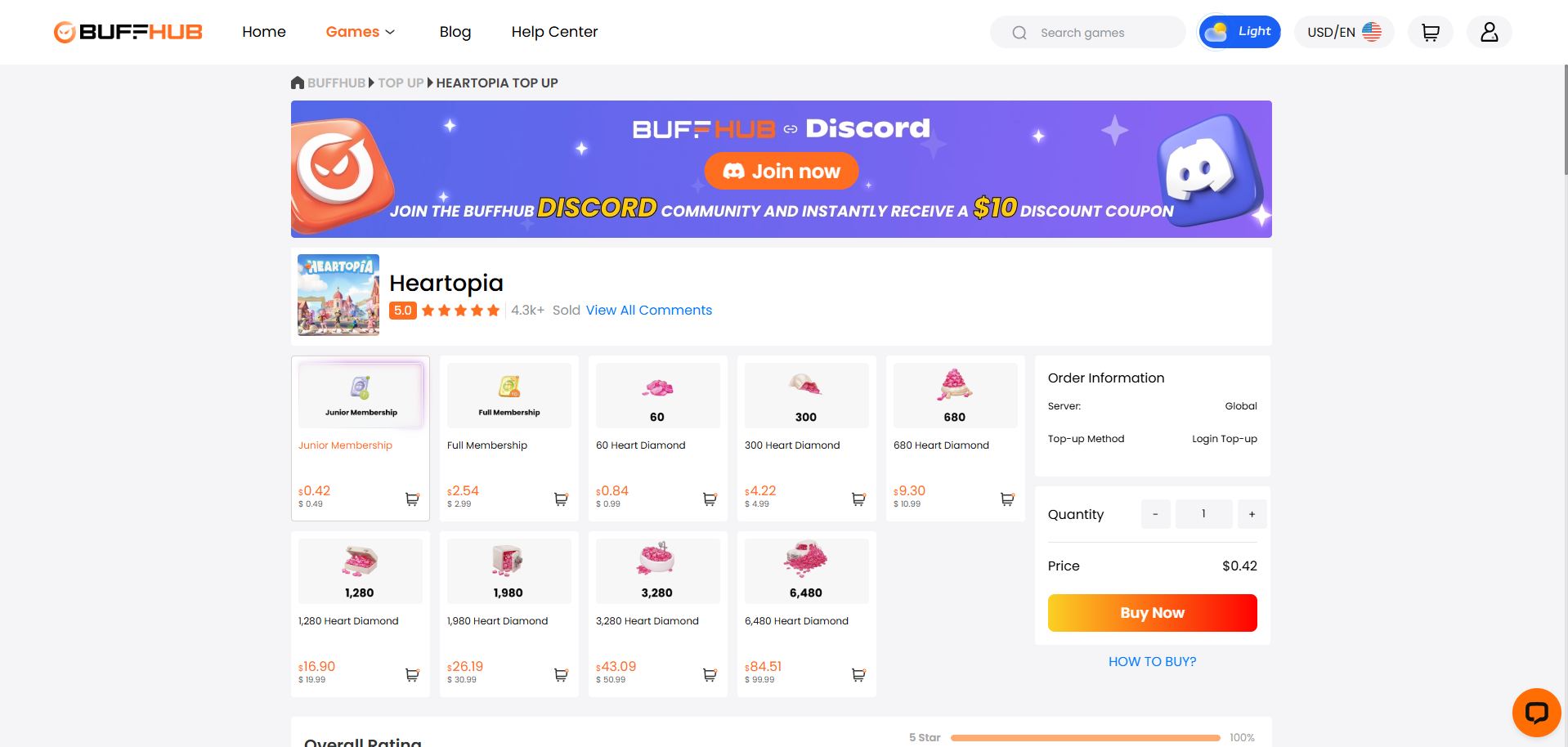
BuffHub is our best overall third-party choice because its current Heartopia page combines one of the broadest compatibility ranges with more than one documented recharge route. The service covers Heart Diamonds and membership products alongside selected packs, while its compatibility information explicitly includes Heartopia mobile and PC accounts but excludes the Steam version. Players can review the current products and account requirements on the BuffHub Heartopia top-up page.
Its published server coverage is also broad, including the Americas, Asia, Global, Southeast Asia and the Taiwan/Hong Kong/Macau Traditional Chinese environment. This makes BuffHub useful for players who want a single third-party top-up service covering several major Heartopia account regions rather than a workflow focused on only one market.
Product and Pack Flexibility
BuffHub currently carries Heart Diamonds, Junior Membership, Full Membership and selected Heartopia packs. That gives players room to use the same storefront for different kinds of purchases instead of returning only when they need a standard premium-currency bundle.
The exact catalogue can change with the in-game Store, so rotating packs should not be treated as permanent BuffHub products. The more durable advantage is that the service already handles several purchase categories rather than limiting Heartopia recharge to Heart Diamonds alone.
Self-Service Top-Up
BuffHub currently publishes Self-Service Top-Up as its preferred Heartopia fulfillment route. After placing an order, the player selects Self-Service, chooses the appropriate Google or Facebook login method, enters the account, confirms the correct region and server, and redeems the corresponding purchase from the in-game Store.
This keeps the player directly involved in the final selection and redemption instead of transferring the whole process to an operator. BuffHub states that login information is cleared after the user leaves the Self-Service results page, although that should be understood as BuffHub's own published data-handling statement rather than an independently audited guarantee.
Assisted Top-Up as a Fallback
BuffHub also documents a separate Assisted Top-Up workflow. In that process, the customer places the order, submits the game-account information required by the service and waits while a staff member completes the requested purchase through the account.
The page tells players not to log into the account while an assisted order is being processed because simultaneous access can create a login conflict. Having this second route gives BuffHub more fulfillment flexibility, but users should check which method applies to their order rather than assuming every BuffHub Heartopia purchase is player-operated.
Account Information Requirements
BuffHub's current Heartopia information table identifies Google or Facebook login details, UID / Player ID, Character Name and verification code among the information that may be required. That is more account information than an Account ID-only recharge service needs, even when the customer uses the Self-Service environment.
The important advantage here is therefore fulfillment flexibility rather than minimum account access. Players whose highest priority is reducing the amount of login information involved should compare BuffHub's workflow with TOPUPlive's Account ID-based route later in this guide.
Mobile, PC and Server Support
BuffHub currently supports the mobile and PC versions of Heartopia, excluding Steam. Its page also states that account progress is shared between supported mobile and PC clients and that cross-platform top-up is supported within that account environment.
The regional coverage is more specific than a generic Global label. Americas, Asia, Global, Southeast Asia and Taiwan/Hong Kong/Macau are individually listed, which gives players clearer information for confirming their server before entering the recharge environment.
Payment Options and Support
BuffHub publishes support for card payments, digital wallets, debit cards and localized payment channels. The platform also advertises customer support and provides separate processing guidance for Self-Service and Assisted Top-Up orders.
Those descriptions come from BuffHub itself and should not be presented as independent guarantees of delivery or security. From a usability perspective, however, clearly publishing payment options, processing guidance and a fallback support route makes the overall recharge process easier to understand before checkout.
Who Should Choose BuffHub?
BuffHub is best suited to Heartopia players who want the broadest all-around combination of product coverage, regional support and fulfillment flexibility. It is particularly relevant for players using a supported mobile or non-Steam PC account who may prefer Self-Service most of the time but still want an assisted fallback available.
That combination gives BuffHub our Best Overall position. It does not rely on every player valuing the same feature; instead, its current setup covers more of the common Heartopia top-up situations within one storefront.
2. LootBar — Strong Self-TopUp Alternative
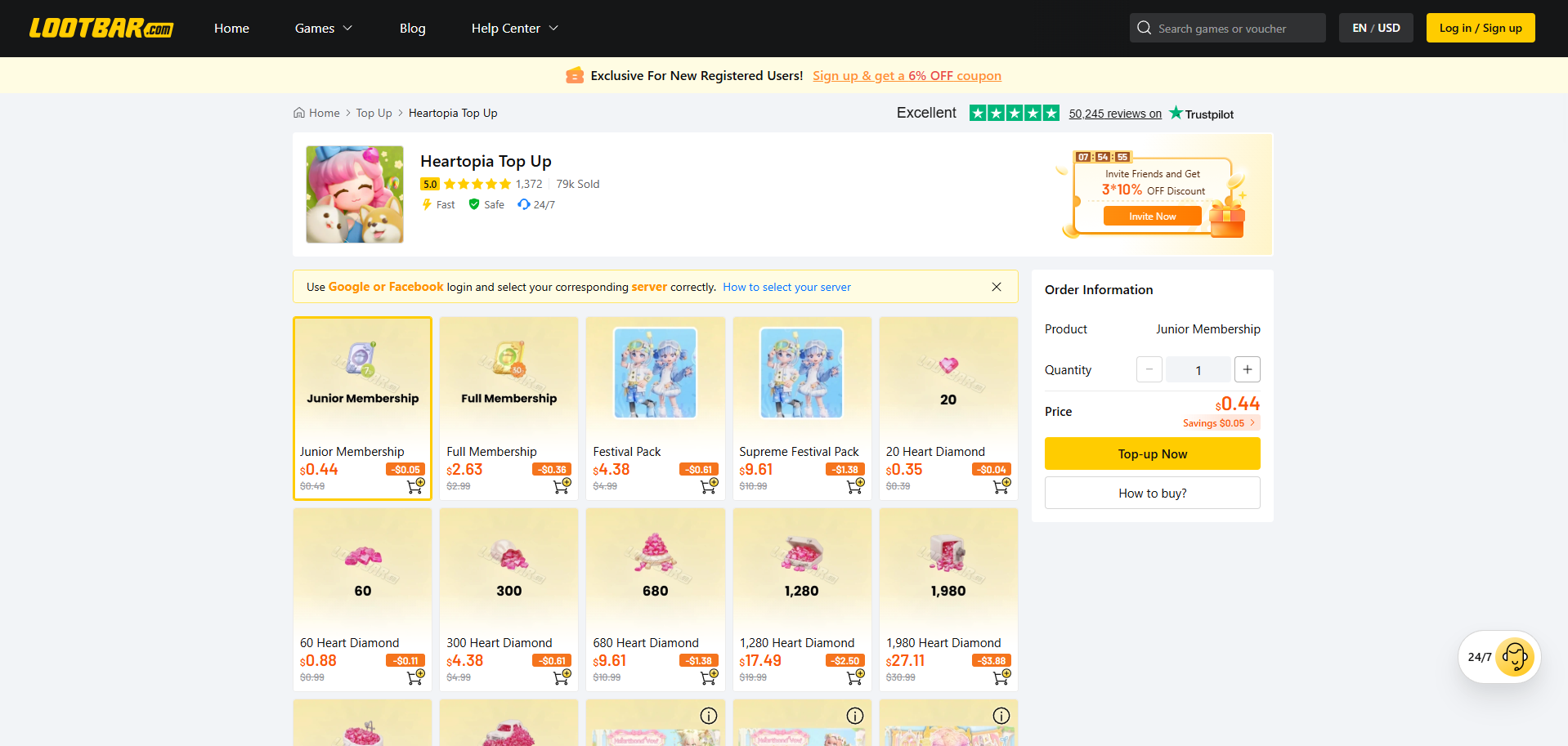
LootBar currently maintains an active dedicated Heartopia page and clearly identifies its top-up method as LootBar Self-TopUp. The service applies to Heartopia Mobile and publishes support for America, Asia, Global, Southeast Asia and Taiwan/Hong Kong/Macau servers. Its current catalogue also extends beyond standard Heart Diamonds to memberships and rotating Heartopia products.
Self-TopUp Workflow
LootBar's current instructions tell customers to select Self-TopUp after purchasing a package, choose Google or Facebook as the login method, enter the correct region and open the in-game Store. The customer then confirms and redeems the corresponding package inside Heartopia.
This is a player-controlled workflow rather than a conventional assisted Login Top-Up. LootBar states that login information used in the session is cleared after the player exits the Self-TopUp results page, which should be treated as the platform's own published description of its process.
Regional Compatibility
LootBar currently lists America, Asia, Global, Southeast Asia and Taiwan/Hong Kong/Macau as applicable servers. The player chooses the corresponding region after entering the Self-TopUp environment.
Its published applicable platform is specifically Heartopia Mobile. That is an important distinction from BuffHub and LDShop, both of which explicitly document non-Steam PC compatibility on their current Heartopia pages.
Product Coverage
The current LootBar catalogue covers standard Heart Diamonds alongside memberships and several rotating products. That gives the service a broader use case for players who purchase more than the basic premium currency.
Event and draw-oriented listings can rotate quickly, so individual products should not be treated as permanent. LootBar's more stable strength is the combination of a broad catalogue with a clearly documented Self-TopUp process.
Who Should Choose LootBar?
LootBar is a strong option for mobile players who specifically prefer a Self-TopUp experience. Its process keeps the customer involved in the in-game redemption, while its regional coverage and product catalogue cover many regular Heartopia purchasing needs.
BuffHub remains our overall pick because it currently adds non-Steam PC compatibility and an assisted fallback to a similarly broad recharge setup. LootBar is the more focused alternative when Self-TopUp on mobile is already the player's preferred route.
3. LDShop — PC & Mobile Login Top-Up Alternative
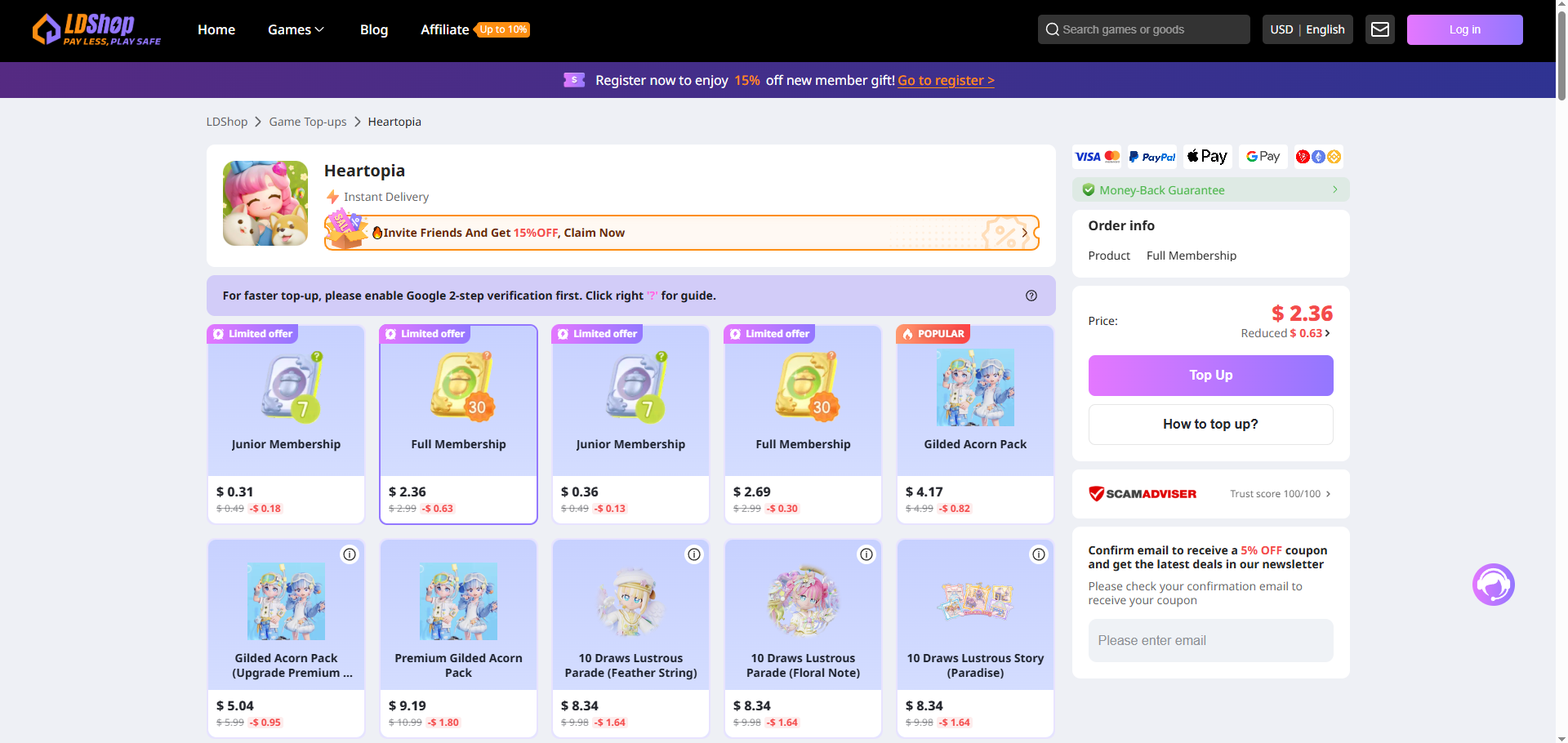
LDShop currently maintains an active dedicated Heartopia recharge page. Its compatibility section explicitly covers PC and Mobile, excluding Steam, and states that supported PC and mobile accounts are interoperable for cross-platform top-up. The current page supports Google and Facebook login and lists America, Asia, Global, Southeast Asia and Taiwan/Hong Kong/Macau as available server environments.
Unlike LootBar's player-operated Self-TopUp model, LDShop's instructions center on sharing the account access needed for staff to complete the recharge. That makes its service more suitable for players who deliberately prefer assisted fulfillment rather than a self-operated redemption environment.
Login-Based Fulfillment
LDShop currently asks for a Google or Facebook login method, password, UID and Character Name. After the order is completed, its published recharge process instructs the customer to provide account or login details through the platform's support process and avoid logging into Heartopia while fulfillment is underway.
That makes LDShop a comparatively account-intensive option. The benefit is a straightforward assisted process for users who do not want to handle the purchase inside a Self-Service environment, but players should understand and be comfortable with the requested account access before choosing this route.
PC and Mobile Compatibility
One of LDShop's clearer practical strengths is its explicit support for both Heartopia PC and Mobile accounts, excluding Steam. The page also states that those supported account environments can use cross-platform recharge.
This gives LDShop a different position from LootBar, whose current Heartopia product page is specifically labeled for mobile. Players switching between supported mobile and PC clients may therefore find LDShop's compatibility documentation useful.
Account and Server Requirements
LDShop publishes its login and account requirements clearly. In addition to Google or Facebook login, the current page asks players to select the correct server and provide the UID and Character Name.
The service currently lists America, Asia, Global, Southeast Asia, Taiwan, Hong Kong and Macau in its published server information. Players should verify the correct region before submitting an order because assisted fulfillment depends on the account details they provide.
Who Should Choose LDShop?
LDShop may suit mobile or non-Steam PC players who prefer an assisted recharge process and are comfortable providing the account access requested by the current page. Its key differentiator is not minimal account interaction but clearly documented cross-platform compatibility and a straightforward assisted workflow.
Players who would rather perform the in-game redemption themselves should compare BuffHub or LootBar, while those who prefer to avoid a game-login-based third-party flow may find TOPUPlive's Account ID model more appealing.
4. TOPUPlive — Account ID-Based Alternative
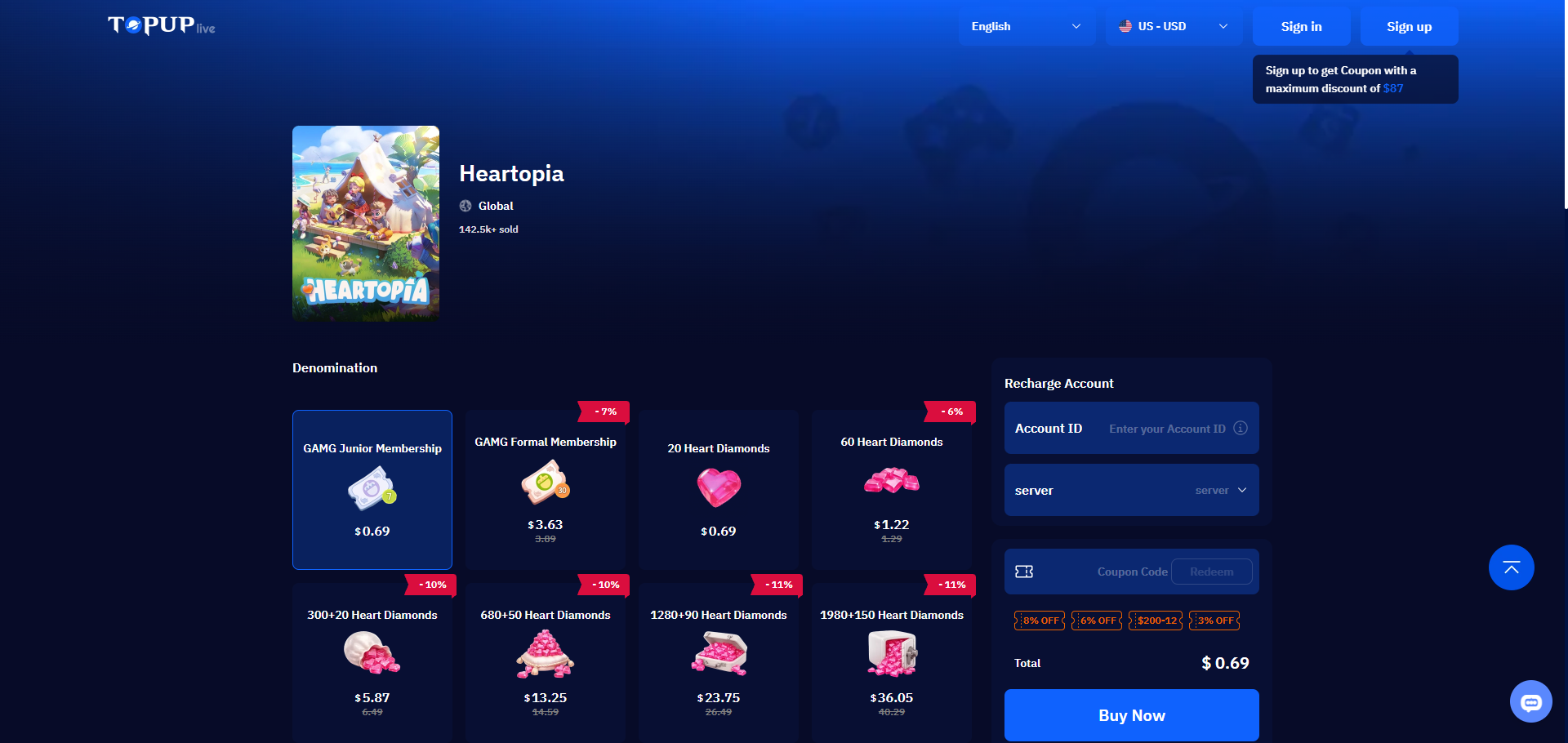
TOPUPlive provides the most clearly differentiated recharge flow in this comparison. Its current Heartopia product page is labeled Global and lists Heart Diamonds alongside GAMG membership products. Instead of publishing an assisted Google or Facebook login requirement on the main recharge form, the page asks the customer to enter a User Account ID and Server.
This makes TOPUPlive particularly relevant for players whose priority is minimizing account-login interaction during a third-party purchase. The receiving account still needs to be identified correctly, so the simplicity of the flow does not remove the need to verify both the Account ID and server before submitting the order.
Account ID Top-Up
TOPUPlive's current instructions are straightforward: select the Heart Diamond or membership product, enter the Heartopia User Account ID and server, then complete checkout. The page also includes instructions for locating the Account ID through the game's Settings interface.
This is structurally different from BuffHub and LootBar Self-Service, where the player enters a game environment and signs in, and from LDShop's assisted account-access workflow. For players comparing recharge methods rather than simply product catalogues, this is TOPUPlive's clearest point of differentiation.
Product Coverage
The current TOPUPlive page includes Heart Diamonds and GAMG membership products. Its catalogue is more focused than the larger rotating pack selection visible on some Self-Service platforms, but it covers the recurring paid categories most Heartopia players are likely to recognize.
Because product listings can change, individual denominations or temporary Store items should not be treated as permanent platform features. The Account ID-and-server workflow is the more durable reason for considering TOPUPlive.
Who Should Choose TOPUPlive?
TOPUPlive is the strongest fit for players who prioritize an Account ID-based third-party top-up over a login-based or Self-Service process. Its current main recharge form requires less published account-access information than the other three core platforms compared here.
Its tradeoff is a more focused catalogue and less emphasis on multiple fulfillment routes. For players who care primarily about account-information simplicity, however, TOPUPlive has a clear use case.
What About the Heartopia XD Web Store?
Heartopia also has a publisher-linked online purchase route. XD's own Heartopia website currently includes an Official Website Purchase entry that leads to the Heartopia purchase environment on XD Shop / XD WebPay.
That makes XD Shop fundamentally different from the four third-party services above. It is the relevant reference for players whose priority is using Heartopia's publisher-linked web purchase ecosystem rather than an external recharge service.
The current XD WebPay interface relies heavily on JavaScript, and its publicly indexed page does not expose enough checkout-field information to make a reliable detailed comparison of its current account requirements. Rather than guessing whether the current checkout uses UID, Account ID, login information or a particular server workflow, players should follow the fields presented by XD when opening the purchase page.
Which Heartopia Top-Up Platform Is Best for You?
If You Want the Best All-Around Third-Party Setup
BuffHub is our preferred overall choice. Its current Heartopia page combines broad product coverage, major server support, mobile and non-Steam PC compatibility, a player-operated Self-Service route and an assisted fallback. That makes it the most versatile option for players whose purchase method, device or product preference may change over time.
If You Prefer Self-TopUp on Mobile
LootBar is the strongest direct alternative. Its current page clearly centers the purchase around Self-TopUp and lets the player enter the game environment through Google or Facebook, choose the correct region and redeem the purchased product from the in-game Store.
If You Prefer an Assisted PC or Mobile Recharge
LDShop is better suited to users comfortable with a staff-assisted login workflow. It clearly documents non-Steam PC and mobile compatibility and publishes the login, server, UID and Character Name information required for its current Heartopia service.
If You Want to Use Account ID Instead of a Login Flow
TOPUPlive has the clearest advantage. Its current Heartopia recharge form asks for the Account ID and server instead of publishing the Google/Facebook login-and-verification workflow used by the other services.
If You Want the Publisher-Linked Purchase Route
Use XD Shop / XD WebPay. Heartopia's own XD website links to it through its Official Website Purchase entry, making it the natural reference for players who want to remain inside the publisher's web purchase ecosystem.
Heartopia Top-Up Platform Comparison
| Platform | Best For | Top-Up Approach | Key Strength |
|---|---|---|---|
| BuffHub | Best Overall | Self-Service + Assisted Top-Up | Broad device, server and product coverage with multiple fulfillment routes |
| LootBar | Self-TopUp Users | Google/Facebook Self-TopUp | Player-controlled mobile redemption across multiple server regions |
| LDShop | PC & Mobile Assisted Recharge | Login-Based Top-Up | Explicit non-Steam PC/mobile compatibility and clearly published account requirements |
| TOPUPlive | Minimal Login Interaction | Account ID + Server | Direct top-up flow without a published game-login requirement on the main recharge form |
The most meaningful difference between these platforms is the amount of account interaction required. BuffHub offers the widest overall combination of workflows, LootBar concentrates on player-controlled Self-TopUp, LDShop handles a more account-intensive assisted recharge, and TOPUPlive uses a fundamentally different Account ID-based approach.
How to Top Up Heartopia More Safely
Start by confirming the correct server and account identifier before ordering. Heartopia operates across several regional environments, and the third-party services reviewed here do not all use the same information to identify the receiving account. A UID, Account ID or character tied to the wrong server can create fulfillment problems even when the selected game is correct.
Next, check the actual fulfillment method instead of assuming all Heartopia top-ups work the same way. BuffHub and LootBar offer Self-Service flows, LDShop uses an assisted login process, and TOPUPlive's main page uses Account ID and server information. The amount of account information you are comfortable providing should be part of the platform decision.
When a service requires Google or Facebook login information, use the platform's actual order or Self-Service environment rather than sending credentials through an unsolicited social-media message or unrelated website. If an assisted order tells you not to log into the game during processing, avoid creating a simultaneous login conflict and keep the order record until the selected Heart Diamonds, membership or pack has been confirmed on the intended account.
Players who prefer not to use a third-party recharge workflow can instead open the Official Website Purchase route from Heartopia's XD website and continue through XD Shop / XD WebPay.
Frequently Asked Questions
What is the best Heartopia top-up platform?
BuffHub is our best overall third-party pick because its current Heartopia service combines broad product coverage, multiple supported regions, mobile and non-Steam PC compatibility, Self-Service Top-Up and a separate assisted fallback. Players who prefer a publisher-linked route can use XD Shop / XD WebPay.
What is the main paid currency in Heartopia?
Heart Diamonds are the core paid currency shown in Heartopia's current purchase ecosystem. XD's own purchase documentation also recognizes GAMG membership products alongside Heart Diamond packages.
Does LootBar currently support Heartopia top-up?
Yes. LootBar currently maintains an active Heartopia Mobile recharge page using Self-TopUp, with America, Asia, Global, Southeast Asia and Taiwan/Hong Kong/Macau listed among the applicable servers.
Does BuffHub support Heartopia on PC?
BuffHub's current Heartopia page explicitly supports mobile and PC versions while excluding Steam. It also states that supported mobile and PC account progress is shared for cross-platform top-up.
What information does LDShop require for Heartopia?
LDShop's current Heartopia page lists Google or Facebook login, server, password, UID and Character Name among its recharge requirements. Its workflow therefore involves more account access than an Account ID-only top-up.
Which Heartopia platform supports Account ID top-up?
TOPUPlive's current Heartopia recharge form asks for the User Account ID and server. It does not publish a game-account login requirement as part of that main direct recharge process.
Does Heartopia have a publisher-linked web top-up option?
Yes. Heartopia's XD website currently provides an Official Website Purchase entry that leads to the Heartopia purchase page on XD Shop / XD WebPay.
Conclusion
Heartopia players currently have several genuinely different recharge workflows available. LootBar is a strong option for mobile players who prefer Self-TopUp, LDShop suits users comfortable with assisted login-based fulfillment across supported PC and mobile accounts, and TOPUPlive provides the clearest Account ID-based alternative for players who want less login interaction. XD Shop / XD WebPay remains the publisher-linked web purchase reference for users who want to stay within Heartopia's own web ecosystem.
BuffHub is our best overall third-party pick because its current Heartopia setup covers the widest combination of practical use cases. It supports major server regions, mobile and non-Steam PC accounts, Heart Diamonds and additional product categories, while offering both a player-controlled Self-Service route and an assisted fallback. That balance of compatibility, product flexibility and fulfillment choice gives BuffHub the strongest all-around position without relying on temporary promotional comparisons.