




Related searches
0 results
Not found
No content related to ""
theme-light theme-light-text
theme-dark-text theme-light
CapCut

CapCut

broadcast broadcast
Join the BUFFHUB Discord community and instantly receive a $10 discount coupon
US - 1 Month Standard
$ 6.37
$ 9.99
UK - 1 Month Standard
$ 9.55
$ 14.99
US - 1 Month Pro
US - 1 Month Pro
$ 12.74
$ 19.99
UK - 1 Month Pro
UK - 1 Month Pro
$ 18.47
$ 19.99

Quantity

Price
$0.00
HOW TO BUY?
Total
- +

0

Overall Rating
5.0
498 reviews
Overall Rating
5.0
Based on 498 reviews
  • 5 Star
    100%
  • 4 Star
    0%
  • 3 Star
    0%
  • 2 Star
    0%
  • 1 Star
    0%
Product Introduction
Recharge guide
User Reviews(498)

CapCut Subscription Top-up - Unlock More Creative Tools on Buffhub


CapCut is an all-in-one video editing tool that supports mobile, desktop, and web. It covers everyday editing functions such as trimming, merging clips, and adjusting video speed, while also providing AI-assisted tools such as auto captions, background removal, and script-generated videos. With built-in music, stickers, effects, and templates, CapCut gives both new and experienced creators a convenient way to produce content for social media, marketing, education, and other creative projects.



What Are the Benefits of CapCut Standard and CapCut Pro?

Upgrading CapCut is not simply about getting more effects. CapCut Standard and CapCut Pro are designed for different levels of creation, helping users reduce editing limitations, access more premium resources, and build a smoother workflow compared with the free version.

· More Premium Creative Assets: CapCut Standard expands the mobile editing experience with more premium effects, transitions, fonts, stickers, templates, and sound effects, making it easier to create polished videos without building every element from scratch.

· More AI-Assisted Editing: Standard provides access to useful AI-powered tools such as auto captions and background removal, helping creators complete common editing tasks faster on mobile.

· Improved Export and Cloud Experience: CapCut Standard includes watermark-free exports, improved output options, and access to project cloud storage, giving regular mobile creators a more convenient way to save and continue their projects.

· Advanced AI Toolkit with CapCut Pro: CapCut Pro adds more advanced AI functions for editing tasks such as object removal, smart cutout, and noise reduction, giving experienced creators greater control over more demanding projects.

· Complete Premium Assets and Cross-Platform Workflow: CapCut Pro provides access to a broader premium asset library, higher-resolution export options, expanded cloud storage, and cross-platform support. This makes it better suited to creators who produce content frequently or need a more complete editing workflow across different devices.

Why Top Up at buffhub.com?

At Buffhub, we provide a simple and convenient solution for purchasing CapCut Subscription. Whether you want CapCut Standard for everyday mobile creation or CapCut Pro for a more complete editing toolkit, you can select the subscription you need, enter your CapCut ID, complete payment, and wait for the order to be processed. For every order you place, we focus on the following service experience:

✓ Fast Delivery — CapCut Subscription orders are processed as quickly as possible after payment, allowing you to access your selected subscription without unnecessary waiting.

✓ Competitive Prices and Offers — Buffhub provides CapCut Subscription options with competitive pricing, while promotional offers and discounts can give users more flexibility when choosing between CapCut Standard and CapCut Pro.

✓ Secure Transactions — The payment process is protected through secure transaction systems, helping users complete their CapCut Subscription purchase with confidence.

✓ Flexible Payment Methods — Multiple payment options make it easier for users in different regions to choose a suitable way to complete their CapCut Subscription purchase.

✓ Simple Top-up Process — The purchase flow is easy to follow: select the CapCut Subscription you need, enter your CapCut ID, confirm the order information, and complete payment.

✓ Customer Support — If you have questions about your order, CapCut ID, payment, or subscription delivery, customer support is available to assist you throughout the process.

CapCut Brief

CapCut combines basic video editing with templates, effects, creative assets, and AI-assisted tools in one editing environment. The free version can meet many everyday editing needs, while CapCut Standard and CapCut Pro expand the available resources and functions for users who want a smoother or more advanced workflow. Standard is mainly designed for mobile creators who want additional premium assets and fewer editing limitations, while Pro provides broader premium resources, advanced AI tools, additional cloud storage, and cross-platform capabilities for more demanding content production.

More down down
Fold Up up up

What Information Is Needed to Top Up CapCut Subscription?

To ensure that your CapCut Subscription can be accurately delivered to the correct account, please prepare the following information before submitting your order:

1. Applicable Platforms: CapCut Mobile & PC
2. Applicable Region/Server: EU / UK / US
3. Required Information: CapCut ID

Please make sure the CapCut ID is correct before submitting your order. Whenever possible, copy and paste the ID directly instead of entering it manually, as this can help reduce input errors and avoid problems during subscription delivery.


How to Get Your CapCut ID?

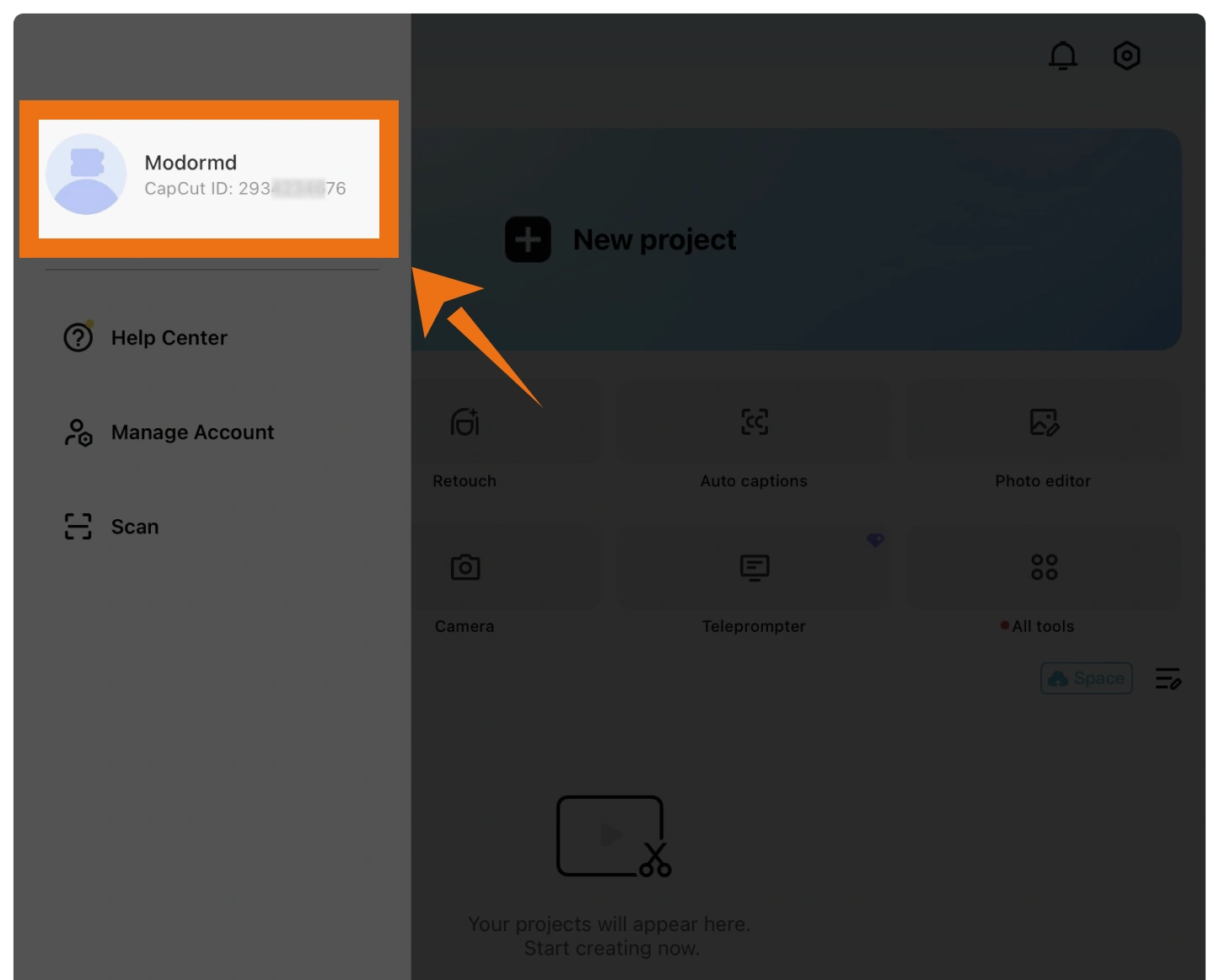
Open CapCut and enter the Me section. Your CapCut ID can be found below or beside your profile avatar. Copy the displayed ID and use it when placing your CapCut Subscription order.

How to find your CapCut ID in the CapCut profile

What Are the Steps to Top Up CapCut Subscription on Buffhub?

1

Visit the page: Go to the Buffhub website, select your preferred language and currency, and complete the login.

2

Locate the product: Open Game Top-up and find CapCut.

3

Confirm the subscription: Select the CapCut Standard or CapCut Pro Subscription product that matches your editing needs.

4

Enter your CapCut ID: Copy and paste the CapCut ID shown on your profile, then carefully check that the account information is correct before continuing.

6

Top-up Complete:
· Order Processing: After payment is completed, your CapCut Subscription order will enter the processing stage.
· Check Your Account: Once processing is complete, confirm that the selected subscription has been credited to the CapCut account associated with the ID you provided.
· Start Creating: After the subscription takes effect, you can return to CapCut and begin using the additional features included with CapCut Standard or CapCut Pro.

FAQ

Q: What Is CapCut Premium?

A: CapCut provides paid subscription options including CapCut Standard and CapCut Pro. CapCut Standard is mainly focused on mobile editing and provides additional premium assets, watermark-free exports, and enhanced editing features. CapCut Pro offers a more complete premium toolkit with advanced AI functions, expanded cloud storage, broader premium asset access, and cross-platform support.

Q: What is the difference between CapCut Standard and CapCut Pro?

A: CapCut Standard is designed primarily for mobile creators who want more premium effects, templates, fonts, stickers, AI-assisted features, and improved export options. CapCut Pro provides a wider range of premium assets and advanced tools, including features such as object removal, smart cutout, noise reduction, expanded cloud storage, and a broader cross-platform workflow.

Q: What information do I need for CapCut Subscription?

A: You need your CapCut ID. Open CapCut, go to the Me section, and find the ID shown below or beside your avatar. Copying and pasting the ID directly is recommended to reduce the risk of entering incorrect account information.

Q: Can I get CapCut Pro without purchasing a long-term subscription?

A: Eligible new users may sometimes receive a limited-time Pro trial. CapCut may also provide temporary Pro access through referral rewards or region-based and time-limited promotional campaigns. These methods are generally intended for short-term access, while a paid subscription remains the more direct option for continued use.

Q: When should I upgrade to CapCut Pro?

A: You may consider upgrading when you regularly need premium effects, fonts, stock resources, or templates, when you frequently create social content and value time-saving editing tools, or when cloud storage and multi-device workflows become important to your projects. If you are unsure whether you need Pro long term, trying a shorter subscription period first can help you evaluate how often you use its premium features.

Q: What devices can I use CapCut on?

A: CapCut supports mobile, desktop, and web use. It can be used on platforms including iOS, iPadOS, Android, Windows, and Mac, although the available subscription features and plan benefits may differ depending on the platform or region.

More down down
Fold Up up up
U253663904
Purchased US - 1 Month Pro · Aug 31, 2026

10/10.

U460980286
Purchased US - 1 Month Standard · Aug 31, 2026

amazing

CHIEFKIEF
Purchased UK - 1 Month Standard · Aug 31, 2026

Come sempre Servizio Regolare e stimato

U920551597
Purchased US - 1 Month Standard · Aug 31, 2026

Would buy again

U870878209
Purchased US - 1 Month Standard · Aug 31, 2026

W

Helpful(0)
U812028790
Purchased US - 1 Month Pro · Aug 31, 2026

todo fácil

View All Comments
Sort By :
Latest
U253663904
Purchased US - 1 Month Pro

10/10.

Aug 31, 2026
U460980286
Purchased US - 1 Month Standard

amazing

Aug 31, 2026
CHIEFKIEF
Purchased UK - 1 Month Standard

Come sempre Servizio Regolare e stimato

Aug 31, 2026
U920551597
Purchased US - 1 Month Standard

Would buy again

Aug 31, 2026
U870878209
Purchased US - 1 Month Standard

W

Aug 31, 2026
Helpful(0)
U812028790
Purchased US - 1 Month Pro

todo fácil

Aug 31, 2026
View All Comments

Product Introduction

  • Alipay Alipay
  • ApplePay ApplePay
  • bancontact bancontact
  • bancontact-1 bancontact-1
  • billease billease
  • blik blik
  • boleto boleto
  • boost boost
  • bpi bpi
  • dana dana
  • Ewallet Ewallet
  • gcash gcash
  • GooglePay GooglePay
  • Ideal Ideal
  • kakao_pay kakao_pay
  • Klarna Klarna
  • konbini konbini
  • Kplus Kplus
  • line line
  • MBWAY MBWAY
  • multibanco multibanco
  • mybank mybank
  • naverpay naverpay
  • NetBanking NetBanking
  • oxxo oxxo
  • payco payco
  • paynow paynow
  • payu payu
  • pix pix
  • Qiwi Qiwi
  • rabbit rabbit
  • samsung samsung
  • sberpay sberpay
  • SBP SBP
  • SEPA SEPA
  • skrill skrill
  • spei spei
  • swish swish
  • tng tng
  • Tosspay Tosspay
  • truemoney truemoney
  • usdt usdt
  • Visa Visa
  • Visa-mastercard Visa-mastercard
  • Visa-mastercard+jbc Visa-mastercard+jbc
  • yoomoney yoomoney
  • Alipay Alipay
  • ApplePay ApplePay
  • bancontact bancontact
  • bancontact-1 bancontact-1
  • billease billease
  • blik blik
  • boleto boleto
  • boost boost
  • bpi bpi
  • dana dana
  • Ewallet Ewallet
  • gcash gcash
  • GooglePay GooglePay
  • Ideal Ideal
  • kakao_pay kakao_pay
  • Klarna Klarna
  • konbini konbini
  • Kplus Kplus
  • line line
  • MBWAY MBWAY
  • multibanco multibanco
  • mybank mybank
  • naverpay naverpay
  • NetBanking NetBanking
  • oxxo oxxo
  • payco payco
  • paynow paynow
  • payu payu
  • pix pix
  • Qiwi Qiwi
  • rabbit rabbit
  • samsung samsung
  • sberpay sberpay
  • SBP SBP
  • SEPA SEPA
  • skrill skrill
  • spei spei
  • swish swish
  • tng tng
  • Tosspay Tosspay
  • truemoney truemoney
  • usdt usdt
  • Visa Visa
  • Visa-mastercard Visa-mastercard
  • Visa-mastercard+jbc Visa-mastercard+jbc
  • yoomoney yoomoney
Language & Currency
  • Language
    English
    中文(繁体)
    日本語
    Bahasa Indonesia
    Bahasa Melayu
    Français
    Italiano
    Deutsch
    Русский
    Español
    한국어
  • Display Currency
    $ USD
    € EUR
    £ GBP
    C$ CAD
    A$ AUD
    S$ SGD
    Ұ JPY
    ₩ KRW
    SA SAR
    AED AED
    RM MYR
    ₱ PHP
    Rp IDR
    ฿ THB
    NT$ TWD
    HK$ HKD
    ₫ VND
    MX$ MXN
    R$ BRL
    ₽ RUB