







Related searches
0 results

Not found
No content related to ""





















The Seven Deadly Sins: Origin


Server:
Global
Top-up Method
Login Top-up
₩0


Star Memory is used for Draws and eligible purchases in The Seven Deadly Sins: Origin, so players may want to recharge when preparing for a Hero Draw, checking the current Shop, or planning their next round of account progression. BuffHub currently provides a Login Top-Up service for the game. Choose the Star Memory amount or eligible package you need, complete the payment, and provide the required linked-account information so the order can be processed.
BuffHub provides top-up options for players who want to purchase Star Memory or selected in-game packages. Product availability can change as the in-game Shop is updated, so check the package details carefully before completing your order.
Recharge Star Memory for Draws and eligible purchases available through the Star Memory Shop.
Choose from eligible packages displayed on the BuffHub product page and have the selected purchase delivered through the Login Top-Up process.
Star Memory can be used for Draws and Shop purchases, which means the value of a top-up matters before you commit to another purchase. At the same time, The Seven Deadly Sins: Origin currently uses a Login Top-Up process on BuffHub, so account handling and order support matter just as much as price. BuffHub combines both sides of the purchase: ways to manage the cost of your recharge and a supported environment for completing a login-based order.
BuffHub offers competitive prices on available The Seven Deadly Sins: Origin top-up products, giving you another place to compare the cost of Star Memory or an eligible package before ordering. Available discounts, promotional pricing, and current offers can provide additional savings when they apply. This is particularly useful when you are planning several Draws or deciding whether a current Shop package fits the amount you want to spend.
This is not a UID-only recharge: the order may require access to the linked game account, its password, and a verification code when account verification is triggered. BuffHub provides a secure checkout and transaction environment for the order, while clear account requirements help you understand what may be needed before processing begins. You should only submit information for the game progress and server you actually want to recharge.
| BuffHub Advantage | What It Means for Your 7DS Origin Top-Up |
|---|---|
| Multiple Payment Methods | Choose from the payment options currently available at checkout, giving you more flexibility when paying for Star Memory or an eligible package. |
| Efficient Order Processing | Once payment and the required linked-account information are available, the Login Top-Up team can begin processing the order. Additional verification may extend the processing time. |
| 24/7 Customer Support | If you have a question about the order, account information, verification, or delivery status, BuffHub customer support is available 24/7. |
For The Seven Deadly Sins: Origin, choosing BuffHub is therefore not just about finding another place to buy Star Memory. The practical advantage is being able to compare competitive prices and available discounts while also getting flexible payment choices, secure checkout, efficient Login Top-Up processing, and 24/7 help within the same purchase experience.
You can also explore other game top-up pages on BuffHub, including Stella Sora and League of Legends: Wild Rift.
Star Memory is an in-game currency used for Draws and purchases in the Star Memory Shop. Current Shop products can include resources and growth-related items, so Star Memory can be relevant both when preparing for Hero Draws and when considering selected Shop purchases.
Available packages, purchase bonuses, and product rules can change with Shop updates. Before placing a The Seven Deadly Sins: Origin top-up order, check the current product details in the game and select the matching Star Memory amount or package on BuffHub.


BuffHub currently uses a Login Top-Up method for The Seven Deadly Sins: Origin. Instead of submitting only a UID, you need to provide the account information required to access the correct game progress and complete the selected purchase.
Prepare the following information before your order so the selected Star Memory amount or in-game package can be delivered to the intended account.
| Required Info |
1. Linked game account
2. Account password 3. Verification code if requested |
| Linked Login | Use a login method linked to the same The Seven Deadly Sins: Origin game progress you want to top up. |
| Server | Use the same server where the game progress you want to recharge is stored. |
| Top-Up Method | Login Top-Up only |
If your The Seven Deadly Sins: Origin progress was created through Steam or PlayStation, do not rely on the Steam or PlayStation platform account alone when you need to access that progress on mobile. Netmarble requires an additional linked account for cross-platform access. Supported game-side linking options include Email, Google, Apple, and Facebook. Make sure the additional account is linked to the same game progress you intend to use before continuing on another supported device.
Use the following in-game steps as a reference when checking or managing the account linked to your current game progress.
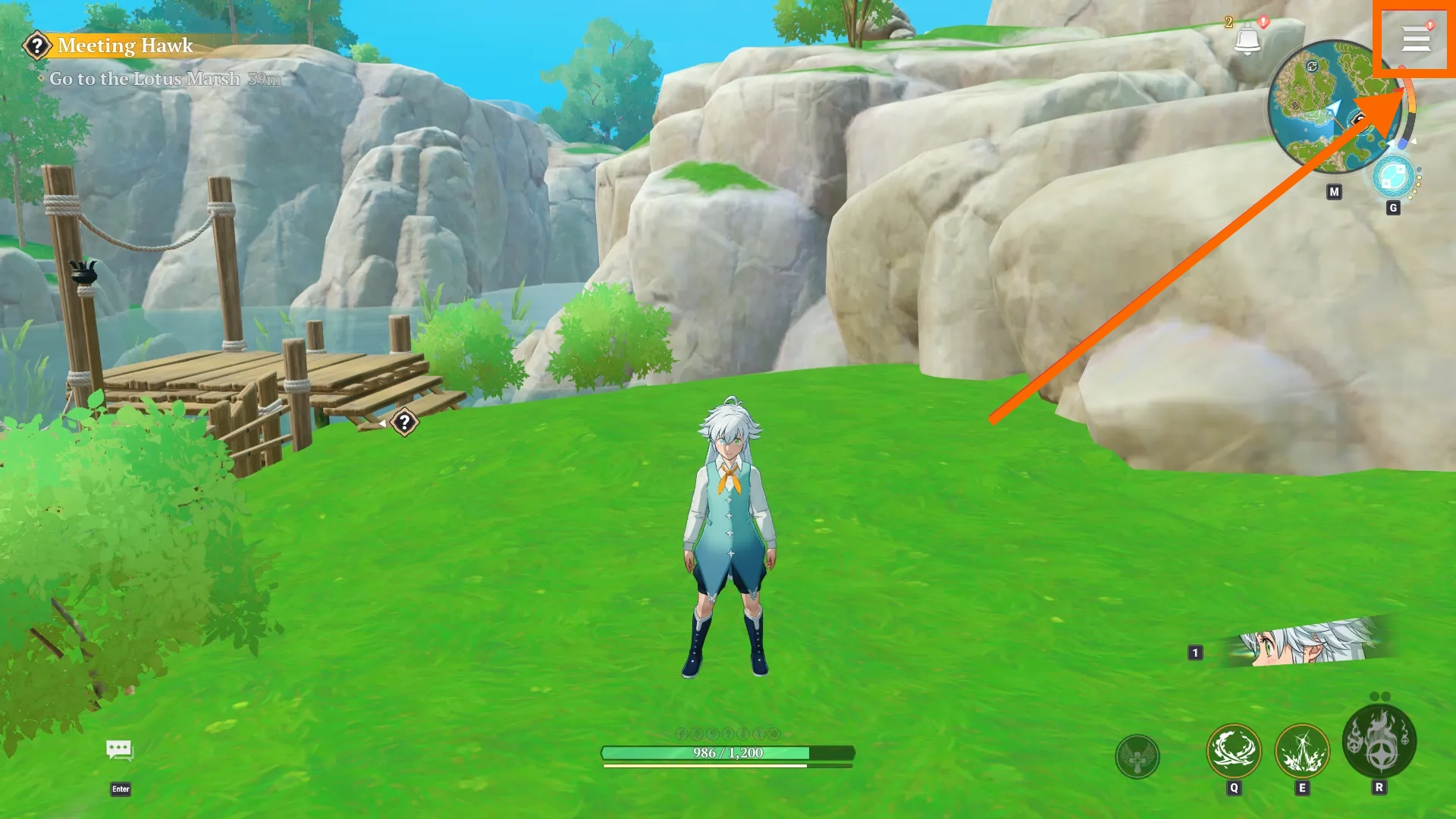
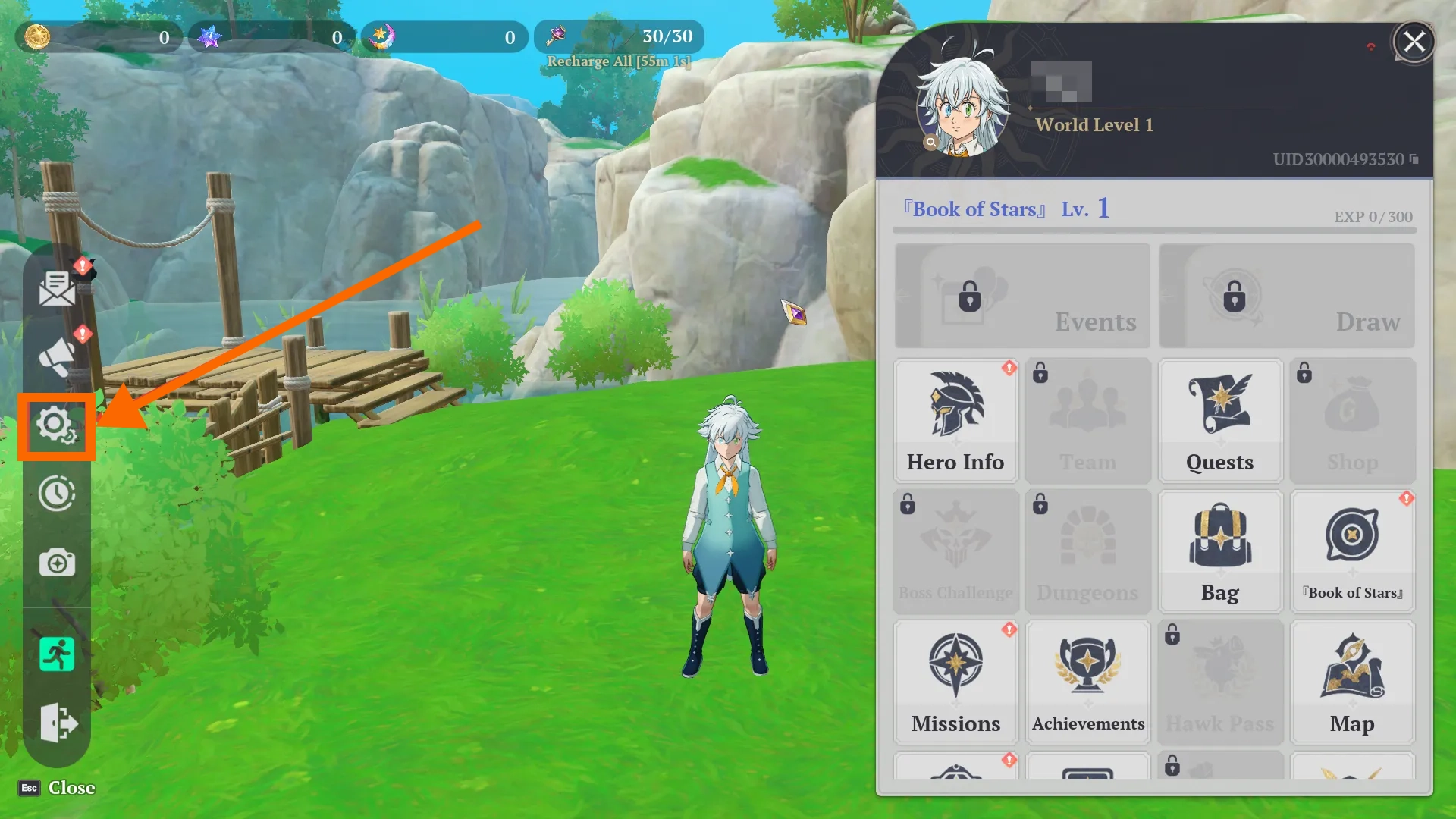
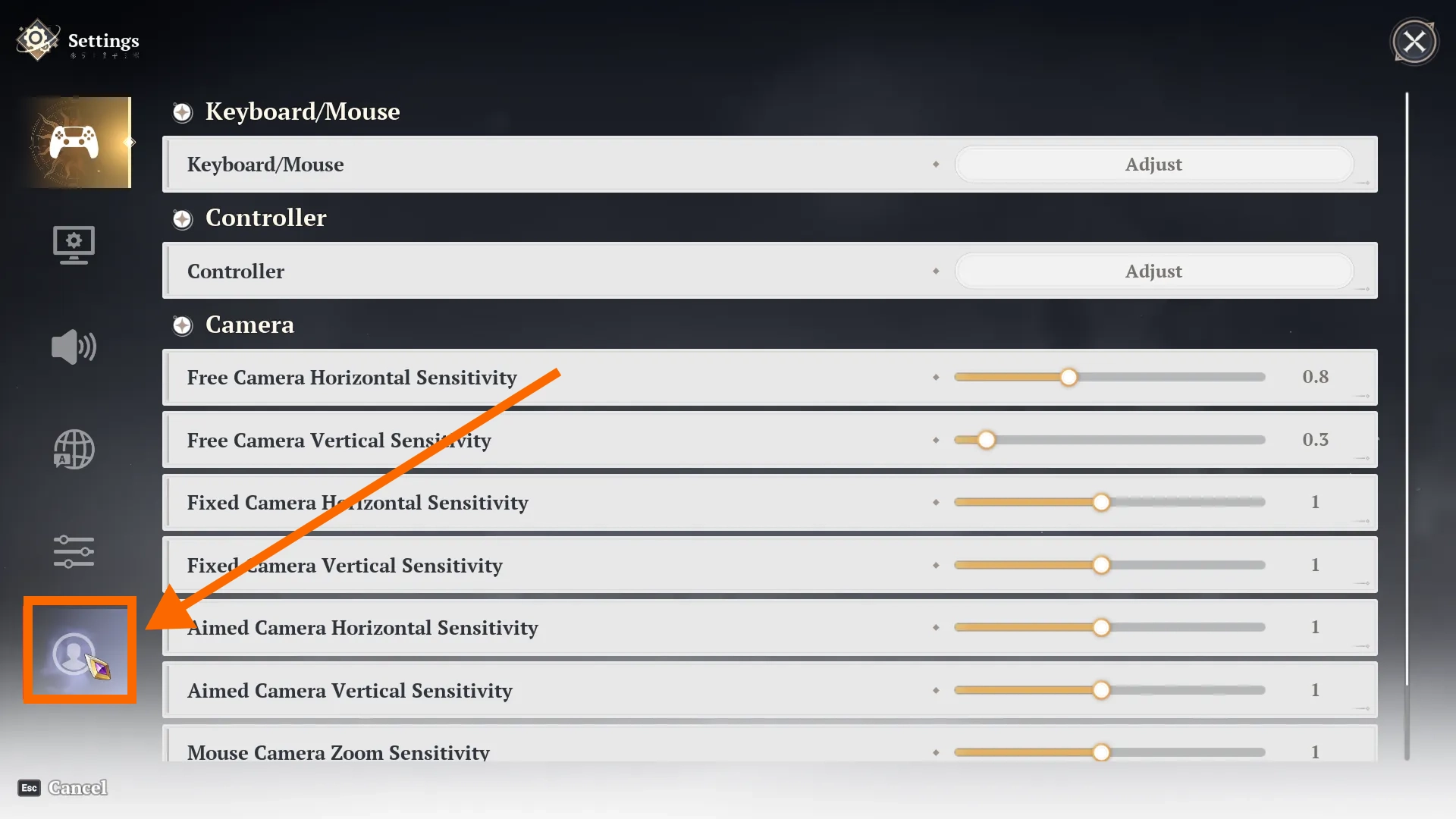
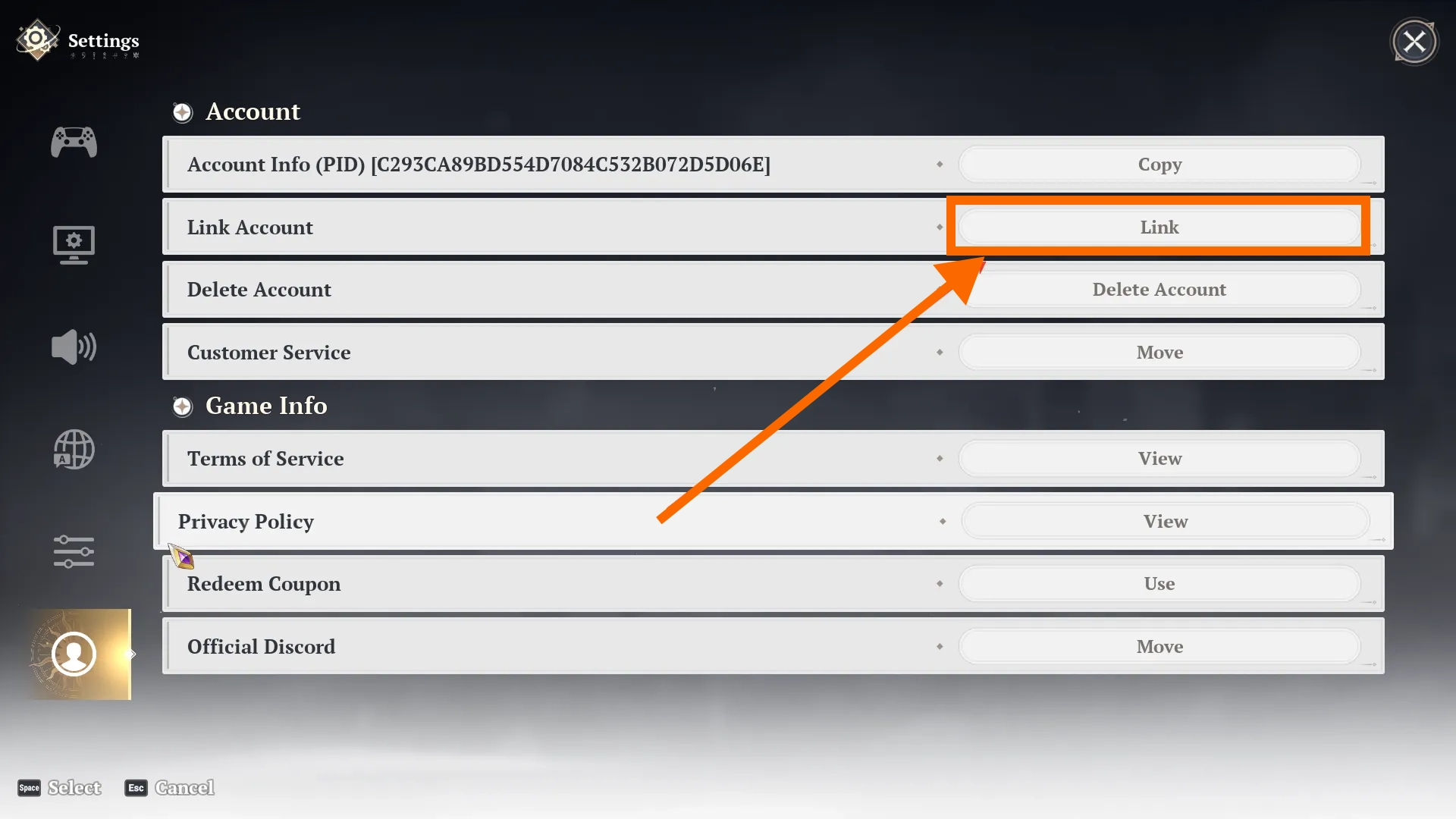
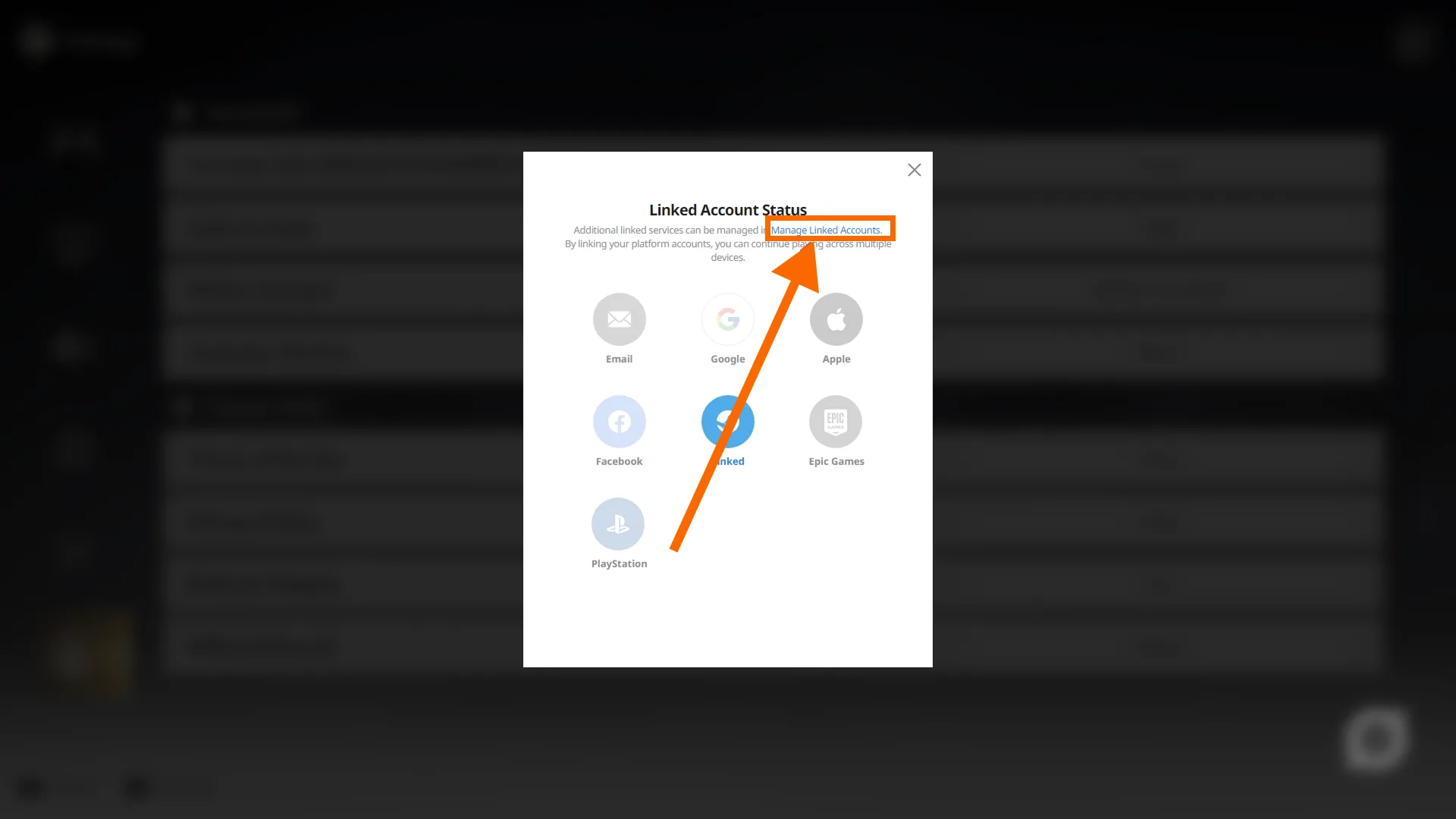
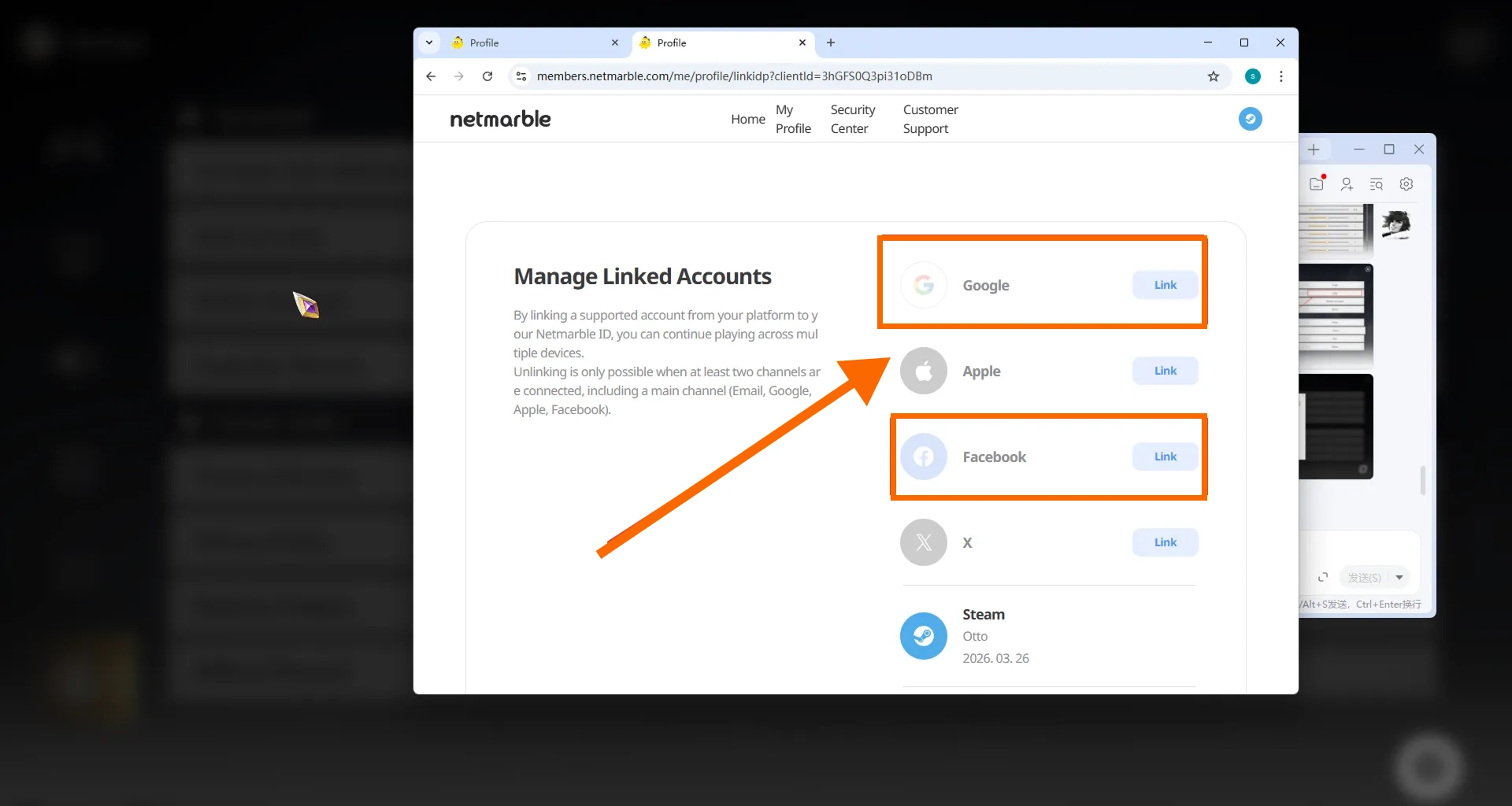
Before linking or switching login methods, confirm that you are working with the correct The Seven Deadly Sins: Origin progress and server. When you later sign in on another supported device, use the linked account associated with that same progress.
The Seven Deadly Sins: Origin currently uses the Login Top-Up method on BuffHub. Follow the steps below to complete your order.

Q: What information do I need for The Seven Deadly Sins: Origin top-up?
You need access to a linked game account, the corresponding password, and a verification code if account verification is requested. Make sure the linked account and server correspond to the game progress you want to recharge.
Q: Do I need to provide my password?
Yes. BuffHub currently uses a Login Top-Up method for The Seven Deadly Sins: Origin, so the login credentials required to access the linked game account may be needed to complete the recharge.
Q: Can I log in while my order is being processed?
Avoid logging in to the same The Seven Deadly Sins: Origin account on another device while the Login Top-Up is being processed. Simultaneous access may interrupt the session used to complete the order.
Q: What should Steam or PlayStation players check before a Login Top-Up?
PlayStation and Steam accounts alone cannot be used to log in on mobile. If your game progress started on either platform, first make sure an additional supported account is linked to the same progress. Netmarble lists Email, Google, Apple, and Facebook as account-linking options for cross-platform access.
Q: What if account verification is requested?
Keep your verification method available while the order is being processed. If a verification code is requested, provide the current valid code when needed. If a code expires before it can be used, a new one may be required before processing can continue.

Very fast and reliable. No issues.
Спасибо
good website! cheap lattice😍
bagus murid
Great experience!
bene
Very fast and reliable. No issues.
Спасибо
good website! cheap lattice😍
bagus murid
Great experience!
bene
Product Introduction
Remind

































































































 Official Supply & Safe
 Money back guaranteed











Very fast and reliable. No issues.