
Related searches
0 results
Not found
No content related to ""
theme-light theme-light-text
theme-dark-text theme-light
Yalla Ludo - Ludo & Jackaroo

Yalla Ludo - Ludo & Jackaroo

broadcast broadcast
Join the BUFFHUB Discord community and instantly receive a $10 discount coupon
68500 Gold
68500 Gold
$ 2.05
$ 2.46
223700 Gold
223700 Gold
$ 5.18
$ 6.21
1463320 Gold
1463320 Gold
$ 10.36
$ 12.43
3666470 Gold
3666470 Gold
$ 26.09
$ 31.31
9973990 Gold
9973990 Gold
$ 51.34
$ 61.6
25236460 Gold
25236460 Gold
$ 104.36
$ 125.23
830 Diamonds
830 Diamonds
$ 2.01
$ 2.41
2320 Diamonds
2320 Diamonds
$ 5.03
$ 6.04
5150 Diamonds
5150 Diamonds
$ 10.09
$ 12.11
13580 Diamonds
13580 Diamonds
$ 25.15
$ 30.18
27640 Diamonds
27640 Diamonds
$ 50.21
$ 60.25
55800 Diamonds
55800 Diamonds
$ 100.34
$ 120.4
168860 Diamonds
168860 Diamonds
$ 294.02
$ 352.83

Quantity

Price
$0.00
HOW TO BUY?
Total
- +

0

Overall Rating
5.0
240 reviews
Overall Rating
5.0
Based on 240 reviews
  • 5 Star
    100%
  • 4 Star
    0%
  • 3 Star
    0%
  • 2 Star
    0%
  • 1 Star
    0%
Product Introduction
Recharge guide
User Reviews(240)

BUFFHUB: Yalla Ludo Recharge – Golds & Diamonds Top Up

Player ID Recharge · International Server · Mobile

Yalla Ludo combines Ludo, Jackaroo, Domino, and real-time voice chat in one social gaming app. Golds and Diamonds are virtual currencies used across supported game, customization, and social features. BUFFHUB provides Yalla Ludo Golds and Diamonds recharge options for supported International Server accounts using the recipient account's Player ID, so the recharge does not require you to share your Yalla Ludo account password.

Why Recharge Yalla Ludo Golds & Diamonds with BUFFHUB?

For Yalla Ludo, the main advantage of a Player ID recharge is that the purchase can be credited to the intended account without handing over the recipient's game password. BUFFHUB combines that direct recharge method with competitive pricing, available discounts, flexible checkout options, order processing, and customer support, giving players a more practical way to compare and purchase Golds or Diamonds.

Player ID Recharge Keeps the Account Login Out of the Order

A supported Yalla Ludo recharge on BUFFHUB uses the recipient's Player ID rather than the game account password. This makes it easier to recharge your own account or enter the intended recipient ID while keeping account login credentials out of the top-up process. BUFFHUB also provides a secure checkout and transaction environment for completing the purchase.

Once the Player ID and payment have been submitted correctly, orders can be handled without a separate account-login step. Current BUFFHUB service information lists delivery at usually around 15 to 30 minutes, although actual processing time can vary with the order and payment status.

Compare the Cost Before Choosing Golds or Diamonds

BUFFHUB offers Yalla Ludo recharge packages at competitive prices, so you can compare the cost of different Golds and Diamonds amounts before deciding how much to buy. Available discounts, promotional pricing, or current offers may provide additional savings when they apply, which is useful whether you are making a smaller recharge or choosing a larger package.

At checkout, you can choose from multiple payment methods currently available for your order. This gives players in different regions more flexibility instead of relying on a single payment option, while the displayed package and price can be reviewed before payment is completed.

24/7 Customer Support: If you need help checking an order, payment status, Player ID issue, or Golds and Diamonds delivery, BUFFHUB customer support is available 24/7.

For Yalla Ludo players, the practical BUFFHUB advantage is the combination of a password-free Player ID recharge, competitive package pricing, available discounts, multiple payment choices, secure checkout, efficient processing, and 24/7 order support. Before placing the order, the most important detail to check is the recipient's Player ID, since the recharge is credited according to the ID you submit.

You can also browse other game top-up and social-app recharge options on BUFFHUB, including ReelShort - Stream Drama & TV, MIGO Live, Sawa Play, and Dazz Live.

What Is Yalla Ludo?

Yalla Ludo is a social board-game app that combines Ludo, Jackaroo, Domino, and real-time voice chat. Players can join matches, communicate through voice chat, meet other users in public chat rooms, and send gifts while using the app's social features.

The current Ludo version includes 2&4 Players mode and Team mode, with Classic, Master, Quick, and Arrow gameplay options, along with Magic tools. Domino supports 2&4 Players mode with Draw Game and All Five, while Jackaroo adds additional team-based board-game options.

Yalla Ludo also includes public voice chat rooms and daily activities. Players can complete game or chat-room tasks and receive different rewards, including Golds, Diamonds, skin fragments, gifts, and other items depending on the current event or feature.

What Are Golds and Diamonds in Yalla Ludo?

Golds and Diamonds are virtual currencies used inside Yalla Ludo. Both can be purchased through supported purchase methods, and Yalla Ludo also allows players to obtain Golds or Diamonds through selected activities and rewards. Their available uses can change as the app adds or adjusts game and social features.

  • Get Golds Through Gameplay and Activities: Golds can be earned by winning games, participating in activities such as Daily Tasks, sign-in rewards, and other methods made available by Yalla Ludo.
  • Use Golds for Supported Game Features: Golds can be used to participate in games and purchase supported virtual items such as profile frames, with additional uses depending on current Yalla Ludo features.
  • Get Diamonds Through Purchases or Rewards: Diamonds can be purchased and may also be obtained through selected activities, sign-in rewards, or room-related rewards provided by Yalla Ludo.
  • Use Diamonds for Premium Virtual Items: Diamonds can be used for supported features such as chest upgrades, profile frames, room themes, dice skins, chat bubbles, and token skins.
  • Golds and Diamonds Stay Inside Yalla Ludo: These virtual currencies are intended for use within Yalla Ludo and do not represent a cash balance that can be exchanged for real-world money.

Because Yalla Ludo can adjust the uses and rules for Golds and Diamonds over time, check the current in-app information before spending or purchasing a specific amount. The available packages, virtual items, activities, and rewards may change with app updates and active events.

More down down
Fold Up up up

Yalla Ludo Recharge Information and Important Notes

Item Details
Applicable Platform Yalla Ludo Mobile
Applicable Server International Server
Recharge Method Player ID-based Golds and Diamonds recharge
Required Information Yalla Ludo Player ID
Game Password Not required for this Player ID-based recharge process
Estimated Delivery Time Usually around 15 to 30 minutes when the Player ID and payment information are submitted correctly
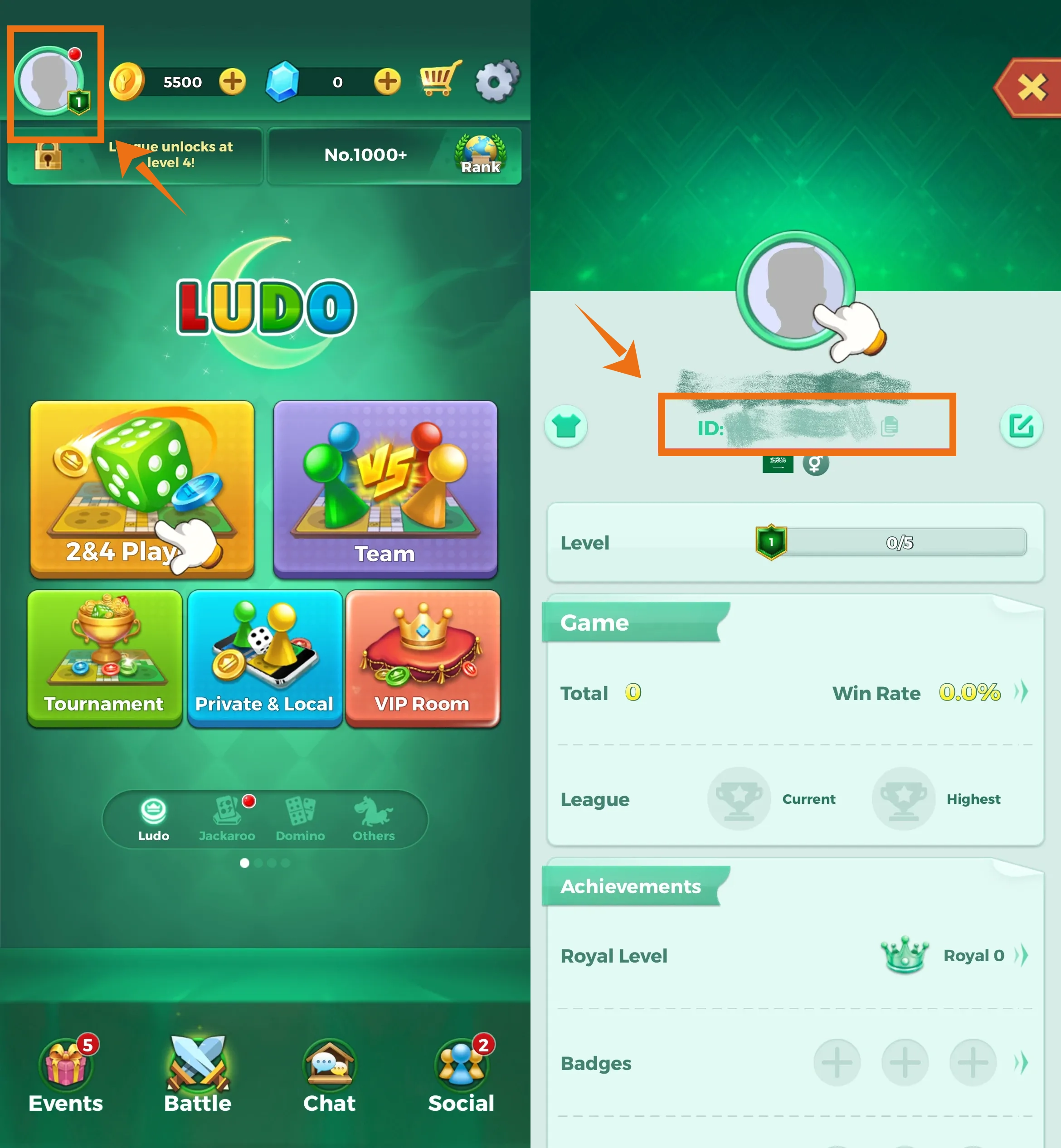
Where to Find the Player ID Open Yalla Ludo, tap the profile icon in the upper-left corner, and locate the ID on the account profile page
Recharge Result Check the Golds or Diamonds balance on the intended Yalla Ludo account after the recharge is completed

Important: Enter the recipient account's Yalla Ludo Player ID accurately before submitting the recharge. Because the order is credited according to the ID provided, incorrect account information can delay the order or send the recharge to an unintended account.

Server Notice: This BUFFHUB product is listed for Yalla Ludo International Server accounts. Confirm both the product and Player ID before completing payment.

How to Find Your Yalla Ludo Player ID

  1. 1.

    Open Yalla Ludo and enter the main game lobby.

  2. 2.

    Tap the profile icon in the upper-left corner of the lobby.

  3. 3.

    Open the account profile page and locate your Player ID. Copy the ID exactly as displayed and use it when placing your Yalla Ludo recharge order.

Yalla Ludo account profile page showing where to find the Player ID

Reminder: Check the Player ID carefully before completing payment. The recharge is delivered according to the ID submitted with the order.

How to Recharge Yalla Ludo Golds and Diamonds on BUFFHUB

  1. 1

    Visit BUFFHUB:

    Go to BUFFHUB, choose your preferred language and currency, and sign in to your account if needed.

  2. 2

    Open the Yalla Ludo Recharge Page:

    Open the top-up section, find Yalla Ludo, and enter the Yalla Ludo recharge page.

  3. 3

    Enter the Recipient's Yalla Ludo Player ID:

    Enter the Player ID shown on the intended Yalla Ludo account profile and check every digit carefully before continuing.

  4. 4

    Select Golds or Diamonds:

    Choose the available Yalla Ludo Golds or Diamonds package you want to purchase and review the amount and displayed price.

  5. 5

    Complete Payment:

    Choose one of the payment methods currently available at checkout and complete the transaction.

  6. 6

    Confirm the Recharge:

    After the order has been processed, open the intended Yalla Ludo account and check the Golds or Diamonds balance to confirm that the selected recharge has arrived.

Yalla Ludo Recharge FAQ

Q1: What information do I need for a Yalla Ludo recharge?

You need the recipient account's Yalla Ludo Player ID. A game account password is not required for this Player ID-based recharge process. Check the ID carefully before submitting the order.


Q2: Where can I find my Yalla Ludo Player ID?

Open Yalla Ludo and tap the profile icon in the upper-left corner of the main lobby. The account ID is displayed on the profile page and can be copied for your recharge order.

Q3: How long does a Yalla Ludo recharge usually take?

Current BUFFHUB service information lists delivery at usually around 15 to 30 minutes when the correct Player ID has been submitted and payment is complete. Actual processing time can vary depending on the order and payment status.

Q4: What payment methods can I use for Yalla Ludo recharge?

BUFFHUB provides multiple payment methods at checkout. The exact options can vary by region, currency, and current payment availability, so use one of the methods displayed when placing your order.

Q5: What should I do if my Yalla Ludo Golds or Diamonds have not arrived?

First confirm that the Player ID submitted with the order is correct and check the Golds or Diamonds balance on the intended account. If the order has passed the expected processing period without arriving, contact BUFFHUB customer support and provide the relevant order information for assistance.

More down down
Fold Up up up
NoXale
Purchased 27640 Diamonds · Sep 24, 2026

Fast service

U578692012
Purchased 5150 Diamonds · Sep 23, 2026

Terbaik

U434421679
Purchased 27640 Diamonds · Sep 23, 2026

:D

TrC80LE7Ty
Purchased 25236460 Gold · Sep 23, 2026

gooood

U578300528
Purchased 68500 Gold · Sep 22, 2026

Best offer

U742084899
Purchased 830 Diamonds · Sep 22, 2026

Todo sin problemas

View All Comments
Sort By :
Latest
NoXale
Purchased 27640 Diamonds

Fast service

Sep 24, 2026
U578692012
Purchased 5150 Diamonds

Terbaik

Sep 23, 2026
U434421679
Purchased 27640 Diamonds

:D

Sep 23, 2026
TrC80LE7Ty
Purchased 25236460 Gold

gooood

Sep 23, 2026
U578300528
Purchased 68500 Gold

Best offer

Sep 22, 2026
U742084899
Purchased 830 Diamonds

Todo sin problemas

Sep 22, 2026
View All Comments

Product Introduction

Remind

  • Alipay Alipay
  • ApplePay ApplePay
  • bancontact bancontact
  • bancontact-1 bancontact-1
  • billease billease
  • blik blik
  • boleto boleto
  • boost boost
  • bpi bpi
  • dana dana
  • Ewallet Ewallet
  • gcash gcash
  • GooglePay GooglePay
  • Ideal Ideal
  • kakao_pay kakao_pay
  • Klarna Klarna
  • konbini konbini
  • Kplus Kplus
  • line line
  • MBWAY MBWAY
  • multibanco multibanco
  • mybank mybank
  • naverpay naverpay
  • NetBanking NetBanking
  • oxxo oxxo
  • payco payco
  • paynow paynow
  • payu payu
  • pix pix
  • Qiwi Qiwi
  • rabbit rabbit
  • samsung samsung
  • sberpay sberpay
  • SBP SBP
  • SEPA SEPA
  • skrill skrill
  • spei spei
  • swish swish
  • tng tng
  • Tosspay Tosspay
  • truemoney truemoney
  • usdt usdt
  • Visa Visa
  • Visa-mastercard Visa-mastercard
  • Visa-mastercard+jbc Visa-mastercard+jbc
  • yoomoney yoomoney
  • Alipay Alipay
  • ApplePay ApplePay
  • bancontact bancontact
  • bancontact-1 bancontact-1
  • billease billease
  • blik blik
  • boleto boleto
  • boost boost
  • bpi bpi
  • dana dana
  • Ewallet Ewallet
  • gcash gcash
  • GooglePay GooglePay
  • Ideal Ideal
  • kakao_pay kakao_pay
  • Klarna Klarna
  • konbini konbini
  • Kplus Kplus
  • line line
  • MBWAY MBWAY
  • multibanco multibanco
  • mybank mybank
  • naverpay naverpay
  • NetBanking NetBanking
  • oxxo oxxo
  • payco payco
  • paynow paynow
  • payu payu
  • pix pix
  • Qiwi Qiwi
  • rabbit rabbit
  • samsung samsung
  • sberpay sberpay
  • SBP SBP
  • SEPA SEPA
  • skrill skrill
  • spei spei
  • swish swish
  • tng tng
  • Tosspay Tosspay
  • truemoney truemoney
  • usdt usdt
  • Visa Visa
  • Visa-mastercard Visa-mastercard
  • Visa-mastercard+jbc Visa-mastercard+jbc
  • yoomoney yoomoney
Language & Currency
  • Language
    English
    中文(繁体)
    日本語
    Bahasa Indonesia
    Bahasa Melayu
    Français
    Italiano
    Deutsch
    Русский
    Español
    한국어
  • Display Currency
    $ USD
    € EUR
    £ GBP
    C$ CAD
    A$ AUD
    S$ SGD
    Ұ JPY
    ₩ KRW
    SA SAR
    AED AED
    RM MYR
    ₱ PHP
    Rp IDR
    ฿ THB
    NT$ TWD
    HK$ HKD
    ₫ VND
    MX$ MXN
    R$ BRL
    ₽ RUB