
Related searches
0 results
Not found
No content related to ""
theme-light theme-light-text
theme-dark-text theme-light
Dazz Live

Dazz Live

broadcast broadcast
Join the BUFFHUB Discord community and instantly receive a $10 discount coupon
10000 + 500 Coins
10000 + 500 Coins
$ 1.2
$ 1.99
25000 + 1250 Coins
25000 + 1250 Coins
$ 3.01
$ 4.99
50000 + 2500 Coins
50000 + 2500 Coins
$ 6.02
$ 9.99
75000 + 3750 Coins
75000 + 3750 Coins
$ 9.03
$ 14.99
100,000 + 5,000 Coins
$ 12.04
$ 19.99
150,000 + 7,500 Coins
$ 18.06
$ 29.99
200,000 + 10,000 Coins
$ 24.08
$ 39.99
250,000 + 12,500 Coins
$ 30.11
$ 49.99
300,000 + 15,000 Coins
$ 36.12
$ 59.99
400,000 + 20,000 Coins
$ 48.16
$ 79.99
500,000 + 25,000 Coins
$ 60.2
$ 99.99
750,000 + 37,500 Coins
$ 90.31
$ 149.99
1,500,000 + 75,000 Coins
$ 180.6
$ 299.99
2,000,000 + 100,000 Coins
$ 240.8
$ 399.99
2,500,000 + 125,000 Coins
$ 301
$ 499.99
3,000,000 + 150,000 Coins
$ 361.2
$ 599.99
3,500,000 + 175,000 Coins
$ 421.41
$ 699.99
4,000,000 + 200,000 coins
$ 481.61
$ 799.99
4,500,000 + 225,000 Coins
$ 541.81
$ 899.99
5,000,000 + 250,000 Coins
$ 602.01
$ 999.99
7,500,000 + 375,000 Coins
$ 903.01
$ 1499.99
10,000,000 + 500,000 Coins
$ 1204.02
$ 1999.99
15,000,000 + 750,000 Coins
$ 1806.02
$ 2999.99
20,000,000 + 1,000,000 Coins
$ 2408.03
$ 3999.99
25,000,000 + 1,250,000 Coins
$ 3010.04
$ 4999.99
30,000,000 + 1,500,000 Coins
$ 3612.05
$ 5999.99

Quantity

Price
$0.00
HOW TO BUY?
Total
- +

0

Overall Rating
5.0
731 reviews
Overall Rating
5.0
Based on 731 reviews
  • 5 Star
    100%
  • 4 Star
    0%
  • 3 Star
    0%
  • 2 Star
    0%
  • 1 Star
    0%
Product Introduction
Recharge guide
User Reviews(731)

BUFFHUB: Dazz Live Recharge – Buy Dazz Live Coins Online

Dazz Live ID Recharge · International Server · Web/Mobile

Dazz Live, currently listed on Google Play as Dazz X - Live Stream & Chat, is a global live-streaming and social platform where users can watch broadcasters, chat, discover live content, share updates, and send virtual gifts. Dazz Live Coins are used for supported paid interactions such as virtual gifting and other eligible Coin-priced content shown inside the platform. BUFFHUB provides a Dazz Live Coins recharge service for supported International Server accounts using the recipient account's Dazz Live ID.

What Does BUFFHUB Add to a Dazz Live Coins Recharge?

For Dazz Live viewers, a useful top-up service should make three things clear: which account receives the Coins, what the recharge costs before payment, and what happens if the order needs attention. BUFFHUB combines ID-based Dazz Live recharge with current pricing, available discounts, flexible checkout choices, order processing, and customer support without turning the purchase into a full account-login handoff.

Can I recharge the right Dazz Live account without sharing a password?

Yes, for the Dazz Live ID recharge route listed here, the key receiving information is the recipient's Dazz Live ID. You do not need to provide the Dazz Live account password for this ID-based top-up method. That keeps the purchase focused on the identifier needed for delivery, while payment is completed through a secure checkout and transaction environment.

Can I compare the price, discount, and payment options before I pay?

BUFFHUB lists competitively priced Dazz Live Coins packages, and selected amounts can also show current discounts or promotional pricing. Because larger and smaller Coin packages may offer different value, you can compare the live amount and displayed price instead of assuming every package costs the same per Coin. BUFFHUB also provides multiple payment methods, with the options available to your order shown during checkout.

How quickly are Dazz Live Coins usually processed, and is help available?

Dazz Live ID orders are handled through a fast and efficient recharge process. Current product information describes delivery as typically taking around 15 minutes when the account information and payment are submitted correctly, although actual timing can vary with payment review, order volume, or account checks. If an order needs attention, BUFFHUB provides 24/7 customer support for recharge-related questions.

Before paying, make sure the Dazz Live ID belongs to the account that should receive the Coins. The ID location and full purchase steps are covered in the recharge guide.

What Is Dazz Live?

Dazz Live is the name commonly used for the live-streaming platform currently listed on Google Play as Dazz X - Live Stream & Chat. The app connects viewers with broadcasters from different regions and is built around live content, real-time conversation, virtual gifting, and social discovery.

Users can watch live broadcasts, chat with broadcasters and other viewers, follow people and topics that interest them, and share posts through the platform's social feed. Dazz Live also includes interactive activities and gifting features that give viewers more ways to take part during live sessions.

Virtual gifts are one of the platform's most visible interactive features. Dazz Live includes standard gifts as well as special-effect gifts, while gifting activity can also appear in supported ranking features. The exact gifts, activities, and social features available may change as the platform is updated.

What Are Dazz Live Coins Used For?

Dazz Live Coins are the paid virtual currency used for supported Coin-based interactions on the platform. Virtual gifting is the clearest use, including gifts shown during live streams, while other Coin-priced content can depend on what Dazz Live currently makes available to your account.

  • · Send Virtual Gifts: Use Dazz Live Coins for supported virtual gifts that can be sent to broadcasters during live sessions.
  • · Send Special-Effect Gifts: Dazz Live includes supported gifts with animated or special visual effects that make gifting more noticeable during a live stream.
  • · Support Broadcasters You Follow: Spending Coins on supported gifts gives viewers a direct way to show support for broadcasters they enjoy watching.
  • · Use Other Eligible Coin-Priced Content: If another supported item or interaction inside Dazz Live displays a Coin price, your available balance can be used according to the current in-app rules.

Do not assume that every paid feature inside Dazz Live uses Coins. Check the current price and payment type shown in the app before spending your balance on a particular gift, item, or interaction.

More down down
Fold Up up up

Dazz Live Recharge Information and Important Notes

Item Details
Applicable Platform Dazz Live Web/Mobile
Applicable Server International Server
Recharge Method Dazz Live ID-based Coins recharge
Required Information Recipient's Dazz Live ID
Account Password Not required for the listed Dazz Live ID recharge route
Typical Processing Time Usually around 15 minutes under typical conditions when the required information and payment are submitted correctly; actual timing may vary
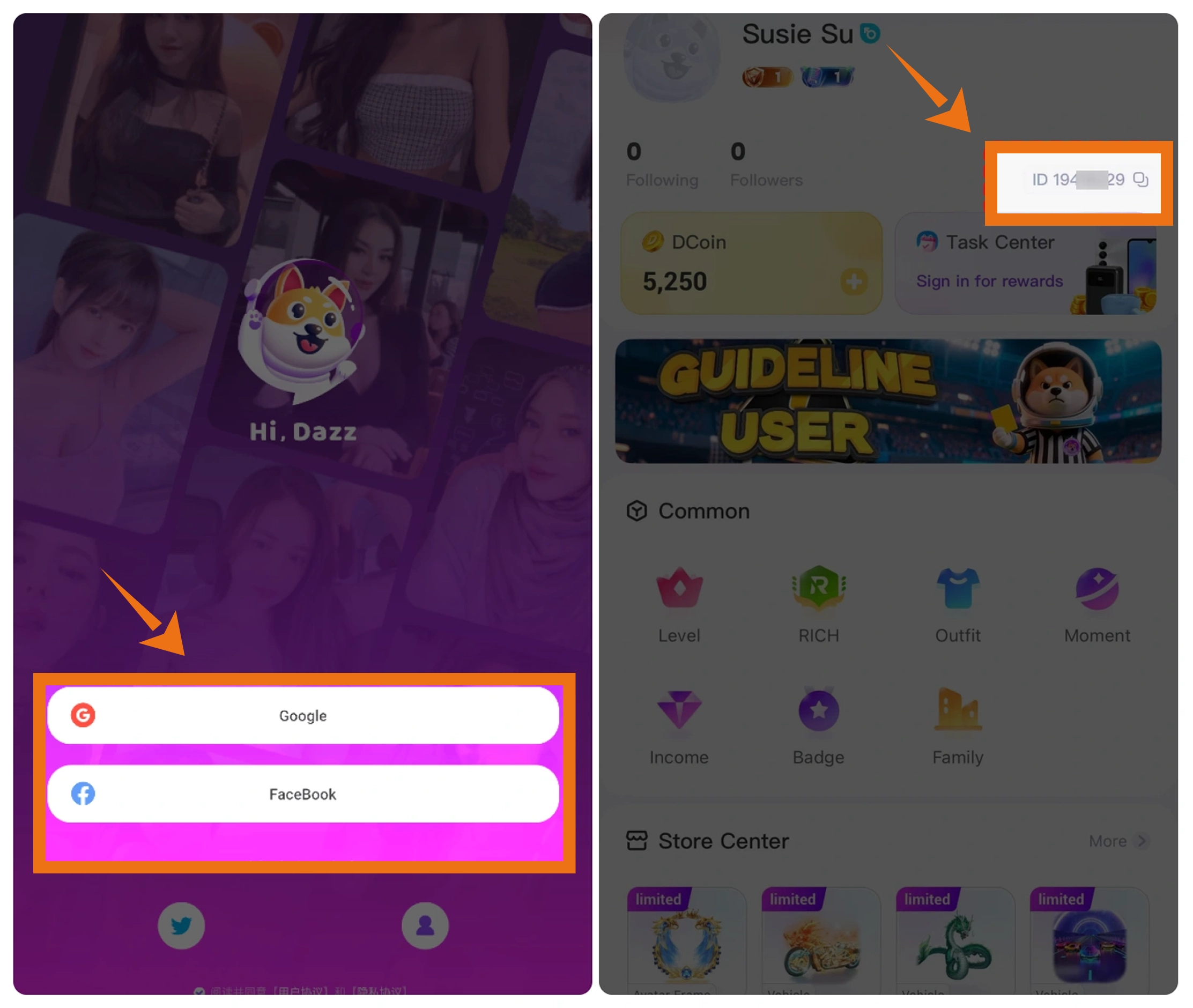
Where to Find the Dazz Live ID Open Profile in Dazz Live and find the User ID shown on the profile page
Recharge Result Check the Dazz Live Coins balance in the recipient account after the order has been processed

Important: Enter the recipient account's Dazz Live ID carefully before submitting the recharge. Incorrect account information can delay the order or cause the Coins to be processed for the wrong receiving account.


Server Notice: The recharge information on this page applies to supported Dazz Live accounts on the International Server. Check the current product information and receiving ID before completing payment.

How to Find Your Dazz Live ID

  1. 1.

    Open Dazz Live and sign in to the account you want to recharge.

  2. 2.

    Open the Profile area in the app.

  3. 3.

    Find the User ID shown on the profile page and copy it carefully. This is the Dazz Live ID used for the Coins recharge.

Dazz Live profile page showing the User ID for Coins recharge

Reminder: Check the Dazz Live ID carefully before paying. Using the correct receiving ID helps avoid unnecessary order delays or delivery to the wrong account.

How to Recharge Dazz Live Coins on BUFFHUB

  1. 1

    Visit BUFFHUB

    Go to BUFFHUB, choose your preferred language and display currency, and sign in to your account.

  2. 2

    Open the Dazz Live Recharge Page

    Open the Top Up section, find Dazz Live, and enter the Dazz Live Coins recharge page.

  3. 3

    Choose a Dazz Live Coins Package

    Compare the currently available Dazz Live Coins amounts and prices, then choose the package you want to recharge.

  4. 4

    Enter the Recipient's Dazz Live ID

    Enter the Dazz Live ID shown on the recipient account's Profile page. Check the ID carefully before continuing.

  5. 5

    Complete Payment

    Choose one of the payment methods currently available at checkout, review the final order total, and complete the payment.

  6. 6

    Check the Dazz Live Coins Balance

    After the order has been processed, open Dazz Live and check the recipient account to confirm that the Coins balance has updated.

Dazz Live Recharge FAQ

Q1: What information do I need for a Dazz Live recharge?

You need the recipient account's Dazz Live ID for the recharge route shown on this page. An account password is not listed as required for this ID-based method. Check the ID carefully before submitting the order.

Q2: Where can I find my Dazz Live ID?

Open Dazz Live and go to the Profile area. The User ID displayed on the profile page is the Dazz Live ID used for the Coins recharge.

Q3: How long does a Dazz Live recharge usually take?

Current product information describes Dazz Live Coins orders as typically taking around 15 minutes when the required account information and payment are submitted correctly. Actual processing time can vary with payment review, order volume, or account checks.

Q4: Which platform and server does this Dazz Live recharge support?

The product information on this page applies to supported Dazz Live Web/Mobile accounts on the International Server. Check the current product details before placing the order in case availability changes.

Q5: What should I do if I entered the wrong Dazz Live ID or my Coins have not appeared?

Check the Dazz Live ID in your order and make sure you are viewing the intended receiving account. If the ID is incorrect or the Coins still have not appeared after the order has been processed, contact BUFFHUB customer support with your order details. BUFFHUB provides 24/7 customer support for order-related assistance.

More down down
Fold Up up up
U695314491
Purchased 75000 + 3750 Coins · Sep 21, 2026

早い

U688358235
Purchased 400,000 + 20,000 Coins · Sep 21, 2026

Schnell, sicher, gerne wieder.

ZedMaster
Purchased 300,000 + 15,000 Coins · Sep 21, 2026

🔥

U171575278
Purchased 10000 + 500 Coins · Sep 21, 2026

.

Helpful(0)
kwI8Q0ssK8
Purchased 3,500,000 + 175,000 Coins · Sep 21, 2026

Always giving great service! (BUFFHUB)

U280770268
Purchased 4,500,000 + 225,000 Coins · Sep 20, 2026

fast and easy

View All Comments
Sort By :
Latest
U695314491
Purchased 75000 + 3750 Coins

早い

Sep 21, 2026
U688358235
Purchased 400,000 + 20,000 Coins

Schnell, sicher, gerne wieder.

Sep 21, 2026
ZedMaster
Purchased 300,000 + 15,000 Coins

🔥

Sep 21, 2026
U171575278
Purchased 10000 + 500 Coins

.

Sep 21, 2026
Helpful(0)
kwI8Q0ssK8
Purchased 3,500,000 + 175,000 Coins

Always giving great service! (BUFFHUB)

Sep 21, 2026
U280770268
Purchased 4,500,000 + 225,000 Coins

fast and easy

Sep 20, 2026
View All Comments

Product Introduction

  • Alipay Alipay
  • ApplePay ApplePay
  • bancontact bancontact
  • bancontact-1 bancontact-1
  • billease billease
  • blik blik
  • boleto boleto
  • boost boost
  • bpi bpi
  • dana dana
  • Ewallet Ewallet
  • gcash gcash
  • GooglePay GooglePay
  • Ideal Ideal
  • kakao_pay kakao_pay
  • Klarna Klarna
  • konbini konbini
  • Kplus Kplus
  • line line
  • MBWAY MBWAY
  • multibanco multibanco
  • mybank mybank
  • naverpay naverpay
  • NetBanking NetBanking
  • oxxo oxxo
  • payco payco
  • paynow paynow
  • payu payu
  • pix pix
  • Qiwi Qiwi
  • rabbit rabbit
  • samsung samsung
  • sberpay sberpay
  • SBP SBP
  • SEPA SEPA
  • skrill skrill
  • spei spei
  • swish swish
  • tng tng
  • Tosspay Tosspay
  • truemoney truemoney
  • usdt usdt
  • Visa Visa
  • Visa-mastercard Visa-mastercard
  • Visa-mastercard+jbc Visa-mastercard+jbc
  • yoomoney yoomoney
  • Alipay Alipay
  • ApplePay ApplePay
  • bancontact bancontact
  • bancontact-1 bancontact-1
  • billease billease
  • blik blik
  • boleto boleto
  • boost boost
  • bpi bpi
  • dana dana
  • Ewallet Ewallet
  • gcash gcash
  • GooglePay GooglePay
  • Ideal Ideal
  • kakao_pay kakao_pay
  • Klarna Klarna
  • konbini konbini
  • Kplus Kplus
  • line line
  • MBWAY MBWAY
  • multibanco multibanco
  • mybank mybank
  • naverpay naverpay
  • NetBanking NetBanking
  • oxxo oxxo
  • payco payco
  • paynow paynow
  • payu payu
  • pix pix
  • Qiwi Qiwi
  • rabbit rabbit
  • samsung samsung
  • sberpay sberpay
  • SBP SBP
  • SEPA SEPA
  • skrill skrill
  • spei spei
  • swish swish
  • tng tng
  • Tosspay Tosspay
  • truemoney truemoney
  • usdt usdt
  • Visa Visa
  • Visa-mastercard Visa-mastercard
  • Visa-mastercard+jbc Visa-mastercard+jbc
  • yoomoney yoomoney
Language & Currency
  • Language
    English
    中文(繁体)
    日本語
    Bahasa Indonesia
    Bahasa Melayu
    Français
    Italiano
    Deutsch
    Русский
    Español
    한국어
  • Display Currency
    $ USD
    € EUR
    £ GBP
    C$ CAD
    A$ AUD
    S$ SGD
    Ұ JPY
    ₩ KRW
    SA SAR
    AED AED
    RM MYR
    ₱ PHP
    Rp IDR
    ฿ THB
    NT$ TWD
    HK$ HKD
    ₫ VND
    MX$ MXN
    R$ BRL
    ₽ RUB