



Related searches
0 results
Not found
No content related to ""
theme-light theme-light-text
theme-dark-text theme-light
Mabinogi Mobile TW/HK

Mabinogi Mobile TW/HK

broadcast broadcast
Join the BUFFHUB Discord community and instantly receive a $10 discount coupon
152 M Coins
152 M Coins
$ 0.82
$ 0.99
690 M Coins
690 M Coins
$ 4.14
$ 4.99
2300 M Coins
2300 M Coins
$ 12.44
$ 14.99
4600 M Coins
4600 M Coins
$ 24.9
$ 29.99
6900 M Coins
6900 M Coins
$ 41.5
$ 49.99
13800 M Coins
13800 M Coins
$ 83.01
$ 99.99

Quantity

Price
$0.00
HOW TO BUY?
Total
- +

0

Overall Rating
0.0
0 reviews
Overall Rating
0.0
Based on 0 reviews
  • 5 Star
    0%
  • 4 Star
    0%
  • 3 Star
    0%
  • 2 Star
    0%
  • 1 Star
    0%
Product Introduction
Recharge guide
User Reviews(0)

MABINOGI MOBILE · TW/HK

Mabinogi Mobile Top Up for M Coins

Choose an M Coins package for your Mabinogi Mobile account and prepare the correct login, character, and server details before placing your order.

Mabinogi Mobile brings the world of Erinn to mobile and PC with story quests, class-based combat, character customization, life activities, and cooperative content. For players using the TW/HK service, M Coins provide access to paid items and offers available through the in-game shop.

A New Journey Through Erinn

The game combines MMORPG progression with the slower, social side of Mabinogi. You can develop a character through combat and class choices, then step away from quests to play music, fish, cook, or take part in seasonal activities. Customization also remains a major part of the experience, from fashion choices to pets and other collectible content.

Because Mabinogi Mobile supports both mobile and PC play for the applicable service, the same adventure can fit shorter sessions as well as longer dungeon and party runs.

What Are M Coins Used For?

M Coins are the paid currency used for eligible purchases in the Mabinogi Mobile Cash Shop. The exact lineup can change as shop rotations and events are updated, but M Coins may be used for the following types of content:

  • Premium bundles that combine selected in-game items in one package.
  • Fashion and pet ticket draws for cosmetic items and companions.

  • Seasonal and Adventurer Passes with additional reward tracks.

  • Limited-time shop offers available during specific events or sales periods.

Check the current in-game shop before choosing a package so the amount you purchase matches the item or pass you plan to obtain.

Why Recharge Mabinogi Mobile M Coins at buffhub.com?

A Page Built for the TW/HK Service

The recharge information is organized around the applicable Mabinogi Mobile service, including the login method, character name, and server details required for this type of order.

M Coins Packages in One Place

You can compare the M Coins packages listed on the product page and select the amount that fits your current Cash Shop purchase instead of starting from a generic game-credit page.

Clear Preparation Before Checkout

The required account and character fields are explained before the recharge steps, helping you check the destination account and server before submitting the order.

More down down
Fold Up up up

Recharge Information and Important Notes

Item Details
Applicable Platform Mabinogi Mobile on mobile and PC
Applicable Server TW/HK
Recharge Method Login Recharge
Required Information
1. Login method: Nexon, Facebook, or Google
2. Login account and password
3. Character name
4. Server
⚠️ Important

1. Make sure the login method, account, password, character name, and server are entered correctly. The recharge will be processed according to the information submitted with your order.

2. Do not log in to Mabinogi Mobile while the Login Recharge is being processed. Logging in from another device or location may interrupt the session and delay the order.

How to Check Your Mabinogi Mobile Information

01
Open the game: Log in to the Mabinogi Mobile account that should receive the M Coins.

02
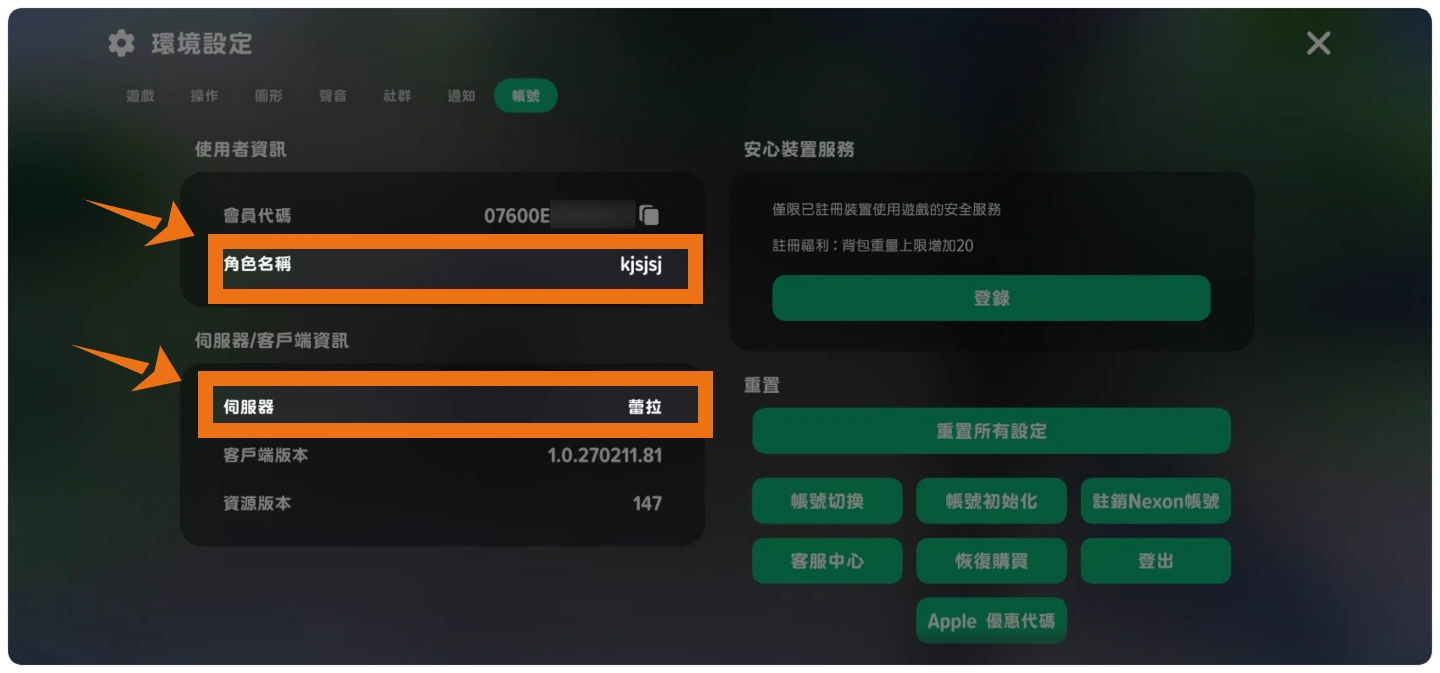
Open Settings: Enter the in-game Settings menu and review the account information shown there.
03
Confirm the destination: Check the character name and server before copying the information into the order form.
Mabinogi Mobile Settings screen showing where to check account, character, and server information

Mabinogi Mobile Login Recharge Process

【Manual Login Recharge】

01
Visit BUFFHUB: Choose your preferred language and currency, then sign in to your BUFFHUB account.
02
Select Mabinogi Mobile: Go to Game Top-Up, open the Mabinogi Mobile product page, and choose the M Coins package you want.
03
Review and pay: Confirm the package and order details, click Buy Now, and complete the payment using an available payment method.
05
Wait for the purchase: A staff member will log in to the submitted Mabinogi Mobile account and purchase the M Coins package selected in the order. Please continue to keep the game closed during this stage.
06
Confirm completion:
Completion page: When processing is complete, the system will take you to the successful recharge page.
Order history: You can also open Purchase History to check the current order status.

Check the account: After the order shows as successful, log in to Mabinogi Mobile and confirm that the selected M Coins package has been credited to the correct character and server.

Frequently Asked Questions

Q1 I normally sign in with Google or Facebook. Which login method should I submit?

Choose the same login method you normally use to enter Mabinogi Mobile. If the character is linked to Google, select Google and submit that account; if it is linked to Facebook, select Facebook. Using a different login method may open another game account that does not contain the intended character.

Q2 Will I receive a code that I need to redeem myself?

No. This product uses Manual Login Recharge rather than code delivery. After you submit the required account information, a staff member logs in and purchases the M Coins package selected in your order. You only need to check the account after the order is complete.

Q3 Can I continue playing while my M Coins order is being processed?

Please wait until the order shows as complete before logging in again. Opening the game on the same or another device during processing can interrupt the recharge session and may delay completion.

Q4 What should I do if I entered the wrong character name, server, or login information?

Stay on the order waiting page and correct the information as soon as the page requests an update, or follow the displayed instructions to contact customer service. Do not place another order for the same package while the first order is still being checked.

Q5 How can I check whether my recharge is still being processed?

Keep the waiting page open for status updates or requests for additional information. You can also open Purchase History in your BUFFHUB account to review the order status. Log back in to Mabinogi Mobile only after the order is marked as successful.

Q6 What should I check after the recharge is complete?

Log in and confirm that the purchased M Coins package appears on the intended character and server. The recharge session will be closed after processing. Once you have confirmed the result, you may also change the game account password if you want to refresh your login credentials.

More down down
Fold Up up up

No reviews yet.

Sort By :
Latest

No reviews yet.

Product Introduction

  • Alipay Alipay
  • ApplePay ApplePay
  • bancontact bancontact
  • bancontact-1 bancontact-1
  • billease billease
  • blik blik
  • boleto boleto
  • boost boost
  • bpi bpi
  • dana dana
  • Ewallet Ewallet
  • gcash gcash
  • GooglePay GooglePay
  • Ideal Ideal
  • kakao_pay kakao_pay
  • Klarna Klarna
  • konbini konbini
  • Kplus Kplus
  • line line
  • MBWAY MBWAY
  • multibanco multibanco
  • mybank mybank
  • naverpay naverpay
  • NetBanking NetBanking
  • oxxo oxxo
  • payco payco
  • paynow paynow
  • payu payu
  • pix pix
  • Qiwi Qiwi
  • rabbit rabbit
  • samsung samsung
  • sberpay sberpay
  • SBP SBP
  • SEPA SEPA
  • skrill skrill
  • spei spei
  • swish swish
  • tng tng
  • Tosspay Tosspay
  • truemoney truemoney
  • usdt usdt
  • Visa Visa
  • Visa-mastercard Visa-mastercard
  • Visa-mastercard+jbc Visa-mastercard+jbc
  • yoomoney yoomoney
  • Alipay Alipay
  • ApplePay ApplePay
  • bancontact bancontact
  • bancontact-1 bancontact-1
  • billease billease
  • blik blik
  • boleto boleto
  • boost boost
  • bpi bpi
  • dana dana
  • Ewallet Ewallet
  • gcash gcash
  • GooglePay GooglePay
  • Ideal Ideal
  • kakao_pay kakao_pay
  • Klarna Klarna
  • konbini konbini
  • Kplus Kplus
  • line line
  • MBWAY MBWAY
  • multibanco multibanco
  • mybank mybank
  • naverpay naverpay
  • NetBanking NetBanking
  • oxxo oxxo
  • payco payco
  • paynow paynow
  • payu payu
  • pix pix
  • Qiwi Qiwi
  • rabbit rabbit
  • samsung samsung
  • sberpay sberpay
  • SBP SBP
  • SEPA SEPA
  • skrill skrill
  • spei spei
  • swish swish
  • tng tng
  • Tosspay Tosspay
  • truemoney truemoney
  • usdt usdt
  • Visa Visa
  • Visa-mastercard Visa-mastercard
  • Visa-mastercard+jbc Visa-mastercard+jbc
  • yoomoney yoomoney
Language & Currency
  • Language
    English
    中文(繁体)
    日本語
    Bahasa Indonesia
    Bahasa Melayu
    Français
    Italiano
    Deutsch
    Русский
    Español
    한국어
  • Display Currency
    $ USD
    € EUR
    £ GBP
    C$ CAD
    A$ AUD
    S$ SGD
    Ұ JPY
    ₩ KRW
    SA SAR
    AED AED
    RM MYR
    ₱ PHP
    Rp IDR
    ฿ THB
    NT$ TWD
    HK$ HKD
    ₫ VND
    MX$ MXN
    R$ BRL
    ₽ RUB