

Getting recognized on BIGO LIVE is not as simple as tapping a “Request Verification” button. That is the first thing every new creator should understand. In 2026, BIGO LIVE puts strong emphasis on account authenticity, creator activity, platform compliance, and the wider creator ecosystem rather than treating verification as a normal profile setting.



A recognized or certified profile can help viewers distinguish a real creator from an impersonator. For serious streamers, working through BIGO LIVE's official host and agency systems can also provide a clearer path to creator support, events, and professional opportunities. But recognition itself is not a shortcut to growth. Your live streams still depend on good content, viewer interaction, consistency, and safe platform behavior.













This guide explains how BIGO LIVE verification and creator recognition work, who is more likely to qualify for review, how to find your BIGO ID and verification code, how the Official Host and agency routes fit into the process, and how to avoid scams that target creators looking for badges or account help.
What Does BIGO LIVE Verification Mean?
BIGO LIVE verification is mainly a trust and authenticity signal. Depending on the account type and program, recognition can help show that a creator, public figure, agency account, or other account belongs to a real person or organization.
For creators, this matters because impersonation can be a real problem on public social platforms. If you are a streamer, musician, influencer, agency host, or brand account, having a clearly recognized identity can make it easier for viewers to tell your account apart from copies.
Still, verification should not be treated as a shortcut to success. Your live room performance still depends on the basics: strong content, regular streaming, viewer retention, safe behavior, and genuine interaction. A badge or certification can strengthen trust, but it cannot carry a weak stream by itself.
Can Anyone Request a Verified Badge on BIGO LIVE?
For most standard accounts, there is no simple public self-service button that guarantees a verified badge. BIGO LIVE separates several systems that users often confuse with each other, including login verification, identity checks, host applications, agency applications, and creator recognition.
In practice, higher-level creator recognition can depend on the account type, creator activity, platform review, or participation in official programs. BIGO's current host guidance confirms that creators can apply for Official Host status through the app or website, but Official Host status itself should not be described as an automatic verified-badge application.
If you are a casual viewer with a new account, you probably should not focus on a badge first. Complete your profile, secure your account, follow the rules, and build a clean activity history. Serious creators should focus on developing their broadcaster profile and exploring the official host or authorized agency route.
Who Is Most Likely to Get Verified on BIGO LIVE?
BIGO LIVE's public creator ecosystem includes regular hosts, Official Hosts, agencies, public-facing creators, and other recognized accounts. Higher visibility and clear creator value can make an account more relevant for platform-side recognition, although BIGO does not publish a universal public rule saying that a specific follower count guarantees a badge.
Public figures may have a stronger case if they are already known outside the app. This can include musicians, entertainers, athletes, digital influencers, and other people with a clear public identity.
Brand accounts can also need stronger identity checks because fake brand profiles can mislead users. The same applies to creator or agency accounts that represent an established organization.
High-performing broadcasters may also receive greater platform attention, especially if they are active Official Hosts, agency creators, or streamers with strong engagement and a clean record. BIGO's current creator materials specifically position Official Hosts as a formal creator path with agency involvement, support, events, and potential increased visibility.
What Should You Prepare Before Trying to Get Verified?
Before thinking about the badge, you should make your account look safe, real, and consistent. BIGO LIVE's creator systems can involve identity, age, account activity, and platform-compliance checks. A profile with missing information, weak security, or serious violations is much harder to trust.
Start with your basic profile. Use a clear photo, a recognizable BIGO ID, and a short bio that explains who you are or what you stream. If you are a creator, your profile should match your content. A singer should make the music focus clear. A gaming streamer should show that clearly. A talk host should present a consistent personal style.
Next, keep your behavior clean. Avoid copyright problems, explicit content, harassment, spam, scam-like promotions, and anything that could trigger community-guideline issues. BIGO LIVE's public pages explicitly warn against inappropriate content, pornography, vulgar behavior, and copyright infringement.
You should also keep your account secure. Use a strong login method, protect your verification codes, and never share your password. BIGO's current support guidance specifically asks users not to provide passwords or verification codes when contacting support.
How Do You Find Your BIGO ID and Verification Code?
Your BIGO ID is one of the most important details connected to your account. You may need it for top-ups, support requests, account recovery, agency applications, or creator-related checks.
To find your BIGO ID, open the BIGO LIVE app and go to your profile page. Your BIGO ID is displayed as the account identifier on your profile. If a service, agency, or support team asks for your public BIGO ID, this is generally the information they mean.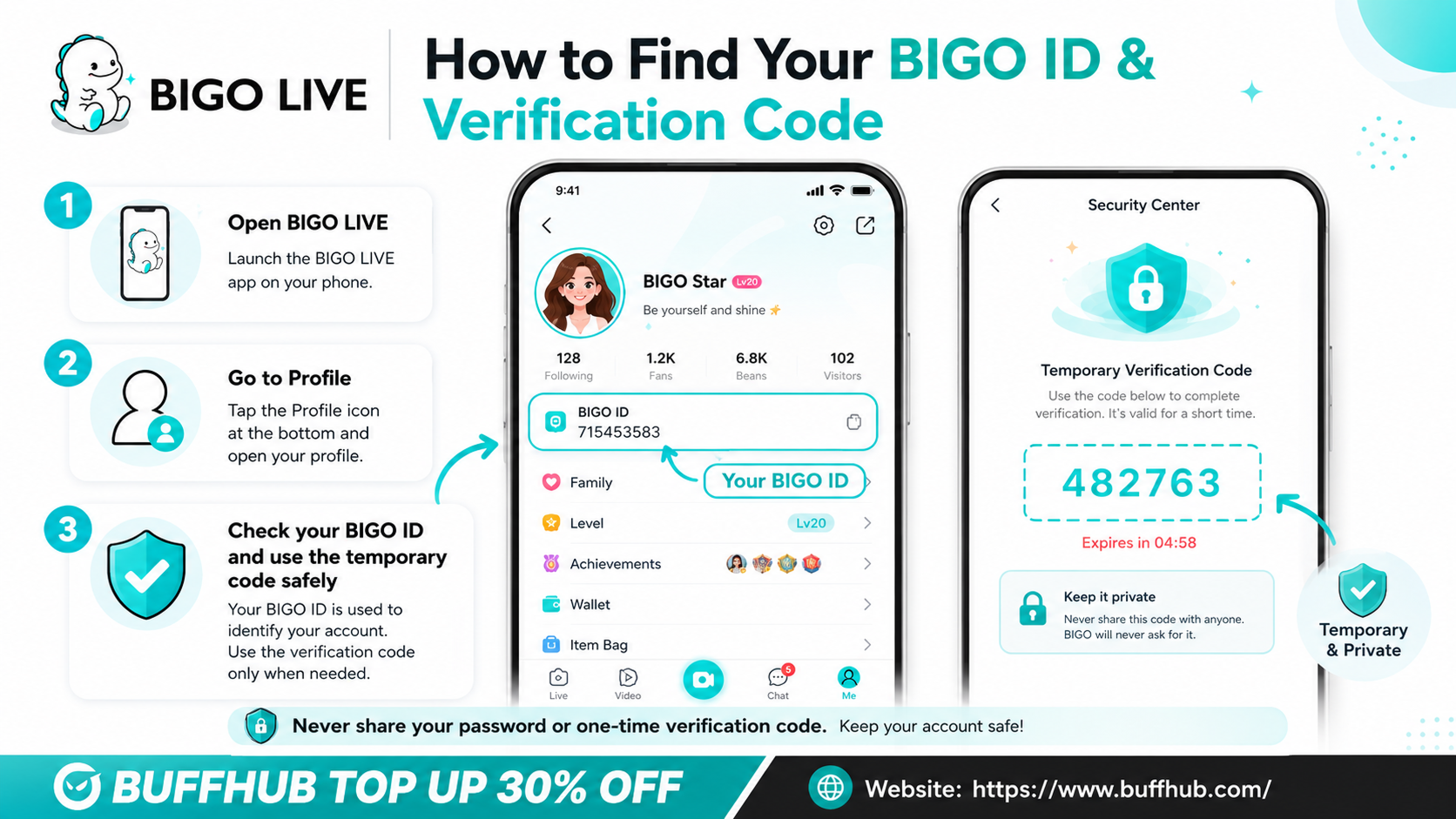
A verification code is different. It is normally a temporary security or login code used to confirm an account or action. Because it is temporary and can provide access to an account flow, you should never send it to another person.
This distinction matters. Sharing your public BIGO ID is normally fine when dealing with support or BIGO LIVE top-up services. Sharing your password, SMS code, email verification code, or one-time login code is not. BIGO's support guidance specifically says not to include your verification code or password in a support request.
How Do You Log in to BIGO LIVE Safely?
BIGO LIVE supports several login methods, depending on your device and region. On the web, BIGO currently offers options including QR-code login, while the mobile app can provide phone and supported social-account login options depending on the region and client version.
For creators, it is smart to keep more than one secure recovery method available when BIGO supports it. This gives you a backup if you lose access to a phone number or linked account. Just make sure every linked method has its own strong security.
The safest habit is simple: never share your password or verification code. BIGO's official support guidance states that customer service does not need your password or verification code to investigate an issue.
If you cannot log in, use the official Account Appeal or account-recovery flow rather than trusting random users who claim they can recover your account for a fee. BIGO's support center currently directs users who have lost access to their account toward the Account Appeal process from the login screen.
What Is Real-Person or Identity Verification on BIGO LIVE?
Identity verification is different from public creator recognition, but it can still be important. BIGO's creator programs can require proof that the person using the account is real and meets the relevant age and eligibility requirements.
For Official Host applications, BIGO's current creator guidance says standard requirements include being 18 or older and having a valid government-issued ID. The same guidance also highlights a clean platform record, stable internet, and suitable streaming equipment as part of the host application process. Requirements can vary by region or program, so the current application page should take priority.
The key is accuracy. Your submitted details should match your real identity where required. Blurry ID photos, mismatched information, poor lighting, or incomplete forms can lead to delays or rejection.
If your first attempt fails, do not rush into shortcuts. Fix the mismatched details, improve the application quality, and use official BIGO support or creator tools.
What Is the Official Host Route?
For many creators, becoming an Official Host is a realistic professional route within BIGO LIVE's creator system. BIGO's current instructions say that you can apply directly through the app by going to Me > Creator Center > Live Services > Apply for official hosts. You can then choose a recommended agency or search for an agency by name or BIGO ID. 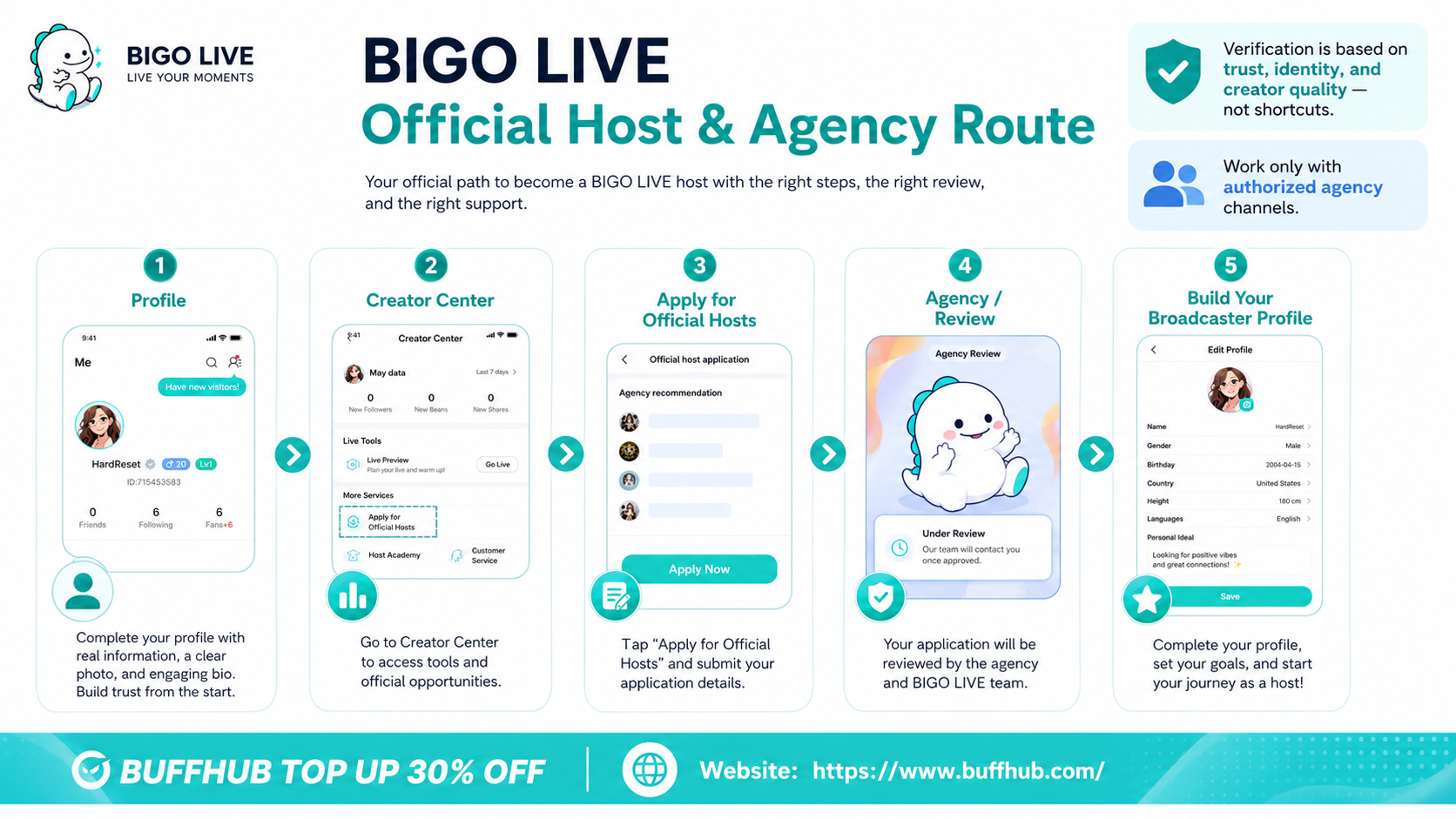
BIGO also provides an official website application route at its host-and-agency application page. Applications are reviewed after submission.
Becoming an Official Host does not automatically mean you will receive a verified badge. However, it places your account into a more formal creator pipeline and can provide access to creator support, official events, training, and potential additional visibility.
This route generally favors creators who can stream consistently, follow platform rules, and demonstrate a clear content style. Think of Official Host status as a professional creator route, not a guaranteed verification shortcut.
Should You Join a BIGO LIVE Agency?
A certified or authorized agency can be useful for serious creators. BIGO's official host guidance says applicants can choose from recommended agencies in the app or search for a specific agency by name or BIGO ID.
The biggest advantage of a legitimate agency is guidance. New streamers often do not know what schedule to follow, what content to test, or how to work toward creator targets. An agency can provide training, feedback, event support, and help with creator-related issues.
But this is also where scams happen. A real agency should not ask for your password or one-time verification code. BIGO's support guidance also warns users not to provide passwords or verification codes when seeking help.
BIGO provides regional agency contacts and an official Agency Cooperation route. Check the official BIGO site or the in-app agency list before trusting someone who claims to represent the platform.
Before joining an agency, check whether it is authorized, read the terms, and ask what they expect from you. You should understand streaming hours, performance targets, payment rules, and any contract limits before agreeing.
What Can Hurt Your Verification Chances?
Your behavior on the platform matters. Recognition is based on trust, so anything that makes your account look unsafe can hurt your chances.
Major problems include explicit content, harassment, hate speech, fraud, scam promotions, copyright violations, fake engagement, or repeated community-guideline strikes. BIGO LIVE publicly warns that pornography, vulgar behavior, and copyright infringement can lead to account action.
Your account security also matters. If your account is frequently compromised or involved in suspicious activity, it becomes harder to trust.
The same goes for fake shortcuts. Buying followers, using modified APKs, joining suspicious “badge seller” groups, or clicking third-party verification links can damage your account and put your account or payment information at risk. BIGO's own safety guidance warns users about suspicious links, modified apps, password theft, and fake account-recovery offers.
A safe creator profile is boring in the best way: real identity, clean content, stable schedule, normal login behavior, and no shady tricks.
How Do You Avoid BIGO LIVE Verification Scams?
Verification scams usually target creators who want fast results. The scammer knows the badge looks valuable, so they offer a shortcut.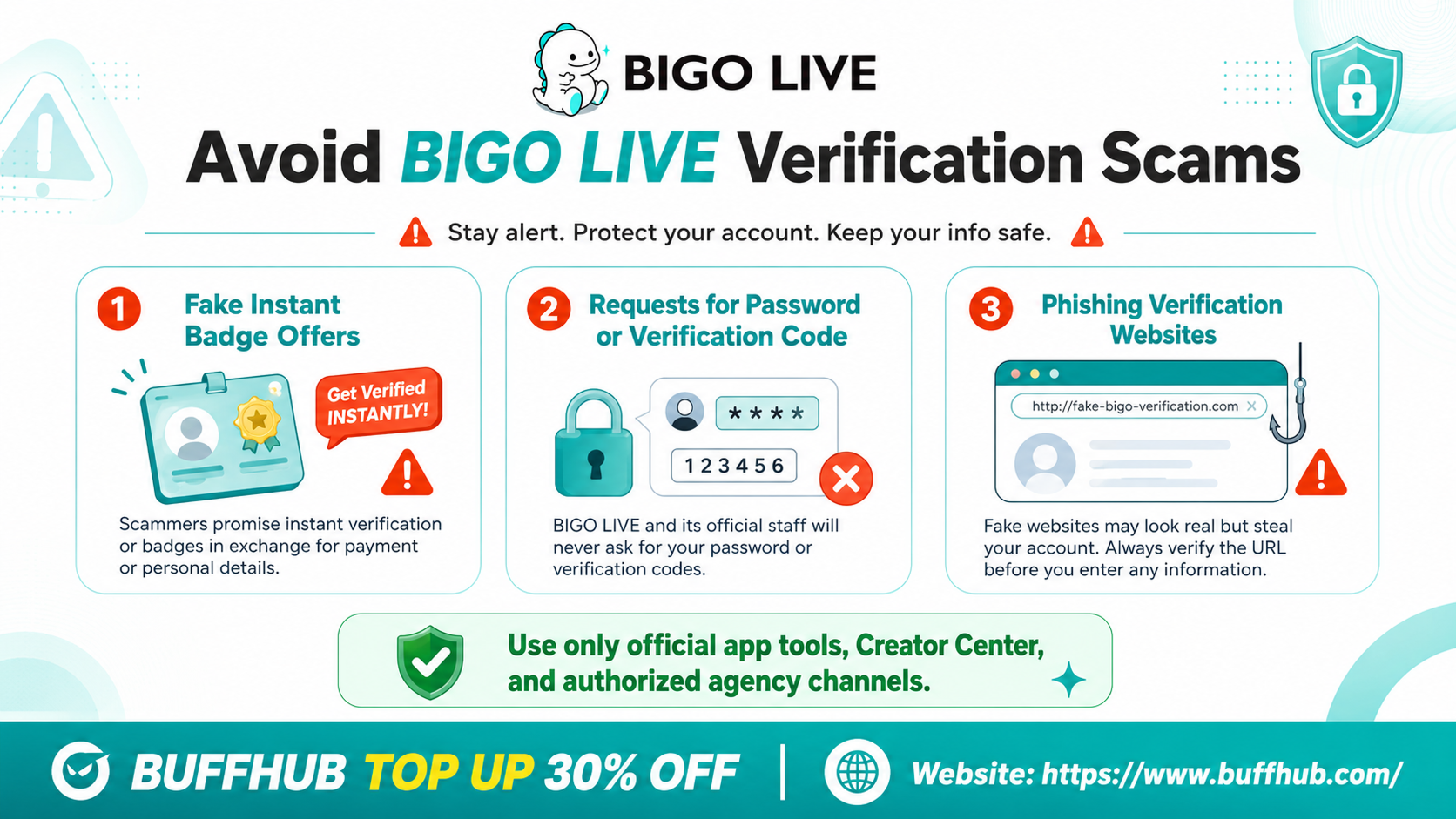
The most common scam is the “instant badge” offer. Someone may claim they can sell you a verified badge for a fee. There is no official evidence that paying a stranger guarantees a BIGO LIVE verification result.
Another common trick is asking for your login information. A scammer may say they need your password or verification code to apply through an agency panel. This is a major red flag. BIGO's current support guidance specifically says not to provide your password or verification code when asking for help.
Third-party verification websites are also risky. They may look official, but they can be phishing pages designed to steal your account, Diamonds, Beans, or payment information.
The safest rule is simple: use official app tools, official support, or authorized agency channels only. BIGO's official site also warns against unsafe unofficial top-ups and directs users toward official contact routes.
What Should You Do If Verification Fails?
If your verification or host application fails, do not panic. Rejection does not always mean the door is closed forever. The problem may be related to your profile, documents, eligibility, content quality, or application details.
First, check whether the issue was technical. Was your ID image clear? Did your phone number work? Did the information match? Was your account fully set up?
Next, review your content. If your live streams are inconsistent or low effort, improve your schedule and presentation before trying again. Better lighting, clearer audio, a cleaner background, and stronger interaction can make your profile look more professional.
Also review your account history. If you had recent warnings or policy issues, focus on rebuilding a clean record. A safe history is much better than rushing into another application.
What If Your BIGO LIVE Account Gets Banned?
A ban can seriously hurt your verification chances, especially if it is tied to major policy violations. If you believe the ban was a mistake, use official support or account-appeal tools rather than random third-party services.
A good appeal should be calm, clear, and backed by evidence. Include your BIGO ID, explain what happened, and attach screenshots or receipts if they are relevant. Avoid angry messages or vague claims. BIGO's current support guidance asks users to provide their BIGO ID, region, a clear description of the problem, device information, app version when available, and relevant screenshots or case information.
If your account is restored, update your password, check linked login methods, review unfamiliar devices or activity, and use stronger security options where available.
Most importantly, do not pay for “unban services.” Suspicious recovery offers can take your money, steal your account, or make the problem worse. BIGO explicitly warns users about fake recovery and hacking offers.
How Can You Improve Your Chances Over Time?
The best way to move toward stronger creator recognition is to build a profile that looks safe, consistent, and valuable. That takes time, but it is also the most reliable route.
Stream on a consistent schedule. Keep your content clean. Build a real audience. Use good lighting and audio. Engage with viewers. Avoid spammy growth tactics. Keep your account secure. Work with authorized creator systems if you want to take streaming seriously. BIGO's current host materials emphasize consistency, creator quality, engagement, and professional support as part of the official-host ecosystem.
You should also keep your public identity consistent. If you use the same creator name across BIGO LIVE, TikTok, Instagram, YouTube, or X, it becomes easier to present a recognizable creator identity. External presence can help, especially if you already have public recognition outside the app.
Verification or creator recognition is not only about being popular. It is about being trustworthy, recognizable, compliant, and useful to the platform's creator ecosystem.
Is BIGO LIVE Verification Worth It?
Yes, higher-level BIGO LIVE recognition can be useful if you are a serious creator, Official Host, public figure, agency creator, or brand account. It can strengthen trust and make your identity easier for viewers to recognize.
But if you are still a beginner, do not treat the badge as your first goal. Focus on account setup, secure login habits, viewer interaction, and consistent streaming first. Those are the things that actually build your presence.
A recognized profile is best seen as a result of strong creator behavior, not a replacement for it. Build the account first. Let recognition follow when the right program or review applies.
Frequently Asked Questions About BIGO LIVE Verification
How do I get verified on BIGO LIVE in 2026?
There is no guaranteed public button that gives every user a verified badge. The most practical route is to build a real, compliant creator profile, complete identity checks when required, and explore the official host or authorized agency system. BIGO's current host application flow is available through Me > Creator Center > Live Services > Apply for official hosts, or through the official website application route.
What is the difference between BIGO ID and a verification code?
Your BIGO ID is your public account identifier. You may need it for support, top-ups, account recovery, or creator applications. A verification code is a temporary security or login code. You should never share that code with strangers.
Does the verified badge boost my BIGO LIVE streams?
A verified or recognized status can help with authenticity and trust, but it does not replace content quality, viewer retention, or a consistent schedule. BIGO's current Official Host materials mention potential increased visibility as one benefit of the official-host route, but that should not be confused with a guaranteed algorithmic boost from a badge alone.
Can I pay someone to verify my BIGO LIVE account?
No. Avoid anyone claiming they can sell you an instant verified badge or guarantee verification for a fee. Use official app tools, official support, or authorized agency channels only.
What should I do if my BIGO LIVE verification is rejected?
Check your profile, documents, account history, eligibility, and content quality. Fix unclear ID photos, mismatched details, weak streaming activity, or policy problems. Then use official support or creator tools if you need to apply again.
Can a ban stop me from getting verified on BIGO LIVE?
Yes, serious or repeated violations can hurt your chances of entering creator programs or receiving higher-level account recognition. If you believe a ban was wrong, appeal through official channels with your BIGO ID, a clear explanation, and relevant evidence.